
Introduction
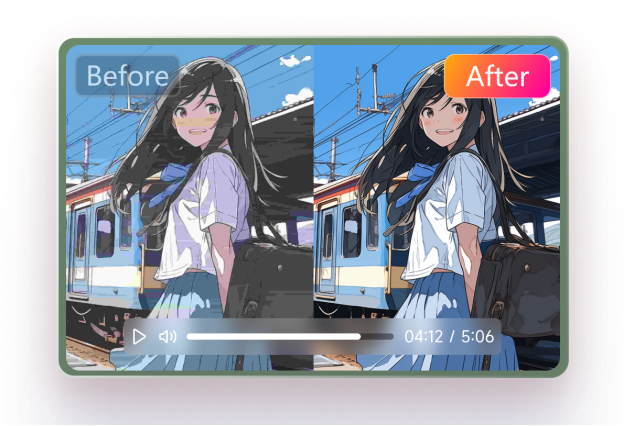
Regardless of how much effort you’ve put in making the videos look admirable and relevant, accessing the perfect videos in one go is indeed a difficult task. This is where the video upscaler walks in, as it enables you to upscale the videos significantly. However, finding the best AI video upscaler is still a difficult task, but the arrival of the HitPaw VikPea has changed everything.
Tune into this post to learn about the detailed review of the HitPaw VikPea, along with its impressive features and performance.
Part1: What is HitPaw VikPea ?
HitPaw VikPea is an AI video upscaler designed to use cutting-edge AI to enhance video quality. The program automatically identifies low-resolution video and improves it by enhancing details, lowering noise, and increasing overall clarity and all without the need for laborious workflows or manual editing abilities. HitPaw VikPea makes the process quick and easy, whether you’re preparing professional material, updating YouTube content, or repairing ancient family clips. It guarantees little loss of detail, supports a variety of video formats, and provides real-time previews. Because of this, it’s the perfect option for both novices and experts who want clear, colorful, high-resolution videos without spending hours editing.
Part 2: Core Features & Performance
HitPaw VikPea presents some of the majestic features that make this AI upscaler video to be the best tool of the lot.
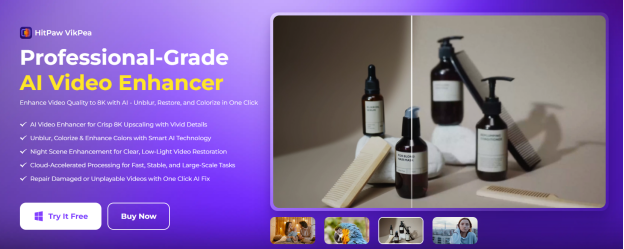
- 4K /8K AI Upscaler
It allows you to upscale the videos to up to 4K, meaning you’ll be able to turn the blurry and low-resolution videos into clean and admirable videos.
- Smart AI Models
With HitPaw VikPea, you could explore several efficient video enhancing models, including the low light model, face model, General model, stabilization model, frame interpolation model, and compress fix that enables you to auto-detect the scene before applying the best solution.
- Cloud Speed & Batch
It provides the GPU that tends to accelerate the cloud rendering for bulk jobs and large files, which will finish the work in hours in a few minutes.
- Rock Steady Stabilization
HitPaw VikPea lets you remove the camera jitter and shake and adds smooth motion through AI frame interpolation.
- Color & HDR Boost
HitPaw VikPea helps you convert the SDR to HDR and tends to revive the faded colors, lifting the shadows and restoring the vintage footage.
- Universal Format Support
It works with the WMV, FLV, AVI, MKV, MOV, and MP4 with no re-encoding needed
- Quick Repair Tools
With HitPaw VikPea you could easily fix the blur, noise, compression artifacts, corrupted files, remove the watermarks, and swap/blur backgrounds.
- Cross-Platform Support
VikPea has wide accessibility and is compatible with both Windows and macOS. It ensures compatibility across many processes by supporting popular video formats, including MP4, AVI, MOV, and MKV.
Performance Verdict
HitPaw VikPea constantly produces crisp, colorful, and realistic-looking results when used in real-world situations. The clarity, smoothness, and color depth improvements are striking, whether you’re editing old family archives or creating material for YouTube. VikPea easily produces results of professional quality while saving time and reducing human labor when compared to traditional editors.
How to upscale the videos with HitPaw VikPea?
Upscaling the videos through HitPaw Vikpea is fairly simple, as all you need to do is look at the simple guide listed below to upscale the videos effortlessly.
Step 1: Before starting to upscale the videos, your main job is to install the software and then select the Video Enhancer. Next, you’re required to import the video you wish to enhance the quality.
Luckily, HitPaw VikPea also enables you to upscale several videos simultaneously, so importing as many videos as you like is possible.
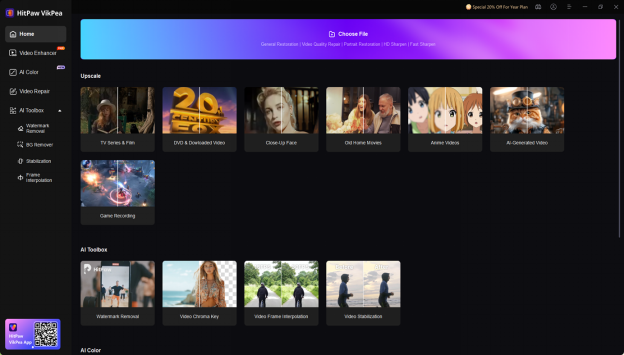
Step 2: After going into the timeline of the HitPaw VikPea, you’re required to select the favorite AI model. To save your time while applying the majestic upscaling techniques, you can opt for the General Restoration Model, as it will make the videos look wonderful and admirable.
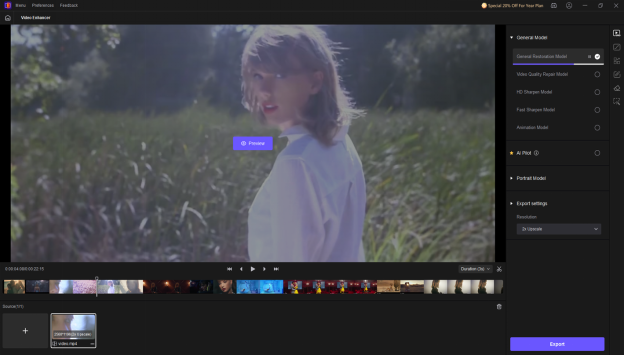
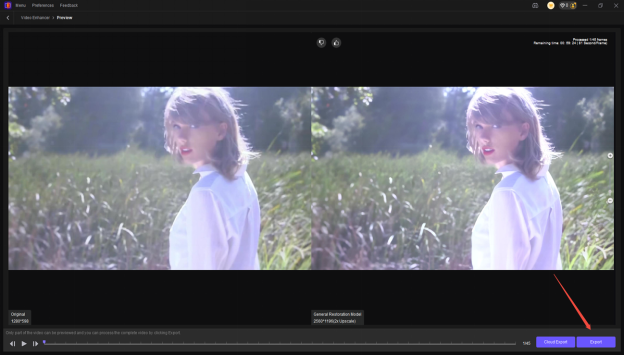
Step 3: Once you’re done choosing the desired AI model, you’ll need to preview the videos, as doing so helps you make some changes if you aren’t happy with the results of the video. Then, you can click on the Export button to download the video into the computer.
Part 3: Pros and Cons
Pros
- Outstanding AI Models
HitPaw VikPea lets you select from several gigantic AI models, which could be used in different video types like gameplay, animation, and movies, as it also provides more customization than several other competitors.
- Speed and Efficiency
HitPaw VikPea tends to deliver fast processing times without compromising the quality, which makes it perfect for both professional and casual users requiring quick results.
- Offers high Quality output
HitPaw VikPea provides an effortless user interface that prevents you from needing any prior knowledge to use the software.
- Simple user interface
HitPaw VikPea empowers you to upscale the videos to up to 4K or 8K as this tool will ensure the detailed video enhancement and tends to maintain the video quality.
- Batch processing
HitPaw VikPea supports the batch processing that makes it look possible to upscale the muppets videos simultaneously.
Cons
- Provides the limited free version
- Asks you to install software on computer
Part 4: Pricing & Plans
The pricing of the HitPaw VikPea is affordable, as if you want to acquire the 1-month premium, you’ll need to pay around $43.19/month, and 1-year license of the HitPaw VikPea will cost you around $99.99. If you want to purchase the HitPaw VikPea for life, it requires you to pay around $350.39.
Conclusion
If you want to upscale the videos for whatever purposes, going for the best AI video upscaler still remains a difficult gig. Thankfully, we’ve listed the HitPaw VikPea as one of the most prominent and sensational tools to upscale the videos thanks to its plenty of stunning AI models.
It provides a simple user interface and will ensure that you can upscale the videos without affecting the quality of the videos. Since it also supports batch upscaling, you’ll be able to enhance or upscale multiple videos simultaneously.

Founder Dinis Guarda
IntelligentHQ Your New Business Network.
IntelligentHQ is a Business network and an expert source for finance, capital markets and intelligence for thousands of global business professionals, startups, and companies.
We exist at the point of intersection between technology, social media, finance and innovation.
IntelligentHQ leverages innovation and scale of social digital technology, analytics, news, and distribution to create an unparalleled, full digital medium and social business networks spectrum.
IntelligentHQ is working hard, to become a trusted, and indispensable source of business news and analytics, within financial services and its associated supply chains and ecosystems










