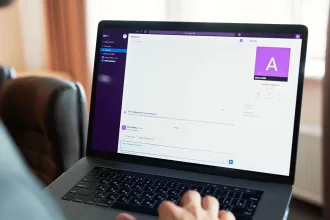
A salesperson is discussing a customer in Slack and needs one detail before replying: has the latest invoice been paid, or is there still an outstanding balance? The information is already in QuickBooks, but getting it may mean opening another system, finding the right record, or asking someone in finance to check it.
That creates a simple access problem. Sales conversations happen in one place, while the financial context needed to continue them often sits somewhere else. A QuickBooks Slack integration can make financial information easier to access without switching systems or asking finance for help.
Reducing the need for extra lookups is especially useful when employees already face frequent interruptions. Microsoft’s 2025 Work Trend Index found that, among high-volume Microsoft 365 users in its telemetry analysis, meetings, emails, or chats interrupted work about every two minutes during core working hours. In its global survey, 48% of employees and 52% of leaders said their work felt chaotic and fragmented.
Two useful approaches are to send predefined Slack notifications when specific events occur in QuickBooks or let users ask for financial information when a question comes up during a conversation. Each approach fits a different type of sales need.
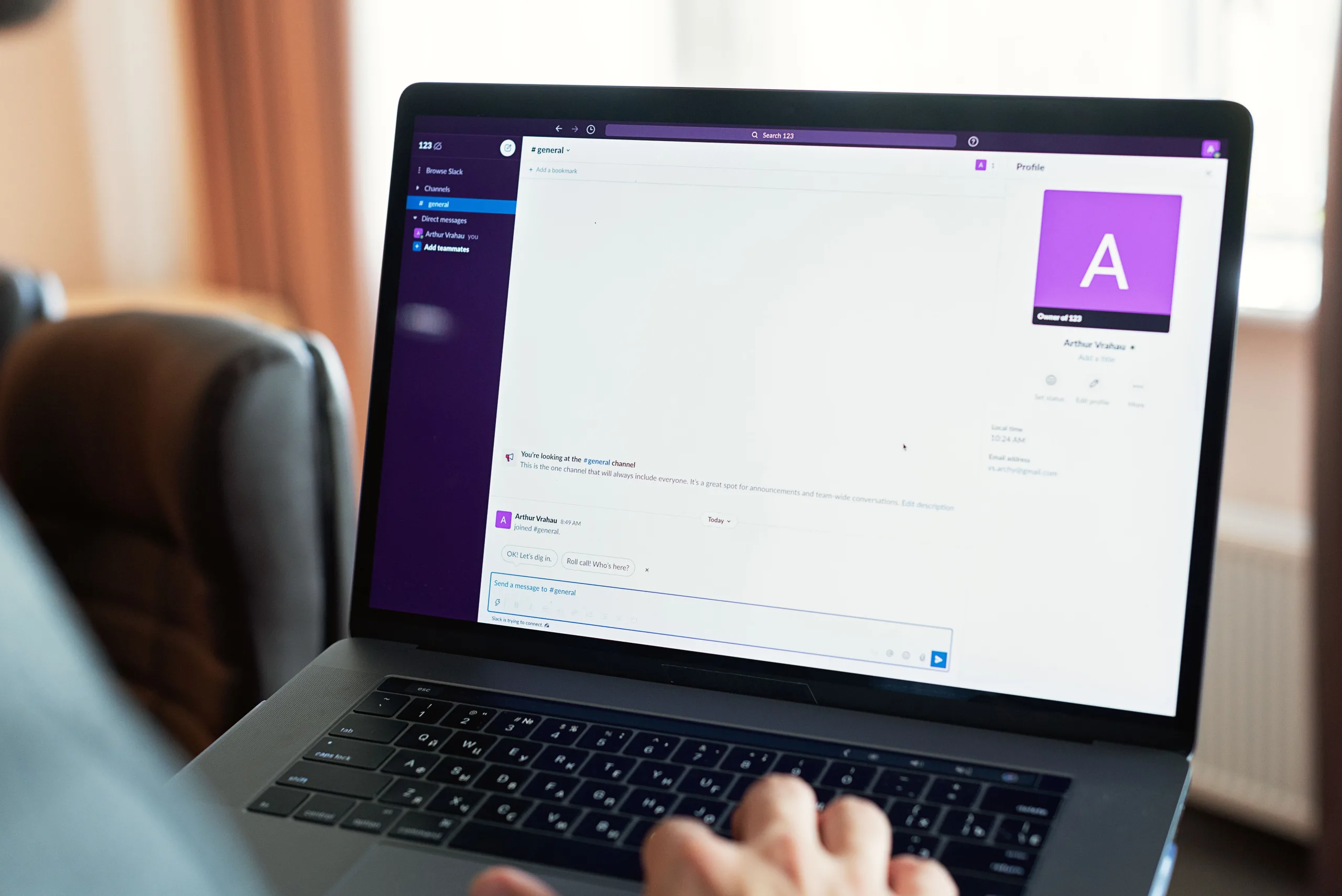
QuickBooks Slack Integration Notifications and On-Demand Questions
One way to connect QuickBooks and Slack is through event-based automation. A predefined event in QuickBooks triggers a Slack message, so the team receives an update without checking the accounting system manually. Zapier, for example, offers workflows that send Slack messages when QuickBooks Online records a new payment or creates a new invoice, or when an invoice becomes due. Make also supports QuickBooks events and payment triggers that can send updates into Slack.
This model works well when the business already knows which events people should hear about. For example, a sales team might want a channel notification whenever a payment is recorded for an important account. The workflow can watch for that event and send the selected information automatically.
Customer conversations, however, often raise questions that were not defined when the automation was configured. A payment notification can confirm that money arrived, but a salesperson may later need to know what the customer still owes or whether another invoice is overdue.
An on-demand model handles this second situation. The user asks for the information during the conversation, and the connected service retrieves the relevant financial data. Kipper follows this model for QuickBooks and Slack: it responds when an approved user asks a question and does not independently post scheduled updates or alerts.
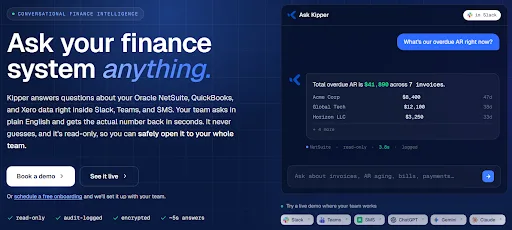 Image source: Kipper
The two approaches can therefore support different parts of the same sales process: automatic messages for known events and conversational access for questions that arise during the discussion.
Using a Slack QuickBooks Integration During Customer Conversations
Keeping sales conversations and financial records in separate systems can leave salespeople with only part of the customer picture in front of them. Salesforce’s State of Sales, 7th Edition notes that standalone tools can leave data siloed or difficult to use even when the data itself is high quality. Its research found that data silos and trapped data had a severe impact on a unified customer view for 36% of respondents, while another 51% reported some impact.
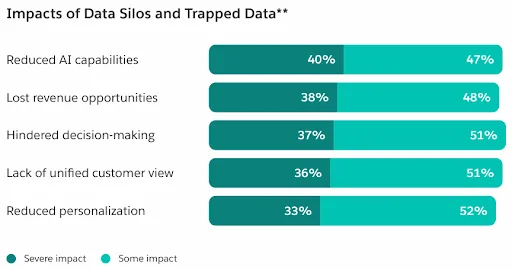 Image source: Salesforce, State of Sales, 7th Edition
Businesses often bring accounting data into the tools their sales teams use. For example, Breadwinner offers integrations that connect QuickBooks with Salesforce, allowing salespeople to view financial information alongside customer records. But when teams discuss a customer in Slack, they may need that same information during the conversation.
This need comes up in several common sales situations. Instead of asking finance to look something up, a salesperson can check the relevant accounting record while the conversation is still active. Here are a few examples:
- Before following up on an unpaid invoice, the account manager can confirm whether the payment has already been recorded.
- During a renewal or account review, the sales representative may need to check the customer’s current outstanding balance or see whether any invoices are overdue.
- If a customer issue is being escalated internally, recent invoice and payment history can provide useful context before the team decides who should respond.
In each case, the salesperson is using information that already exists in the accounting system, such as payment status, customer balance, or invoice history. The integration returns that information from the connected accounting data, but decisions about how to handle the account or what action to take still belong to the people involved.
How to Connect QuickBooks to Slack for On-Demand Financial Access
There are different ways to implement on-demand access to QuickBooks data from Slack. To show how the process works in practice, the steps below use Kipper as one example. With Kipper, a QuickBooks Online Slack integration involves connecting the accounting source, adding Slack as an interface, assigning user access, and then letting approved team members ask questions from Slack.
Step 1: Connect QuickBooks Online
Start in the Kipper portal and open Data Sources. Select QuickBooks Online and complete the Intuit authorization process with the appropriate QuickBooks credentials. Only the workspace administrator who connects the data source needs those credentials. Other users do not need their own QuickBooks login.
Kipper sign-up page for a free 14-day trial, with no credit card required
Kipper also offers a Free plan for one QuickBooks Online company, allowing users to explore financial data through Claude or ChatGPT. Teams that want to test the Slack integration can use the 14-day Starter trial, which includes 100 questions and requires no credit card.
Kipper then maintains a synced, read-only copy of the connected financial records for answering questions. The connection does not allow Kipper to create, edit, or delete records in QuickBooks.
Step 2: Add Slack and Match User Identities
Next, open Interfaces in the Kipper portal, choose Add interface, and select the Slack option for QuickBooks. A Slack workspace administrator may need to authorize the app.
Each Kipper member’s email address must match the email used for that person’s Slack account. Kipper uses this match to identify who is asking a question and apply the correct access. If the email addresses do not match, Kipper will not recognize the user as an authorized member.
Step 3: Set Access Before Sales Users Start Asking
Invite the people who should be able to ask questions and configure their data access. On Kipper’s Starter plan, administrators can choose from three predefined read-only access options: Full Access, Accounts Receivable, and Accounts Payable. Pro and Enterprise plans also support custom permission rules.
For a sales team, Accounts Receivable is the most relevant example because it covers customers, invoices, payments, credit memos, and refunds. The user can then query that information through Kipper without receiving direct access to the QuickBooks account itself.
Step 4: Ask in Slack and Continue in the Same Thread
After setup, users can open Kipper from the Slack Apps area and ask a question in its Messages tab or in a direct message (DM). In a channel where Kipper has been added, they can mention @Kipper followed by the question.
Example of Kipper answering a financial question in Slack using read-only QuickBooks data
Kipper replies in the same thread, with answers typically coming back in about five seconds. Follow-up questions can then continue the existing conversation. For example, a salesperson could ask which invoices for a customer are overdue, then follow with “Now show only the ones over 60 days” without repeating the original request. If the user asks about a specific QuickBooks Online invoice, Kipper can provide a link to download that invoice as a PDF in the same Slack thread, as long as the user has permission to access it.
Kipper can also support financial questions from other departments. A broader Kipper functionality overview covers how sales, finance, and operations teams can access accounting information through their everyday communication tools.
How to Ask Better QuickBooks Questions in Slack
A clear question makes it easier to find the right financial records. Users do not need to know QuickBooks report names or special commands, but it helps to name the customer, invoice, or time period and ask for one specific result.
In a Slack to QuickBooks workflow, the question starts in Slack, so the wording of that question helps determine how precisely the system can find the relevant financial information.
| Examples of QuickBooks Questions to Ask in Slack | ||
|---|---|---|
| What You Need | Example Question | Question Type |
| Check a specific invoice | “Has invoice 2318 been paid?” | Direct lookup |
| Find records that meet a condition | “Which Acme invoices are more than 60 days overdue?” | Filtered list |
| Get a total | “What is Acme’s current outstanding balance?” | Total |
| Compare two periods | “How do payments this month compare with last month?” | Comparison |
These types of questions match the lookups, filters, sums, and date-range comparisons that Kipper can perform over supported records.
The first answer can also become the starting point for the next question. In the same Slack thread, a salesperson can narrow the result, change the time period, or focus on one item without repeating the full request.
For example, after asking for a customer’s outstanding balance, the next message might be, “Which invoices make up that balance?” followed by, “Which one is the oldest?” Kipper keeps the conversation context within the thread, so the questions can become more specific as the discussion develops.
Kipper groups open invoices by customer in Slack using Accounts Receivable access
Salesforce’s State of Sales, 7th Edition also examined how sales professionals use AI agents. Among those using AI agents, 90% said AI and agents help them understand customers better, while 88% said AI makes them more productive. These findings show why conversational access to relevant customer context can be useful in sales workflows.
Image source: Salesforce, State of Sales, 7th Edition
Set Clear Access Rules for a QuickBooks Slack Connector
Before salespeople start using financial data in Slack, teams should consider three practical questions: what information they can retrieve, who can see their answers, and when a figure needs to be verified.
Give sales teams the data they actually need. A salesperson may need customer balances, invoices, payments, or overdue invoices, while broader accounting data can stay with finance. Kipper provides read-only access controls, although the available permission options depend on the subscription plan. For salespeople who mainly need customer and invoice information, the Accounts Receivable level often fits those needs because it covers customers, invoices, payments, credit memos, and refunds.
Be careful with shared channels. Permission controls determine what a user can retrieve, but they do not make a Slack reply private. Kipper checks the permissions of the person asking the question, and everyone in the channel can see the reply. If the answer contains sensitive customer or financial information, use a direct message or Kipper’s Messages tab instead.
Verify figures before using them outside an internal discussion. A quick lookup can provide useful context for the team. But before using a figure for a business decision, verify it independently against the accounting records. Normal financial controls and professional judgment still apply.
FAQs About QuickBooks and Slack Integration
Can I ask QuickBooks questions directly in Slack?
Yes. With Kipper, approved users can ask financial questions through the Kipper Slack app or in a direct message. In a channel where Kipper has been added, users can mention @Kipper and ask the question there. Kipper replies in the same thread, and follow-up questions can continue the conversation without repeating the original request.
How can I connect QuickBooks to Slack for on-demand financial access?
One option is to use Kipper as a read-only connection between QuickBooks Online and Slack. An administrator connects QuickBooks Online through Kipper, adds Slack as an interface, invites approved users, and assigns their data access. Team members can then ask supported financial questions from Slack.
What QuickBooks information can sales teams retrieve in Slack?
Sales teams can use Kipper to retrieve information such as customer balances, invoice and payment status, overdue invoices, and payment history. Questions can also ask for filtered lists, totals, or comparisons across supported records. What each person can retrieve depends on the data available through the connection and the permission level assigned to that user.
Can salespeople access QuickBooks data in Slack without a QuickBooks login?
Yes. Only the workspace administrator who connects QuickBooks Online to Kipper needs the relevant QuickBooks credentials. Other approved users can ask questions through Kipper without receiving their own QuickBooks login. Their access to financial data is controlled through Kipper’s read-only permissions, with the available controls depending on the plan.
What is the difference between QuickBooks notifications in Slack and on-demand questions?
Notifications are triggered by events selected in advance, such as a new payment or invoice. On-demand access works differently: the salesperson asks for a specific financial fact when the need arises during a conversation. This makes notifications useful for predictable updates, while conversational access is better suited to questions that cannot always be anticipated beforehand.
Keep Financial Context Close to the Sales Conversation
Conversational access is most useful when a salesperson can check a financial fact at the moment it becomes relevant. If a customer asks about an invoice, payment, or outstanding balance, the salesperson can look up that information while the discussion is still active.
This connection supports that workflow by bringing requested accounting information into the place where the customer conversation is already happening. With Kipper, salespeople can retrieve that context without their own QuickBooks login or a separate lookup from finance, while administrators control what they can access.
For the sales team, the practical benefit is straightforward: when a financial question comes up, the salesperson can check the relevant context in Slack and keep the customer discussion moving.