An actual channel-access incident documented by our team shows why a missing YouTube channel needs more than a standard appeal. This guide explains the evidence, official recovery routes, payment checks and business continuity steps that matter.
Updated: November 6, 2026 | Reading time: approximately 12 minutes | Editorial status: The incident described here remains under YouTube review.
On the morning of November 6, 2026, colleagues managing a YouTube channel opened a video and found the warning: “This video is no longer available because the YouTube account associated with this video has been closed.” A previously authorized manager opened YouTube Studio and saw: “You don’t have access to this channel.” Both messages were captured in original screenshots reproduced below.
At first, it appeared that the videos, channel and archive had disappeared overnight. The owner subsequently reported receiving a YouTube notification concerning a suspected hacking incident and a Community Guidelines problem. YouTube acknowledged the case, saying its review would generally provide an update within 72 hours. That was a case-specific response, not a promise of restoration.
The owner separately raised an approximately $250 discrepancy involving AdSense for YouTube and advertising activity they did not recognize. The available material does not establish whether this was an unauthorized transfer, an earnings adjustment, a legitimate payment or an unrelated billing issue. Channel recovery and payment-account investigation must proceed in parallel.
The lesson for creators and businesses is straightforward: an inaccessible YouTube channel is a symptom, not a diagnosis. Treat account security, channel status, delegated access and money flows as separate questions until evidence connects them.
The real incident: What our screenshots show, and what they do not
Screenshot 1: The video says the account was closed
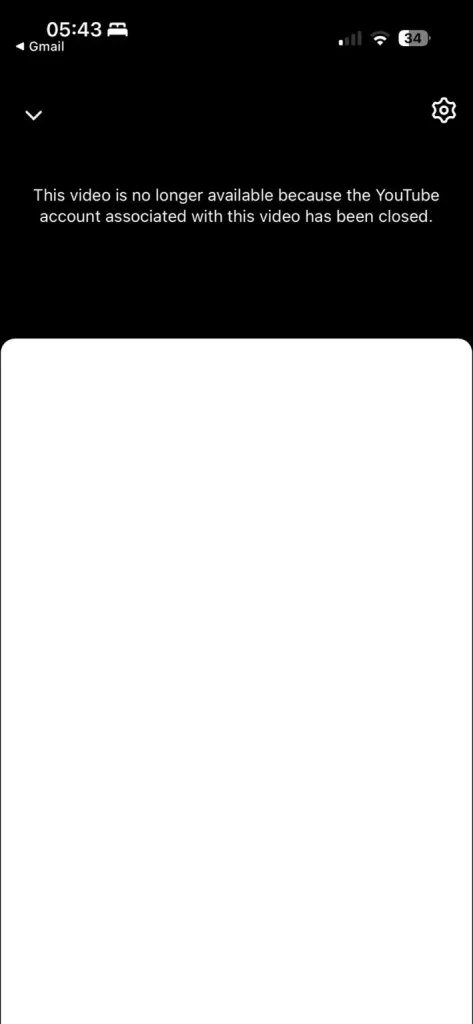
Figure 1. Original, unaltered incident screenshot. YouTube displays an “account … has been closed” message on a video page.
This confirms that a viewer could not watch that video at the time of the screenshot. It is consistent with a channel/account closure or termination, but does not establish the reason. It does not prove that the videos were permanently erased, nor does it show who caused the account to close.
Screenshot 2: A manager has lost access to the channel
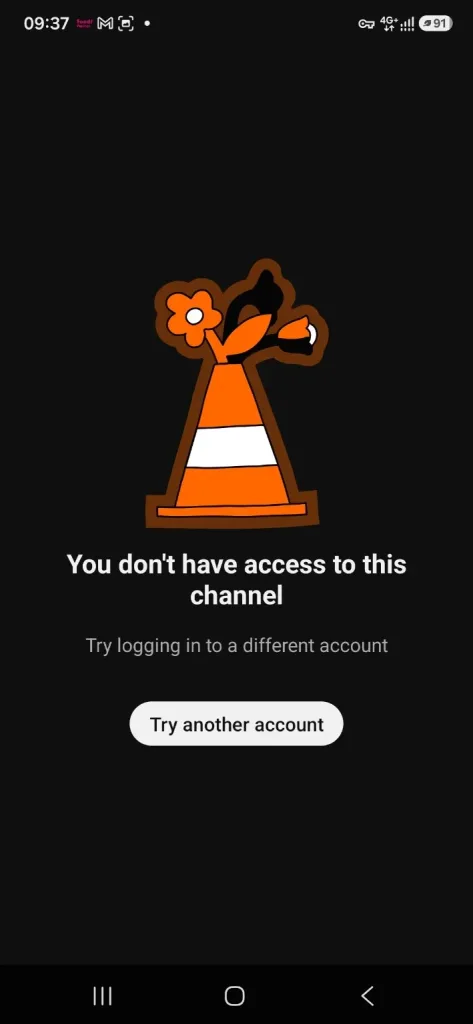
Figure 2. Original, unaltered incident screenshot. YouTube Studio tells a previously authorized manager that the channel is inaccessible.
This shows that this particular signed-in account no longer had channel access. Possible explanations include removed permissions, a different signed-in identity, a channel termination, a Brand Account access problem, or account compromise. It does not by itself prove that the primary owner was removed or that all managers lost access.
The message we received from YouTube
After the owner contacted YouTube, the recovery response said:
“We’re reviewing your channel”
“Thanks for your patience as we look into what might have happened with your channel. We’ll keep you updated … usually within 72 hours.”
“If you haven’t already taken steps to secure your account, we recommend you do that now.”
The email address in that message has been deliberately omitted from this public article. A review acknowledgement is not a ruling that hacking occurred, and the 72-hour language is not a guarantee of restoration. We will update this article when an outcome is confirmed.
Why a YouTube channel can suddenly disappear: Six possibilities
Account takeover is not a hypothetical business risk. IntelligentHQ has reported on AI-enabled account takeover fraud; the practical lesson is to investigate credentials, sessions and delegated access rather than simply resetting one password.
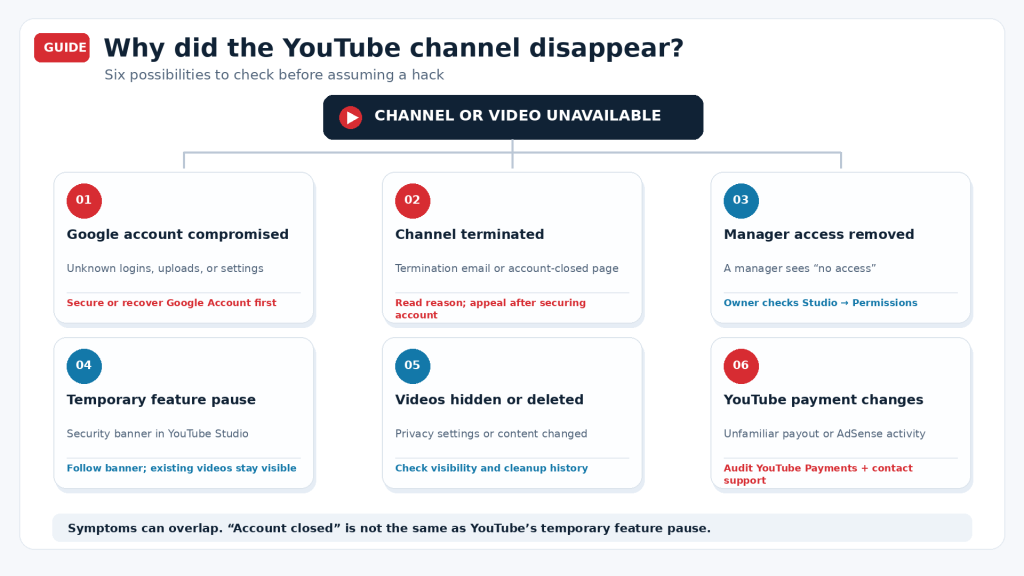
Infographic: A diagnostic guide. These are alternative explanations, not six confirmed events in our case.
| What you see | What might have happened | Best first check |
|---|---|---|
| Unfamiliar logins, uploads, branding, or settings | Google account or channel hijacking | Secure the Google account; use YouTube’s hacked-channel recovery assistant |
| Video says the channel/account was closed; termination notice received | Community Guidelines or other channel termination | Read the termination reason; appeal through Studio after recovering any compromised Google account |
| Manager sees “You don’t have access” | Permissions revoked, different account selected, Brand Account issue, or termination | Ask the owner to check the correct account and Studio → Settings → Permissions |
| Creator sees a security-restriction banner but viewers can still watch | YouTube’s temporary feature pause | Follow the banner’s instructions and review status |
| Channel exists but videos vanished | Videos made private, removed, or changed by an authorized or unauthorized user | Audit video visibility, upload activity, and security history |
| Unexpected YouTube earnings or payment activity | Payment-account changes, adjustments, transfers, or unauthorized activity | Examine AdSense for YouTube → Payments → Payments info and contact support/bank if appropriate |
Important distinction for 2026: On October 21, 2026, YouTube introduced a temporary feature pause when it detects possible unauthorized activity. It can temporarily block uploads, livestreams, playlist changes, thumbnails, and some visibility changes while the security team reviews the account, typically within 24 hours. YouTube says existing videos remain watchable and monetization status is not impacted by that specific pause. Therefore, our account-closed video screenshot is not adequately explained by this feature alone. Official YouTube announcement.
What to do in the first 15 minutes when your YouTube channel is hacked or missing
Unexpected emails are especially dangerous during a crisis. As our reporting on phishing and fraud following a UK airport cyberattack shows, an apparently well-informed message can still be an impersonation attempt. Go to Google and YouTube directly, not through unsolicited recovery links.
1. Preserve the evidence before changing anything. Save screenshots of the public video error, Studio access messages, relevant YouTube emails, any unexpected livestreams, the original channel URL or channel ID (often beginning UC), and the approximate time the issue began. Record the last known normal date. Keep email headers and case/reference numbers privately, not in a public post. If you suspect an unsafe browser or infected computer, use a trusted device for the recovery process.
2. Verify what is actually affected. Open the original video URL in a signed-out browser and ask a colleague to check independently. Is the whole channel unavailable, or only some videos? Does the primary owner still see the channel when signed in? Does Studio show a termination notice or a temporary security-pause banner? Those answers determine the next action.
3. Search the owner’s inbox for the official reason. Look for messages from YouTube and Google about termination, unexpected sign-ins, changes to recovery information, account access, or AdSense associations. Open YouTube Studio directly rather than clicking a surprising email link. A real-looking email can still be phishing.
4. Secure every account with management access. The owner should review recent security activity, trusted devices, recovery methods, passkeys or two-step verification, and third-party access. Managers must secure their own Google accounts too. Do not assume only the owner can be the entry point.
5. Open one clear recovery case and maintain a timeline. Use the official hacked-channel instructions and save the support case ID. If YouTube is already reviewing the incident, add meaningful new evidence to the existing case instead of repeatedly filing contradictory appeals.
How to recover a hacked YouTube channel, step by step
A channel managed by several people should be treated as an identity-and-access system. Our guide to Zero Trust and identity security explains why correct credentials alone do not prove a session or device is safe.
Step 1: Recover and secure the Google account first
YouTube says a hacked channel is linked to a compromised Google account; its official process begins by recovering that account. If you can still sign in, change the password from a trusted device and visit Google Security Checkup. Review recent security events, remove unfamiliar devices or access, inspect recovery email and phone details, and enable a passkey or strong two-step verification.
If you cannot sign in, use Google Account Recovery. Follow Google’s ownership checks and do not share verification codes with an alleged recovery agent. A paid “Google recovery specialist” who asks for your password or one-time codes is a serious warning sign. Google’s compromised-account guide.
Step 2: Use YouTube’s official hacked-channel recovery assistant
Open Recover a hacked YouTube channel and follow its link to the Hacked Channel Assistant, available in English, Spanish, and Portuguese. YouTube directs creators to establish account ownership and secure the associated Google account before cleaning up the channel. If you are an eligible creator and the Google account is recovered, contact Creator Support through the options available in Studio. Otherwise, YouTube points creators to @TeamYouTube on X.
Time matters: YouTube says its support for potential channel-hacking incidents is limited to events within the previous nine months because of data retention. That is a separate rule from its termination-appeal deadline. Start the recovery process as soon as possible.
Step 2A: Contact @TeamYouTube on X for a faster public support response
If you cannot reach YouTube Creator Support, also try the official @TeamYouTube account on X. YouTube explicitly identifies this as a way to ask for help when Creator Support is unavailable, and says tagging @TeamYouTube is the quickest way to get the attention of its X support team. Its official guidance says the account is monitored from Monday 9 a.m. Pacific Time through Friday 5 p.m. Pacific Time. Responses may arrive quickly, but there is no guaranteed reply time or channel-restoration deadline. YouTube’s @TeamYouTube support guide.
For the best chance of getting directed to the right support process:
- Post publicly from an X account that is not protected, and tag @TeamYouTube directly rather than only @YouTube or @YouTubeCreators.
- Include your original channel or video URL and a short description of the exact problem (for example, an account-closed video notice and lost Studio access).
- Attach a redacted screenshot showing the error. Keep email addresses, payment details, recovery codes, phone numbers and sensitive case records out of the public post.
- Mention that you have already used YouTube’s hacked-channel assistant or submitted a recovery case, if true. If asked to provide private details, use only the official secure support process.
- Keep following the existing support case. If you receive no useful guidance, reply to the same X thread with new information instead of repeatedly posting personal details.
Important: @TeamYouTube can guide you toward support, but its own help page says hacked-channel incidents should be handled by Creator Support and that the X team cannot reactivate AdSense accounts. A response on X is not evidence that a hack is confirmed or that restoration is guaranteed. Official hacked-channel instructions.
Step 3: If the channel was terminated, appeal the termination
A compromised account can be used to upload videos or livestreams that breach YouTube’s rules, and the channel may then be terminated. YouTube’s guidance is explicit: recover the Google account first, then appeal the termination and explain that any unauthorized content was not uploaded by the legitimate owner.
In YouTube Studio, look for the termination information. Where available, choose Begin Review → Start Appeal, explain the evidence, and submit. If that interface is unavailable, use the alternate form linked from YouTube’s termination help page. The current general termination guidance permits appeals for up to one year after termination and limits the number of appeals. A copyright-based termination follows a different, potentially legal process; do not file a copyright counter-notification unless it is genuinely the right route.
Do not create or use another channel to circumvent an active termination: YouTube prohibits this and it can complicate the case.
Step 4: If only a manager lost access, check the channel permissions
If the owner can still access the channel, sign in to Studio and open Settings → Permissions. Confirm which Google accounts have owner, manager, or editor roles. Remove unknown delegates, investigate unexpected changes, and re-invite a legitimate manager when safe. Check whether the user signed in under a different identity or Brand Account. YouTube’s permissions guide.
If the owner also cannot access the channel, or the channel has been terminated, changing a manager’s role will not solve the underlying problem. Move back to Google account recovery and YouTube support.
Step 5: Clean up the channel after it returns
Once access is restored, use YouTube’s hacked-channel cleanup guidance. Review unfamiliar uploads, livestreams, strikes, channel name and handle, banner, playlists, comments, video privacy, delegates, AdSense association, and Content Manager settings. YouTube has a cleanup tool for eligible owners/managers that presents unusual activity for review.
For an unauthorized upload without policy strikes or claims, YouTube advises deletion. For uploads with strikes or claims, contact YouTube for an investigation rather than treating deletion as a complete solution. Recheck all manager accounts: otherwise an attacker may still have access.
What if money is missing from AdSense for YouTube?
In our incident, the owner raised two additional concerns: approximately $250 appeared to be missing from the earnings/payment account, and some advertisements were not authorized. At publication, we do not know whether either issue resulted from the same suspected compromise. It is important not to label an accounting adjustment or legitimate transfer as a theft without checking the transaction trail.
Begin in AdSense under Payments → Payments info, then use the payments-account selector to choose YouTube Payments Account. Google keeps AdSense and YouTube payments in separate accounts when a publisher uses both products. Inspect transaction history, balance adjustments, the payee profile, bank/payment methods, recent settings changes, and the timing of any payout. Google’s YouTube payments explanation and payments account guidance explain where to look.
If there is a payment to an unfamiliar bank account or an unauthorized withdrawal, save transaction IDs and screenshots, report the issue to YouTube/Google Payments and the financial institution immediately, and ask whether a pending transfer can be stopped or investigated. If an unfamiliar Google Ads campaign or advertising charge is involved, determine which billing account actually incurred it; advertising spend and AdSense earnings are not the same system. Do not publish account numbers or financial statements in a public support thread.
For businesses: Protect the channel as a revenue and reputation asset
A company-owned channel is more than a video library. It may contain an audience built over years, affiliate or advertising revenue, branded campaigns, and links embedded across the company website. During an incident, security, communications and finance teams should not be forced to wait for each other to act.
- Assign an incident owner. Put one person in charge of the evidence timeline and YouTube support reference. Keep other teams from sending conflicting reports.
- Separate access from publishing. Audit all owners, managers, editors, agencies and production vendors. Remove shared passwords; use the minimum permissions required for each role.
- Protect the audience. If unauthorized uploads or suspicious livestreams appeared, publish a short warning on an independent verified channel such as the corporate website or an established social profile. Tell viewers not to follow unfamiliar investment or payment links.
- Audit the money independently. Assign finance to check the AdSense for YouTube payments account, while marketing checks whether unfamiliar Google Ads campaigns or charges exist. These are different financial products.
- Preserve continuity. Keep offline copies of original videos, thumbnails, captions and metadata. Prepare an approved fallback communication channel so the brand can speak even if YouTube access is interrupted.
Whether the root cause is a hack or a mistaken enforcement action, the objective is the same: verify what happened, protect people and payments, recover the channel using the correct route, and document what will change afterward.
What to send YouTube: Two messages you can copy
Message 1: Hacked channel, access loss, and possible termination
Subject: Urgent review: Suspected YouTube channel compromise, loss of access, and possible termination — [Channel name / ID]
Hello YouTube Creator Support,
I am the legitimate owner/authorized manager of [channel name], channel ID [UC…], at [original channel URL]. On [date and time, timezone], we discovered that our published video links displayed an “account … has been closed” message, and an authorized manager could no longer access the channel in YouTube Studio.
The account owner has also received a notification concerning possible unauthorized activity and a Community Guidelines issue. We are securing the associated Google accounts and preserving the original notices and screenshots.
Please investigate whether unauthorized access, a permissions change, or a channel termination caused this issue; confirm the status of the channel and its videos; and advise which recovery or appeal step applies. If unauthorized content caused a termination, please review that activity separately from the owner’s legitimate uploads.
Our case/reference number is [reference], if available. We can verify ownership and supply the full channel ID, historical URLs, and incident timeline privately.
Thank you for your help.
Do not paste passwords, backup codes, identity documents, or bank details into an initial message.
Message 2: AdSense for YouTube discrepancy
Subject: Security investigation requested: AdSense for YouTube payment discrepancy — [Case ID]
Hello YouTube/Google Payments Support,
During the review of a possible YouTube channel compromise, we noticed an unexplained difference of approximately USD $250 in our AdSense for YouTube account. We also need to verify advertising activity that the account owner does not recognize.
Please help us identify whether this amount reflects a payment, an adjustment, a hold, or an unauthorized transaction. We ask that you review changes to the YouTube payments account, payout method, and relevant settings during [date range].
We have preserved transaction screenshots and can provide reference IDs through a secure support channel. Please tell us the correct next steps if a payment or linked advertising account was altered without authorization.
Thank you.
Short, public post for @TeamYouTube
Post this on X from a public account. Include a redacted screenshot if helpful; never publish the recovery email address, phone number, banking details, backup codes or identity documents.
@TeamYouTube Our YouTube channel suddenly became unavailable. Videos show an “account closed” message, and an authorized manager lost Studio access. We have contacted YouTube and received a review notification. Could you help us reach the correct recovery team? Original channel URL: [link]. We can provide ownership evidence securely.
What similar cases in other parts of the world can teach creators
The following incidents are independently reported examples, not evidence that our own channel was attacked by the same group or that all cases are connected.
| Place and date | What was reported | Relevant lesson |
|---|---|---|
| Canada — Linus Tech Tips, March 2023 | Linus Media Group channels were hijacked, used to promote crypto scams, and temporarily became unavailable; the channels were subsequently restored. | A channel can temporarily disappear after a hijack without being permanently lost. Netcraft investigation · Restoration report |
| Australia — Seven Network, June 2024 | Multiple broadcaster-branded YouTube channels were altered to show an AI-generated Elon Musk pitching a crypto scam; some pages were inaccessible. | A trusted channel identity can be used to mislead viewers, so warn the audience through separate trusted channels. ABC News |
| India — Supreme Court, September 2024 | Its official YouTube channel showed cryptocurrency-related content; the institution announced that its channel had been taken down. | Even high-profile institutional channels can be affected. Indian Express |
| South Korea — Han Hye-jin, November 2025 | A crypto-related livestream appeared, the channel was removed for a period, and the creator subsequently announced restoration after approximately three days. | A hacking incident can coincide with a policy-based takedown and later restoration. ChosunBiz/OSEN |
| Pakistan — ARY Digital, July 2026 | The broadcaster said its channel had been hacked and later confirmed restoration on July 29, 2026. | Keep a separate public communication channel to tell viewers when access is restored. ARY Digital’s update |
A different kind of problem can look similar: reporting from December 2025 documented disputes about YouTube policy terminations and some later reinstatements that were not necessarily hacking cases. That is another reason to ask for the actual termination reason instead of assuming an intrusion. Search Engine Journal.
Why the 24-hour and 72-hour messages should not be confused
There are at least three different clocks in YouTube’s published guidance and our case:
- Typically 24 hours: The review described for the specific temporary feature pause introduced in October 2026. Existing content normally remains visible under that mechanism. Official announcement.
- Usually within 72 hours: The personalized review update our owner received. This reflects that case’s communication, not a universal deadline for restoring channels.
- Nine months / one year: YouTube’s documented nine-month support window for potential hacked-channel incidents, versus its one-year general window for submitting a termination appeal. These are different rules. Hacked-channel help · Terminations help.
If the case remains unresolved after the stated update window, follow up with the existing case ID, the new observations, and a concise timeline. Ask for status and next action rather than declaring that YouTube failed to meet a restoration guarantee it did not make.
After recovery: A practical security checklist
Recovery should lead to a stronger operating model, not merely renewed access. IntelligentHQ has explored both trust and verification in the digital economy and the need for cybersecurity awareness among employees. For channel teams, that means protecting each Google identity and keeping an auditable roster of owners and managers.
- Confirm the original channel ID, URL, subscribers, and video library have been restored as expected.
- Change compromised passwords and examine recovery methods, recent sign-ins, devices, and third-party apps.
- Turn on passkeys or two-step verification for every owner and manager.
- Review Studio → Settings → Permissions and any Brand Account roles; remove accounts no longer required.
- Audit uploads, livestreams, video privacy, descriptions, external links, pinned comments, and channel branding.
- Ask YouTube to investigate strikes or claims attached to unauthorized uploads.
- Verify the AdSense for YouTube association, payout account, transaction history, and advertising/billing accounts.
- Keep backup copies of original videos, thumbnails, descriptions, and an emergency contact route outside YouTube.
- Publish a brief, factual viewer update once the channel is secure; do not speculate about the attacker.
Frequently asked questions
Is a YouTube channel permanently deleted if videos say the account has been closed?
Not necessarily. That message shows the video is unavailable because of the status of its associated account; it does not explain why or prove that restoration is impossible. First check the owner’s email and Studio notices, then follow the proper appeal or account-recovery path.
Can a hacked YouTube channel be recovered after termination?
Possibly. YouTube provides a hacked-channel recovery route and allows an owner to appeal termination after recovering the linked Google account. Success depends on the account’s circumstances and YouTube’s review; it is not automatic. YouTube recovery instructions.
Why do I see “You don’t have access to this channel” when I used to manage it?
Your permissions may have been changed or removed, you may be using the wrong Google identity or Brand Account, or the channel may have been terminated or compromised. Have the owner check the permissions list—if the owner can still access Studio—before assuming a hack.
How long does YouTube take to recover a hacked channel?
There is no single guaranteed recovery period. YouTube says the temporary feature pause is typically reviewed within 24 hours, but our separate case notice mentioned a likely update within 72 hours. Full recovery can depend on account verification, termination status, and restoration work.
Can someone hack a YouTube channel without knowing its Google password?
Compromise can involve more than a guessed password, including phishing or malware. Google and YouTube recommend checking active sessions, devices, account recovery options, third-party access, and the security of every manager’s account. The exact mechanism cannot be inferred from an access error alone. Google Security Help.
What should I do if AdSense for YouTube money is missing too?
Document the transactions, distinguish adjustments from actual payouts, review the YouTube Payments Account and payout methods, then report any unauthorized transfer through secure Google support and to your financial institution. Do not assume the missing amount proves who accessed the channel.
Official help links worth bookmarking
- YouTube: Recover a hacked channel
- YouTube: Hacked-channel assistant
- Google: Account recovery
- Google: Secure a compromised account
- YouTube: Channel or account terminations and appeals
- YouTube: Clean up a hacked channel
- YouTube: Add or remove channel permissions
- YouTube: Temporary feature pause announcement
- Google: AdSense for YouTube payments
- YouTube Creator Support / @TeamYouTube
Final takeaway: When a channel vanishes, investigate the account, the channel, and the money separately
Losing access to a channel can feel like losing an entire archive overnight. Our own experience began with two unsettling screens, followed by a suspected-hacking notification and a pending YouTube review. What we can prove today is what the screens showed; what happened behind the scenes still requires the platform’s findings.
That distinction matters to every creator. Secure the Google account, obtain the actual channel status, use the correct recovery or appeal process, audit the payment account independently, and keep clear evidence. A calm, documented response gives you the best chance of resolving the right problem.
Editor’s note (November 6, 2026): This guide draws on two unaltered screenshots and first-hand descriptions of a pending YouTube review and a potential payments discrepancy. The cause of the channel closure, the presence or extent of unauthorized access and the status of the reported $250 have not been independently established. IntelligentHQ will update material facts if the owner receives a confirmed outcome.