AI can spit out a pitch deck in 60 seconds, but investors only trust numbers they can trace back—not gradient-filled slides. A 2026 BankerToolBench review of nine frontier models found 0 percent of auto-generated books “client-ready.” The takeaway? If your financial slides for AI pitch decks warp revenue, margin, or runway, speed hurts more than it helps. We pressure-tested dozens of tools and narrowed the field to six that keep every figure editable, sourced, and safe. Let’s find the one that fits your model, team, and budget.
The best tools for financial slides at a glance
Below is a quick side-by-side look at how each platform handles the essentials: financial rigor, data grounding, native editing, and security. Use it to pick the right partner for financial slides for AI pitch decks.
| Rank | Tool | Best for | Native PPT / Slides? | Finance-slide edge | Starting price* |
| 1 | Plus AI | PowerPoint & Google Slides loyalists | Yes | Edits existing decks; adds editable charts in place | $10 /user /mo |
| 2 | Slidebean | Fundraising structure + model help | Export (PPTX / PDF) | Templates plus runway calculators | $7 /mo |
| 3 | Beautiful.ai | Brand-tight, polished layouts | Export | Smart Slides lock spacing and hierarchy | $12 /mo |
| 4 | Gamma | Fast drafts; Sheets connectivity | Export | Smart Charts sync with Google Sheets | $9 /mo |
| 5 | Pitch | Real-time collaboration & analytics | Export | Version history and viewer metrics | $13 /mo |
| 6 | Microsoft Copilot | Microsoft 365-governed teams | Yes (PPT) | Prompt-to-deck inside tenant controls | Bundle pricing |
Prices checked September 1 2026; confirm current rates before purchase.
1. Plus AI: best overall for native PowerPoint and Google Slides
If you build decks in PowerPoint or Google Slides, Plus AI feels like an in-house analyst, not another app. Click the add-in, paste a brief or drop in a Word or PDF, and watch editable slides appear without leaving your existing file.
For teams that want an ai presentation maker inside familiar software, Plus AI is the strongest fit for financial slides for AI pitch decks.
Why it stands out
- Native editing. Paste a revenue table and Plus drops an editable column chart in your brand colors; one prompt converts it into a burn-rate bridge.
- Proven adoption. The PowerPoint add-in holds a 4.8 / 5 rating from 130 reviews on Microsoft Marketplace, and the Google Slides version shows more than one million installs according to the Google Workspace Marketplace.
- Security fit. SOC 2 Type II, encryption at rest and in transit, and optional SSO help finance teams clear procurement quickly.
Watch-outs
Plus AI formats the deck; it doesn’t create the forecast. Embedded charts inside uploaded files may still need manual cleanup.
For any team that already trusts its model and just needs investor-ready slides fast, Plus AI delivers speed without sacrificing control.
2. Slidebean: best for fundraising structure and model support
Slidebean approaches a deck like an accelerator coach: story first, numbers close behind, making it a strong ally for financial slides for AI pitch decks that still need credible projections.
Open its template library and you’ll find traction, TAM, and a runway calculator that connects to revenue, burn, and head-count inputs. Enter your figures and Slidebean autofits charts that clear a quick sanity check, nudging you toward realistic CAC and churn lines.
Exports to PowerPoint work, but plan a short spacing pass before you hit send. The platform holds a 4.4 / 5 average from 26 reviews on G2, and lists a $7 per month Starter plan when billed annually.
Watch-outs. Security details (SOC 2, SSO, data retention) are not yet public; request them before uploading a full model. And you still own the assumptions; Slidebean formats the numbers but can’t defend them during diligence.
3. Beautiful.ai: best for controlled, polished financial layouts
Beautiful.ai is the strict stylist on this list: its Smart Slides lock spacing, fonts, and colors so even a rushed founder can ship board-ready financial slides for AI pitch decks in minutes.
Drop a gross-margin bridge onto the canvas and the editor snaps labels, bars, and totals into place; multi-metric dashboards stay readable even when the forecast shifts an hour before the call. Exports arrive as editable PPTX, but plan a quick QA pass in PowerPoint to tweak widths or footnotes.
Proof of polish. Beautiful.ai holds a 4.7 / 5 rating from more than 190 G2 reviews, and its Pro plan lists at $12 per month when billed annually.
Trade-offs. Guardrails can feel cramped for highly custom layouts, and public security docs (SOC 2, SSO) are available only on Enterprise plans.
4. Gamma: best for fast drafts and connected charts
Need a first pass of financial slides for AI pitch decks in minutes? Gamma is the speed specialist. Paste a prompt, link a doc, or drop a URL and you get a web-native deck, complete with Smart Charts that sync to Google Sheets. Update the source sheet, hit refresh, and the slide flips to the new numbers—no CSV uploads or version roulette.
A June 2026 upgrade made hand-off smoother: editable tables now survive PowerPoint and Google Slides exports, and Smart Charts stay clickable instead of flattening into images. Gamma holds a 4.6 / 5 rating on G2 and lists Pro pricing at $9 per seat per month when billed annually.
Trade-offs. Card-style layouts can look casual next to a Series C pitch, and public SOC 2 or SSO details are limited. Treat Gamma as the rapid-fire scratch pad that later becomes a polished PowerPoint once the narrative gels.
5. Pitch: best for collaboration and investor engagement
Think of Pitch as Google Docs for financial slides for AI pitch decks. Multiple founders can tweak copy, swap charts, and leave threaded comments in real time, shrinking feedback loops from days to minutes.
Version history lets you roll back a broken edit with one click, and link analytics show which partner re-read the financial slide before the next call.
Proof of collaboration appeal. Pitch carries a 4.4 / 5 average from more than 60 G2 reviews, and its Plus plan starts at about $11 per user per month on annual billing (roughly $13 when paid monthly).
Trade-offs. The built-in chart engine covers revenue curves, burn bars, and simple bridges; cohort or scenario views still start in Excel. Larger finance teams should verify SSO and data-retention terms.
6. Microsoft Copilot for PowerPoint: best for Microsoft 365 governance
Sometimes the safest pick is the one IT already trusts. For companies anchored in Microsoft 365, Copilot lives inside PowerPoint and turns outlines, pasted text, or a bulleted brief into finished slides without leaving the tenant’s security bubble.
Why it works for financial slides. Charts, shapes, and animations appear as standard PowerPoint objects, so your template and slide master slot in automatically. Copilot also inherits Microsoft 365 identity, retention, and audit controls, letting finance teams keep every deck inside a familiar compliance perimeter.
Licensing watch-out. Microsoft lists Copilot as a $30-per-user-per-month add-on to eligible E3/E5 or Business plans. Confirm with procurement before promising it to the CFO.
Which tool should you choose?
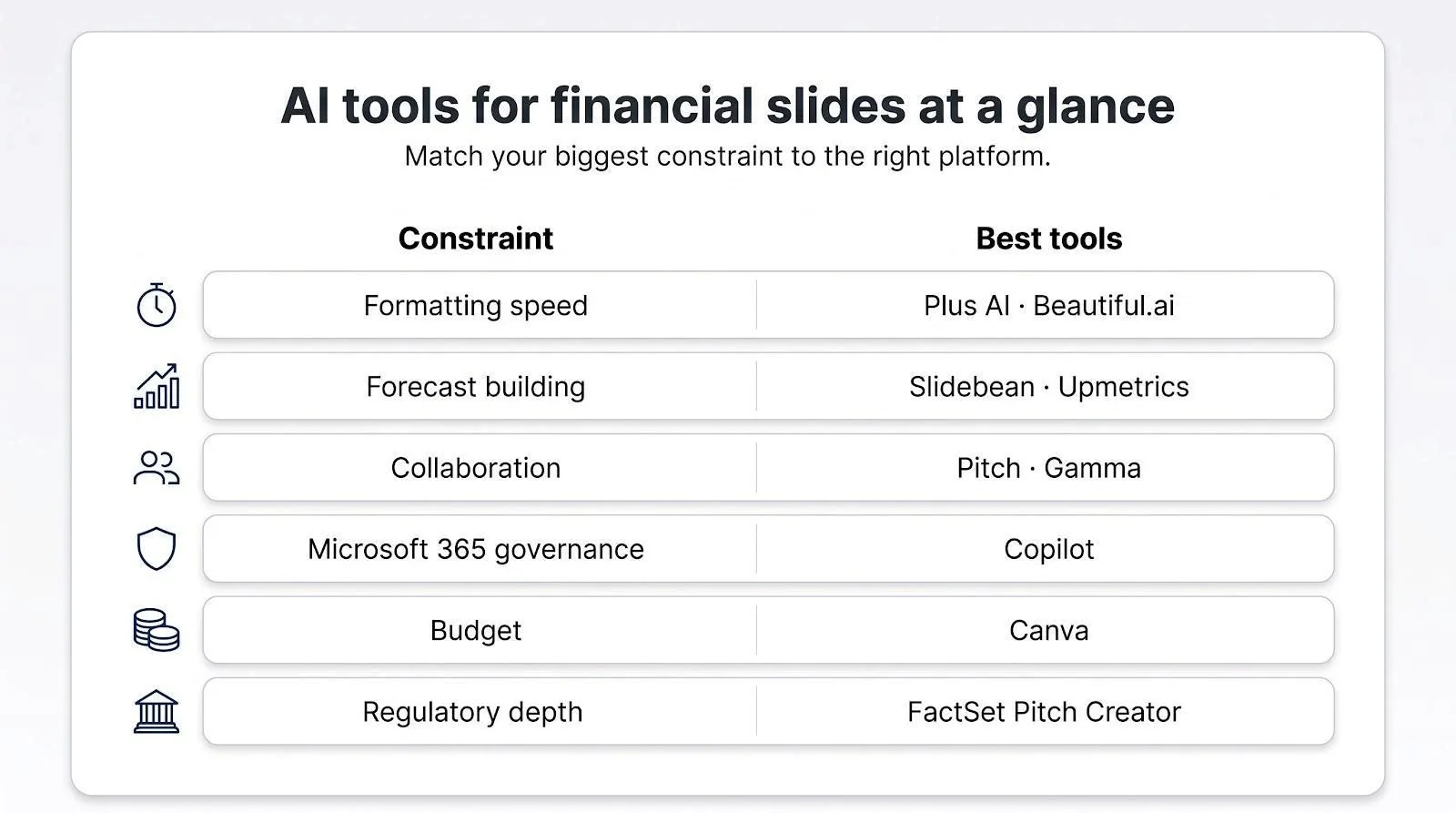
Match the tool to your biggest constraint for financial slides for AI pitch decks:
- Formatting speed. Your model is finished, and you need editable, on-brand slides. Pick Plus AI or Beautiful.ai.
- Building the forecast. Still refining revenue drivers or runway? Slidebean guides assumptions, then charts the results.
- Real-time collaboration. If co-founders and advisers must comment at once, Pitch or Gamma keep feedback loops short.
- Microsoft 365 governance. Stay inside the tenant with Copilot for PowerPoint and keep IT happy.
What makes a financial slide investor-ready?
For financial slides for AI pitch decks, treat the page like a cockpit gauge: each number must be current, traceable, and arranged so the next decision is obvious.
- Separate history from projection. Use distinct colors or a vertical line to mark where actuals stop and forecasts start, and label the hand-off month (“July 2026 onward”).
- Show the operating drivers. A revenue curve rests on price × customers × usage; surface at least one of those inputs beneath the chart.
- Include the investor’s mini-dashboard on the slide:
- Growth rate, gross margin, ARR
- Burn multiple, cash runway (in months)
- CAC payback or churn
- Cite every external figure. Footnotes need a source name, data period, and retrieval date (“CB Insights, 2025 SaaS Benchmarks, accessed August 30, 2026”).
- Preserve editability. Deliver the file in the format your audience uses, such as native PowerPoint for most venture meetings or Google Slides for async reviews, so last-minute tweaks do not break the chart.
Frequently asked questions
Can AI create my financial projections from scratch?
AI can suggest numbers, but investors back reality, not fiction. Treat any AI-generated forecast as a draft scenario, then add verifiable drivers and a human check before including it in financial slides for AI pitch decks.
Which tool outputs fully editable PowerPoint charts?
Native inside PowerPoint: Plus AI and Microsoft Copilot. Export with editable objects: Beautiful.ai and Gamma. Always open the PPTX and drag a data label to confirm.
Conclusion
Choose the platform that solves your immediate constraint—whether speed, forecast building, collaboration, or governance—and you’ll deliver investor-ready financial slides that stand up to diligence every time.