AI tools have exploded in capability in 2026 — especially for turning static pictures into dynamic video clips. But finding a free ai image to video generator (not just a paid one disguised with a trial) that actually works isn’t easy. After hours of testing, reading user reports, and comparing results across platforms, I’ve distilled the top 5 free tools that deliver real, usable outputs in 2026.
Whether you want social‑ready clips, creative animations, or cinematic motion, these tools cover the spectrum — with practical notes on how they felt in real use.
Part 1. Top 5 AI Image to Video Generator Free Tools
Before we dive into each tool, here’s a quick comparison chart showing strengths, limitations, and how generous their free tiers really are:
| Tool | Free Credits / Tier | Max Clip Length (Free) | Watermark? | Best For | Notes |
| Pollo.ai | Generous free tries | ~5–10s clips | ✕ sometimes | All‑round creator | Web, Android, iOS |
| CapCut AI | Free with daily limits | ~5–8s | ✔ sometimes | Short social videos | Integrated editor |
| Runway | One‑time 125 credits | ~5–10s | ✔ | Creative professionals | Strong motion |
| Canva AI | Free plan | ~3–5s | ✔ | Templates & beginners | Easy UI |
| HeyGen | Free credits | ~5s | ✔ | Avatar + animated scenes | Great for UGC |
Pollo.ai (My Favorite All‑in‑One Free AI Image to Video Generator)
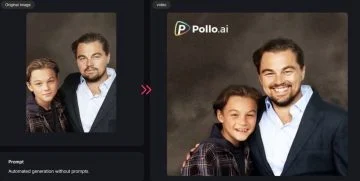
I jumped into Pollo.ai first because it combines a strong ai image to video generator free workflow with flexibility. The upload + prompt process felt intuitive and fast compared to others.
Strengths:
- Really good at preserving details from the original image.
- Smooth motion & transition effects.
- No strict device limitations — I used both web and iOS versions seamlessly.
- Free tier is genuinely generous compared to others.
Weaknesses:
- Free output lengths are short (~5–10s).
- Some advanced masks/effects require paid credits.
Best For: Content creators, marketers, and hobbyists who want a reliable, easy tool without constant paywalls.
Tip: Pollo.ai’s mobile apps make it super easy to generate and download clips directly to socials.
CapCut AI
CapCut’s free integrated AI features let you animate photos into short clips inside the video editing timeline — which I personally loved for quick social edits.
Strengths:
- Built into CapCut editor (perfect for TikTok/Reels).
- Templates help even if you’re a beginner.
- Decent motion profiles on simple images.
Weaknesses:
- Watermarks on free clips.
- Motion quality isn’t the most cinematic.
Best For: Short short clips, meme‑style videos, and casual creators.
Runway
Runway’s creative motion models felt the most polished — I got smoother transitions and more natural camera‑like motion than most free‑tier tools.
Strengths:
- Excellent motion realism.
- Lots of creative settings and styles.
- Credits go fairly far if you use them judiciously.
Weaknesses:
- Only 125 free credits one‑time — no daily renewal.
- Free outputs include watermarks in many cases.
Best For: Concept artists, motion designers, and professional creators who want control and quality before paying.
Canva AI
Canva’s AI feels like a safe place to start if you’re brand new. Upload an image, pick a style, and let Canva generate a short animated version.
Strengths:
- Template‑driven workflow is super beginner‑friendly.
- Great if you’re already using Canva for visuals.
Weaknesses:
- Very short clips on free tier.
- Watermarks common unless you upgrade.
Best For: Students, casual social posts, and template‑based content.
HeyGen
While HeyGen is known for AI avatars and talking heads, it also does respectable image‑to‑video motion in its free tier.
Strengths:
- Works well for UGC and character‑centric clips.
- Easy prompt interface.
Weaknesses:
- Short clips on free credits (often ~5 seconds).
- Outputs may include branding or watermarks.
Best For: Social media creators focused on person‑based clips or avatar scenes.
Quick Summary (Free Tiers)
Most free options aren’t unlimited — but tools like Pollo.ai and Runway feel the most balanced between usable outputs and accessibility. CapCut and Canva are excellent for beginners, while HeyGen shines in avatar‑heavy use cases.
Pro Tip: Even tools with credit systems can be used daily if you pace generation based on daily resets (like Runway or Kling in some other tests).
Part 2. If I Could Only Choose One — Why It Would Be Pollo.ai
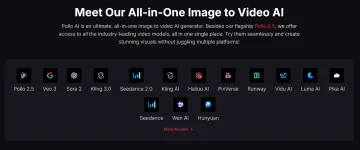
After experimenting with all of the top free ai image to video generator options this year, there’s one that stands head and shoulders above the rest for overall capability, ease of use, and real‑world utility:
All‑Round Capabilities
Pollo.ai isn’t just for image to video — it brings image editing, AI prompt refinement, motion animation, and export tools under one roof. No switching apps mid‑project.
Truly Comfortable Free Experience
While most tools punish free users with watermarks or tiny windows, Pollo’s free tier feels whole. You can produce meaningful clips without immediate upsell pressure.
Consistency Across Platforms
I tested Pollo.ai on web, Android, and iOS — and the experience was surprisingly consistent (both in speed and quality). This cross‑device reliability mattered for workflow flexibility.
Speed vs Quality Balance
Some high‑end tools feel slow or need expensive credits to reach cinematic quality. Pollo.ai, in my runs, delivered usable motion quicker and with fewer compromises.
Together, this makes Pollo.ai an ideal go‑to for content creators — whether you’re testing ideas, posting social clips, or building layered video workflows.
Part 3. FAQs
Q: What is an AI image to video generator?
A: An image‑to‑video AI tool takes a static picture and adds motion, depth, or transitions to produce a short video clip using generative models. These are used for animation, social clips, ads, or creative content.
Q: Are there really free AI image to video generators in 2026?
A: Yes — but “free” often means limited credits or short clips. Tools like Runway and Pollo.ai have free tiers with meaningful uses; others like CapCut and Canva offer free motion effects in editor contexts.
Q: Which tool gives the best quality free outputs?
A: In independent comparisons, credit‑backed tools with strong motion models (like Runway) typically yield smoother, more natural animations than simple template‑based options.
Q: Can these free tools be used commercially?
A: Commercial rights depend on each platform’s terms. Some permit royalty‑free use; others require paid subscriptions for commercial rights. Always check terms before monetizing.
Conclusion
In 2026, free ai image to video generator tools have matured far beyond gimmicks — you can genuinely animate photos without paying immediately. Among the top five I tested, Pollo.ai stands out for its mix of usability, flexibility, and actual free utility.
Whether you’re a seasoned creator or just experimenting, these tools give you real power to bring images alive with motion.
References
- Best free AI image to video tools comparison (2026 overview)
- Independent rankings of free image‑to‑video AI tools
- Hands‑on tests of best image to video generators in 2026
- Rankings and free tier commentary for AI video generators 2026