For many IT teams, mixed-device support is described as a compatibility issue. In practice, it is usually a workflow issue first.
Most organizations no longer operate in a clean, standardized endpoint estate. Windows remains dominant in general business operations. macOS is common in design, leadership, and knowledge work. Linux shows up in engineering, data, DevOps, labs, kiosks, and internal infrastructure. Servers add another layer, especially when support teams move between desktop troubleshooting and backend administration in the same hour. That broader cross-platform reality is also reflected in the kind of editorial discussion already surrounding unified remote support and distributed work environments.
What makes this difficult is not simply that these systems are different. It is that each one interrupts support work in a different way.
A Windows support session often begins with familiar remote-control expectations. On macOS, the real friction tends to appear earlier, at the permission layer, where screen recording and accessibility access can slow down or complicate first contact. Linux is different again. A support team may need to work with a full desktop session on one machine, a terminal-only workflow on another, and an inconsistent desktop stack across the rest. That means the challenge is not just cross-platform access. It is maintaining continuity when the shape of the session changes from one endpoint to the next.
Why Mixed-OS Support Breaks Down in Real Operations
The usual product comparison asks whether a tool “supports Windows, Mac, and Linux.” That is too shallow to be useful.
A better question is this: can the tool preserve a coherent support workflow when the environment shifts underneath the technician?
That sounds abstract, but it shows up in ordinary situations. A support engineer may start with a user on a MacBook who cannot grant the right permissions, switch to a Windows finance PC with account lockouts, then move to an Ubuntu workstation used for internal development, and finally check a Linux server behind the same application workflow. If those transitions require different tools, different authentication paths, different connection assumptions, and different records of what happened, support quality drops quickly.
This is why mixed-OS support should be evaluated less like a feature checklist and more like an operational system.
A workable platform in this environment should do four things well:
1. Handle Different Session Types Without Forcing Tool Switching
Not every problem needs full remote control. Sometimes the technician only needs visibility. Sometimes they need desktop control. Sometimes they need persistent access for maintenance. Sometimes they need terminal-level access to a server. In a mixed estate, these are not edge cases. They are normal support patterns.
A support stack becomes expensive when technicians have to keep translating between tools and session models. The cost is not only licensing. It is the hidden tax of context switching, fragmented audit trails, and slower diagnosis. That broader case for consolidation, including reduced switching friction and fewer overlapping tools, is part of the logic behind unified support software in the reference article.
2. Respect OS-Level Reality Instead of Pretending It Does Not Exist
Cross-platform support tools often fail when they assume all operating systems should behave like Windows.
They do not.
macOS permissions are stricter by design. Linux is not one environment but many. Distribution differences matter. Desktop environments matter. Display systems matter. Permission models matter. Even the difference between X11 and Wayland can change what a technician can do in practice.
That matters because remote support fails at the edges. It fails during setup, during re-connection, at the login screen, or when a machine is online but not in the state the tool expected. The most useful products are usually the ones that acknowledge those constraints clearly and design around them, rather than hiding them behind vague “Linux support” claims.
3. Support Unattended Access Where Ongoing Work Actually Requires It
Much of remote support is not live troubleshooting with a user watching.
It is follow-up work. Patch verification. Maintenance outside local business hours. Re-checking a machine after a configuration change. Managing shared devices that do not belong to one user. Supporting internal tools, kiosks, test systems, or technical workstations that need occasional but recurring access.
This is where unattended access matters most in mixed environments. Without it, every recurring task turns into a coordination problem. The user must be available. The device must be in the right state. The technician loses the ability to resolve issues in the quiet windows where support work is often most efficient.
That is especially important on Linux, where shared and persistent-use systems are common.
4. Keep Security and Governance Consistent Across Different Endpoints
The security problem in mixed-OS support is not only that each platform has its own controls. It is that operational shortcuts emerge when the main tool does not fit the job.
That is when teams fall back to ad hoc SSH access, personal admin scripts, direct local credentials, unmanaged remote desktop workarounds, or one-off utilities that sit outside the main support process. Over time, that creates an environment that is harder to audit and harder to standardize.
A good remote support platform in a mixed estate does more than connect to devices. It reduces the need for these side channels by giving technicians a consistent path into different endpoint types without discarding control and accountability. The example article makes a similar point in security terms, noting the value of centralized access and consistent governance across different operating systems.
A Practical Example
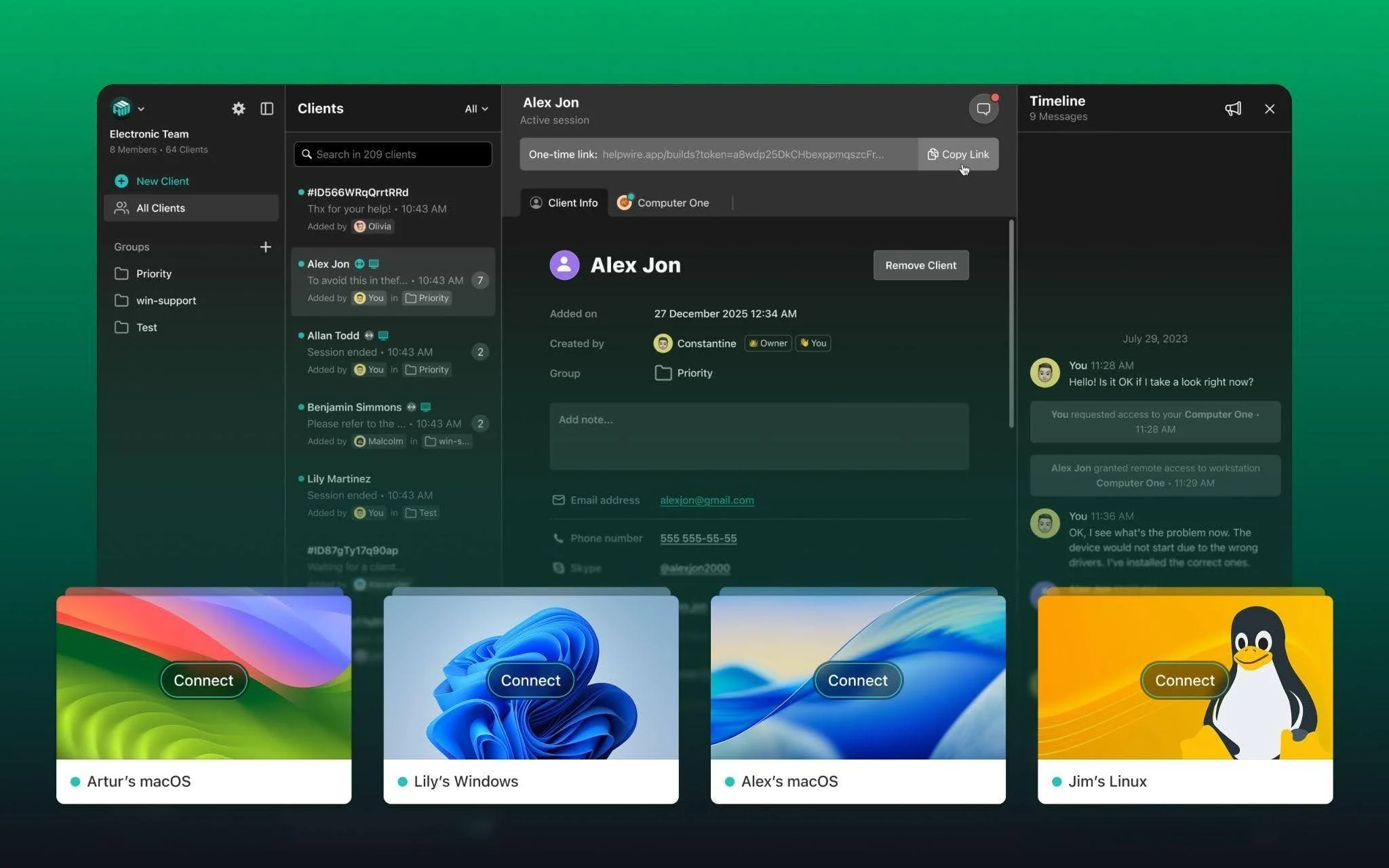
A common issue in mixed OS environments is not initial access but repeat support. A technician may need to return to a Windows laptop, a Mac workstation, and a Linux machine as part of the same workflow, without juggling separate tools or rebuilding the session logic each time.
In that context, a useful platform should support attended and unattended access, work across desktop and server-oriented environments, and stay usable when OS-level differences shape what is possible.
HelpWire is relevant here because it is built around that cross-platform support model rather than a single-OS workflow. For teams supporting Windows, macOS, Linux, and remote machines used for ongoing maintenance, its value is in giving technicians a more consistent way to reconnect and manage issues across different environments. Its Linux unattended access support is part of that picture, especially for shared workstations and recurring admin tasks, but the broader point is that it helps reduce fragmentation in mixed-OS support rather than solving one Linux-specific problem alone.
The Better Way to Judge Remote Support Tools
For mixed-OS environments, the real question is not whether a product can connect to different devices.
It is whether it can reduce operational friction without flattening the differences that make those devices hard to support in the first place.
That means looking beyond compatibility grids and feature lists. Teams should ask how a tool behaves when permissions are strict, when Linux is varied, when a server is involved, when a shared machine needs repeat access, and when the technician has to move between all of those states in a single workday.
That is where remote support platforms start proving their value. Not at the point of first connection, but in how well they preserve continuity across a messy, mixed, and very normal modern environment.
I can also adapt this into an IntelligentHQ-style version with a headline, deck, and tighter publication-ready formatting.