The best motion design tools for AI-assisted creative teams in 2026 include Jitter for collaborative brand content, Adobe After Effects for advanced motion graphics, Rive for interactive product animation, Cavalry for procedural 2D systems and Runway for generating source footage and visual concepts.
However, no single platform covers the entire process equally well.
Professional teams increasingly use a connected tool stack: AI generates concepts or source material, a motion application controls timing and visual language, and a delivery platform manages versions, formats and developer handoff.
This guide compares ten leading tools according to the work they are best equipped to handle. It does not assume that an AI-generated result is automatically production-ready or that every team needs the most technically advanced software.
Key takeaways
- Jitter is the strongest overall option for teams producing repeatable, branded motion content in a collaborative browser-based workspace.
- Adobe After Effects remains the most complete professional option for detailed 2D motion graphics, compositing and visual effects.
- Rive is the best choice for interactive animation that must work inside websites, applications and games.
- Cavalry is particularly strong for procedural, data-driven and highly variable 2D animation.
- Runway is useful for generating footage, treatments and visual ideas, but it does not replace a precision motion-design application.
- Blender offers the deepest free toolkit for 3D animation and motion work.
- AI should accelerate ideation, adaptation and repetitive production—not make unreviewed creative decisions.
- Teams already comparing broader editing platforms should start with IntelligentHQ’s guide to the best AI video-editing tools in 2026.
The best motion design tools at a glance
| Tool | Best for | AI role | Collaboration model | Principal output |
|---|---|---|---|---|
| Jitter | Branded motion at scale | Generates effects, variations and adaptations | Shared browser workspace | Video, GIF and Lottie |
| Adobe After Effects | Professional motion graphics and compositing | Assists connected creative workflows and asset generation | Creative Cloud workflow | Video and image sequences |
| Rive | Interactive product and UI animation | Agent-assisted scripting and repetitive tasks | Real-time team collaboration | Runtime animation and video |
| Cavalry | Procedural and data-driven 2D motion | Best paired with external AI ideation and asset tools | Desktop production workflow | Video, images and Lottie |
| DaVinci Resolve Fusion | Node-based compositing and broadcast graphics | Resolve AI tools support wider post-production | Shared Resolve projects | Finished video |
| Blender | 3D motion design | External and add-on-assisted workflows | File- and pipeline-based | 3D renders and animation |
| Runway | Generative footage and visual development | Core generative-video workflow | Cloud creative workspace | Generated and edited video |
| Canva | High-volume marketing adaptations | Generates and adapts campaign assets | Brand-controlled collaboration | Social and presentation video |
| LottieFiles | Web and app animation delivery | Vector-generation and conversion assistance | Review, versioning and handoff | Lottie and dotLottie |
| Figma Make | Animated prototypes and UI concepts | Prompt-generated interactions | Collaborative product workspace | Interactive prototypes |
Capabilities, access and plan limits can change. Teams should verify current exports, commercial-use terms, AI training settings and workspace controls before procurement.
How these tools were selected
This is a workflow-based editorial comparison rather than a claim that one application produces objectively better animation than every alternative.
The tools were assessed against six practical criteria:
- Motion control: How precisely can designers control timing, easing, hierarchy and composition?
- AI usefulness: Does AI solve a real production problem, or does it merely add a prompt box?
- Editability: Can designers revise the result at layer, property, keyframe or component level?
- Team workflow: Are commenting, shared assets, version control and approval supported?
- Production scale: Can a team create multiple sizes, languages and campaign variations efficiently?
- Delivery: Can the result reach video, social, web, application or broadcast environments without unnecessary rebuilding?
The tools are not ranked solely by the quantity of AI features. Motion design still depends on visual judgement, typography, rhythm, continuity and technical delivery.
1. Jitter: Best overall for AI-assisted creative teams
Jitter is the most directly aligned with the needs of an AI-assisted brand or marketing team.
It operates in the browser and combines a relatively accessible animation model with shared workspaces, reusable components, comments and batch production. Its AI features can generate editable animations and effects, propose variations, animate images and help resize or translate assets for different channels.
Importantly, the platform positions AI-generated work as a starting point that remains editable. Designers can adjust parameters and reuse the resulting motion rather than accepting a flattened output.
Jitter also supports batch import and export, animated components and delivery to video, GIF and Lottie formats. This makes it suitable for organisations that need one campaign system adapted across multiple markets, aspect ratios and messages.
Best for
- Brand and campaign teams
- Social-media motion systems
- Product-launch assets
- Animated typography
- Multilingual campaign variations
- Designers moving from Figma into motion
Main strengths
- Browser-based team workflow
- AI-generated but editable effects
- Reusable animated components
- Comments and shared assets
- Batch production and export
- Lower learning barrier than traditional compositing software
Main limitations
Jitter is not intended to replace the deepest compositing, character-animation or visual-effects capabilities of After Effects, Fusion or Blender.
Teams producing complex film titles, intensive visual effects or technically demanding 3D scenes will normally need another application.
2. Adobe After Effects: Best for professional motion graphics
Adobe After Effects remains the reference point for professional 2D motion graphics, title design, compositing and visual effects.
It provides detailed control over keyframes, masks, text, shapes, expressions, effects, cameras and compositing. Its extensive plugin ecosystem and integration with Illustrator, Photoshop and Premiere Pro make it particularly valuable for established creative departments.
Adobe increasingly connects After Effects with AI-assisted production across Creative Cloud. Firefly can help generate or modify source assets, while Premiere provides AI-assisted post-production tools around editing, audio and consistency.
The advantage is not one-click animation. It is the ability to combine AI-generated material with a mature professional motion environment where designers retain control over the final frames.
Best for
- High-end brand films
- Broadcast and title sequences
- Motion identities
- Compositing and visual effects
- Character and typography animation
- Teams already using Adobe Creative Cloud
Main strengths
- Deep animation control
- Professional compositing
- Large plugin and template ecosystem
- Strong connections with Adobe design and editing applications
- Suitable for both short assets and complex sequences
Main limitations
After Effects has a substantial learning curve, and large projects require disciplined file organisation. Collaboration is less immediate than in browser-native tools, while rendering and version management can become demanding.
AI can shorten parts of the workflow, but it does not remove the need for experienced motion designers.
3. Rive: Best for interactive product animation
Rive is designed for animation that must respond to users and operate inside a product rather than simply play as a video.
Designers can build animations, states and transitions visually, then connect them to real product inputs such as taps, clicks, scrolling and data. Rive’s state machines allow product teams to define how animation responds to user behaviour.
Its runtimes support web, iOS, Android, React, Flutter, Unity, Unreal and other environments. This means the animation remains interactive after delivery instead of being exported only as a prerecorded sequence.
Rive also supports shared libraries, reusable components, team collaboration and an AI coding agent in early access. According to Rive, that agent can help write code and address complex repetitive tasks.
Best for
- Application interfaces
- Interactive websites
- Animated product components
- Game interfaces
- Responsive characters
- Designer-to-developer handoff
Main strengths
- Production-ready interactive animation
- State machines and data binding
- Reusable components and libraries
- Real-time collaboration
- Broad runtime support
- Animation remains controllable through code
Main limitations
Rive is not a replacement for a full film-compositing or nonlinear editing system. Teams also need cooperation between design and engineering to implement interactive behaviour correctly.
Use it when motion is part of the product—not merely decoration added to a video.
4. Cavalry: Best for procedural and data-driven motion
Cavalry approaches motion graphics as a system of relationships rather than a collection of manually animated layers.
Its procedural workflow is valuable when designers need to generate numerous variations, repeat elements, connect animation to data or alter an entire composition by changing a small number of controls.
Potential applications include animated charts, scoreboards, product catalogues, generative identities, broadcast packages and campaign systems with hundreds of combinations.
This makes Cavalry especially relevant to AI-assisted teams. AI can help develop concepts, scripts or source data, while Cavalry provides deterministic control over how those inputs become repeatable motion.
Best for
- Data-driven animation
- Procedural brand systems
- Generative typography
- Broadcast graphics
- Large numbers of visual variations
- Designers who prefer rule-based workflows
Main strengths
- Real-time procedural animation
- Strong repetition and variation tools
- Data-connected visual systems
- Non-destructive workflow
- Lottie delivery options
- Useful for scalable campaign production
Main limitations
Cavalry has a smaller ecosystem than After Effects, and its procedural approach requires designers to think in systems and dependencies.
It is strongest when the creative problem involves repeatability or data—not necessarily when every shot is individually composed.
5. DaVinci Resolve Fusion: Best for motion inside post-production
Fusion is integrated into DaVinci Resolve and provides node-based compositing, motion graphics, tracking, keying, particles and 3D tools.
Its main advantage is continuity. A team can edit, grade, mix sound and create motion graphics within the broader Resolve environment instead of transferring every sequence between unrelated applications.
The node system can make complex composites easier to inspect because the relationship between sources, masks, effects and outputs remains visible.
Blackmagic Design also offers collaboration through shared Resolve project workflows. This makes Fusion particularly relevant to teams working on longer-form video, film, branded entertainment or broadcast delivery.
Best for
- Motion graphics integrated with editing
- Broadcast packages
- Compositing and visual effects
- Tracking and screen replacement
- Long-form branded video
- Teams already grading in Resolve
Main strengths
- Node-based compositing
- Integrated editing, colour and audio
- Capable 2D and 3D environment
- Strong tracking and keying
- Available within the free version of Resolve, with additional Studio capabilities
Main limitations
Fusion can feel less immediate than a layer-based interface for designers accustomed to After Effects. It is also more technically oriented than browser-based marketing tools.
6. Blender: Best free tool for 3D motion design
Blender is the strongest free, open-source option for teams creating 3D motion.
It combines modelling, animation, simulation, rendering, compositing and video tools in one application. Geometry Nodes allow designers to build procedural systems that can generate and modify complex scenes through reusable relationships.
For motion teams, Blender can produce product animations, abstract brand worlds, 3D typography, environmental sequences and simulated materials.
AI is not the central identity of Blender itself. Instead, teams commonly use it alongside AI-generated storyboards, textures, references, scripts or source imagery. This division can be advantageous because the final 3D scene remains structured and controllable.
Best for
- 3D brand films
- Product visualisation
- Abstract motion graphics
- Procedural environments
- Character animation
- Teams needing a capable free platform
Main strengths
- Free and open source
- Complete 3D production environment
- Geometry Nodes
- Strong rendering options
- Extensive community and learning resources
- Supports scripting and custom pipelines
Main limitations
Blender has a significant learning curve and can require powerful hardware for complex rendering. It also lacks the simple browser-based review process offered by newer collaborative design tools.
7. Runway: Best for generating motion source material
Runway is most valuable to motion teams during visual development and source-generation stages.
It can generate video from text or images, modify footage and help teams explore shots that would otherwise require filming, animation or complex compositing. This is useful for mood films, pitch treatments, backgrounds, transitions and early campaign concepts.
The important distinction is between generating motion and designing a motion system.
Runway can create visually compelling footage, but precise typography, repeatable brand animation and frame-specific revisions are generally better handled in After Effects, Jitter, Cavalry or another structured animation tool.
Teams focused specifically on turning still assets into clips can compare the models and control systems in IntelligentHQ’s guide to the best AI image-to-video tools.
Best for
- Visual concept development
- Image-to-video generation
- Background plates
- Pitch films and storyboards
- Experimental transitions
- Previsualisation
Main strengths
- Rapid visual exploration
- Generative video and transformation tools
- Useful for difficult or expensive source shots
- Cloud-based workflow
- Supports iterative creative development
Main limitations
Generated motion may include inconsistent subjects, unstable details or unwanted camera behaviour. Results can also be difficult to revise with the precision of a layered motion-design file.
Commercial teams must review output rights, source permissions, likeness risks and client confidentiality.
8. Canva: Best for distributed marketing teams
Canva is useful when a central design team must enable marketers, regional teams or non-specialists to create approved motion content.
Brand-management features can centralise approved templates, fonts, colours and assets. Teams can then generate or adapt campaign materials without rebuilding every design from the beginning.
Its value is operational rather than cinematic. Canva can help teams produce social videos, animated presentations, promotional graphics and campaign adaptations at high volume.
Best for
- Distributed marketing organisations
- Social-media variations
- Animated presentations
- Brand-controlled templates
- Regional and multilingual adaptations
- Non-specialist content creators
Main strengths
- Accessible interface
- Shared brand assets and templates
- Broad library of content formats
- AI-assisted asset generation
- Fast resizing and repurposing
- Simple review and collaboration
Main limitations
Advanced motion control is more limited than in dedicated animation applications. Template convenience can also make output look generic unless experienced designers establish a strong underlying system.
9. LottieFiles: Best for animation review and developer handoff
LottieFiles helps teams manage lightweight vector animations intended for websites and applications.
It provides workspaces, comments, approval statuses, version history and developer handoff. Integrations with tools such as After Effects and Figma help move assets between design and implementation.
The platform also offers AI-assisted vector and conversion tools, although teams should treat generated assets as material to inspect and optimise rather than automatic final deliverables.
Best for
- Web and application animation
- Lottie asset libraries
- Designer–developer collaboration
- Version review and approval
- Lightweight interface motion
- Managing reusable animation systems
Main strengths
- Central animation workspace
- Version history
- Comments and status controls
- Developer handoff
- Web, iOS and Android delivery
- Integrations with major design applications
Main limitations
Lottie supports a defined subset of animation features. Complex effects, raster-heavy scenes and some expressions may not translate correctly.
Teams should test animation on target devices rather than relying only on a desktop preview.
10. Figma Make: Best for AI-generated motion prototypes
Figma Make brings prompt-assisted interaction and animation into a collaborative product-design environment.
Teams can describe transitions, delays and easing in natural language, then generate interactive prototype behaviour. Existing Figma designs can be used as the visual foundation, making the process relevant to product designers who need to communicate motion before engineering begins.
Its role is primarily prototyping. The generated interaction demonstrates intent, but the production animation may still need to be implemented through code, Rive or another runtime system.
Best for
- Product-design exploration
- Animated interface prototypes
- User-flow demonstrations
- Early stakeholder reviews
- Testing micro-interaction concepts
- Teams already working in Figma
Main strengths
- Prompt-based interaction generation
- Works with existing interface designs
- Familiar collaborative workspace
- Fast concept iteration
- Useful before technical implementation
Main limitations
A prototype is not automatically production code. Designers and engineers still need to define performance, accessibility, responsiveness and final implementation behaviour.
Which motion design tool is best for your team?
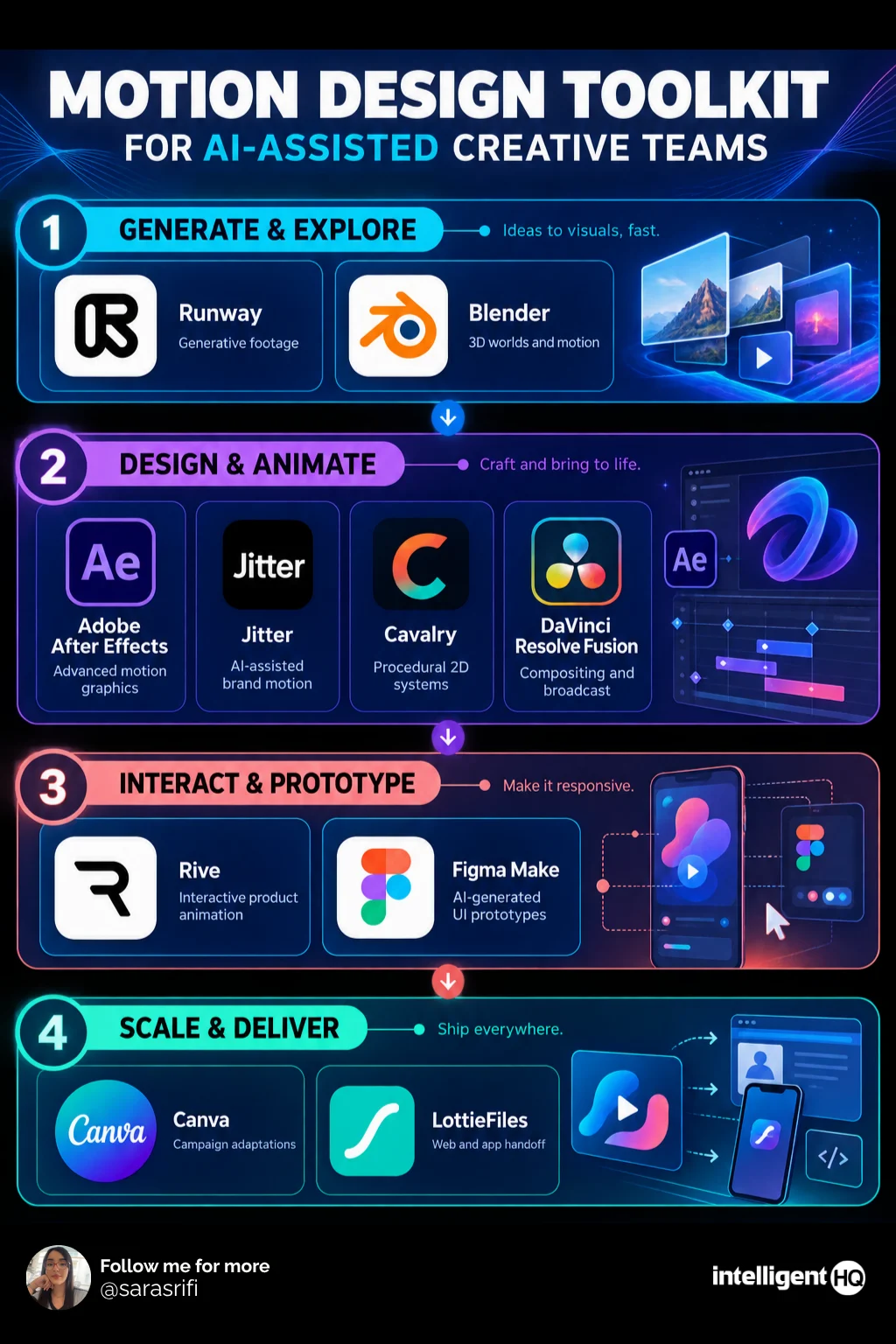
| Team requirement | Recommended tool |
|---|---|
| Detailed professional motion graphics | Adobe After Effects |
| Fast AI-assisted brand animation | Jitter |
| Interactive application motion | Rive |
| Procedural or data-driven graphics | Cavalry |
| Motion integrated with editing and grading | DaVinci Resolve Fusion |
| 3D motion and product animation | Blender |
| Generative source footage | Runway |
| Distributed marketing production | Canva |
| Lottie review and developer handoff | LottieFiles |
| Animated UI concepts | Figma Make |
The best choice depends on the final destination of the motion.
A social campaign, application interaction, broadcast graphic and 3D product film may all involve animation, but they require different file structures, review processes and delivery formats.
A practical AI-assisted motion-design workflow
1. Define the communication objective
Start with the message, audience, channel and required action. “Make it dynamic” is not a usable brief.
Define what the viewer should notice first, what should change over time and what information must remain legible.
2. Establish the visual system
Set typography, colour, spacing, image treatment and motion principles before generating variations.
The motion system might specify:
- Preferred duration ranges
- Easing behaviour
- Entry and exit conventions
- Permitted camera movement
- Typography animation rules
- Accessibility requirements
- Sound and silence policies
3. Use AI for exploration
AI can generate reference frames, image-to-video tests, movement directions, storyboard options and alternative compositions.
These outputs should broaden exploration—not silently establish the final brand language.
For teams working from generated still images, the AI image-to-video tools comparison explains the differences between camera control, subject consistency and generative motion.
4. Rebuild the selected direction in an editable system
Move the approved direction into Jitter, After Effects, Rive, Cavalry, Blender or Fusion.
Keep typography, timing, masks and reusable elements editable. A flattened AI video becomes expensive when a stakeholder requests a precise change.
5. Create controlled variations
Use components, procedural rules or batch tools to adapt the master design across:
- Landscape, square and vertical formats
- Languages and markets
- Products and customer segments
- Short and extended durations
- Light and dark environments
- Reduced-motion versions
6. Add and verify audio
Music and sound should support the motion hierarchy without overwhelming the message.
Teams generating original audio can consult IntelligentHQ’s guide to AI music generators and how creators use them. Licensing terms should be checked for the specific account, output and commercial context.
7. Review with human owners
Assign responsibility for:
- Brand approval
- Motion quality
- Accessibility
- Copyright and likeness review
- Factual accuracy
- Technical delivery
- Final publication
An AI system cannot assume accountability for the finished campaign.
What AI should—and should not—do in motion design
Good uses of AI
- Generating visual directions
- Creating rough storyboards
- Exploring motion variations
- Producing background footage
- Removing repetitive manual work
- Resizing and localising approved assets
- Generating temporary audio or voice tracks
- Helping document animation systems
Uses requiring caution
- Generating final logos or trademark assets
- Replicating a living artist’s recognisable style
- Creating realistic people without documented consent
- Uploading confidential campaign material
- Automatically publishing unreviewed content
- Making accessibility decisions without testing
- Generating factual or regulated claims
- Replacing all original project files with flattened output
The strongest AI-assisted workflow keeps the human team in control of creative direction, approval and delivery.
Questions to ask before selecting motion graphics software
What must the tool export?
Determine whether the project requires MP4, ProRes, image sequences, GIF, Lottie, an interactive runtime or editable project files.
Who needs to edit the work?
A specialist motion designer may be comfortable with After Effects or Blender. A distributed marketing team may need Jitter or Canva.
Does the animation need to respond to users?
If it must react to clicks, data or application state, prioritise Rive, Lottie or a coded implementation over a conventional video export.
How many versions are required?
Procedural tools and component-based systems become more valuable when a campaign needs hundreds of combinations.
Where will confidential assets be processed?
Review storage location, model-training policies, administrator controls, retention and deletion procedures before uploading unreleased products or customer data.
Can the team leave the platform?
Check whether editable project files and standard output formats remain available if the organisation changes tools.
Common motion-design mistakes made by AI-assisted teams
Selecting tools based on demos
A striking generated clip does not prove that the platform can handle revisions, typography or reliable batch delivery.
Using AI before establishing a visual system
Without brand constraints, each generated result may move differently and create an inconsistent campaign.
Confusing generation with animation control
A model can produce movement without producing an editable motion-design system.
Ignoring reduced-motion requirements
Interfaces and websites should account for people who prefer or require reduced motion. Decorative movement should not obstruct navigation or understanding.
Automating weak creative decisions
Automation multiplies whatever system it receives. It can distribute inconsistency as efficiently as it distributes good design.
Failing to preserve provenance
Teams should record which models, source assets, licences and human approvals contributed to important commercial work.
Frequently asked questions
What is the best motion design tool in 2026?
Jitter is the strongest overall option for AI-assisted teams producing collaborative brand and campaign content. Adobe After Effects remains the more capable choice for advanced professional motion graphics and compositing.
Is After Effects still worth learning?
Yes. After Effects continues to provide detailed control, broad professional adoption and an extensive ecosystem. AI changes parts of the workflow but does not eliminate the need for precise motion-design skills.
Can AI create motion graphics automatically?
AI can generate footage, effects and animation directions. However, professional motion graphics frequently require manual control over typography, timing, hierarchy, branding and delivery.
What is the best free motion design software?
Blender is the strongest free choice for 3D animation. DaVinci Resolve provides a capable free route into Fusion compositing, while several browser-based platforms offer limited free access.
Which tool is best for animated websites and apps?
Rive is particularly strong for interactive, runtime-based animation. LottieFiles is useful for managing and delivering lightweight Lottie assets.
Which motion design tool is easiest for beginners?
Canva and Jitter are more accessible than traditional professional applications. Canva suits template-based marketing output, while Jitter provides more focused motion controls.
Can Runway replace After Effects?
Not completely. Runway can generate and transform source footage, while After Effects provides structured control over compositing, typography, keyframes and revisions. Many teams can benefit from using both.
Should creative teams use one platform or several?
Most professional teams need a small, intentional tool stack. A common setup might combine Runway for source generation, After Effects or Jitter for motion control and LottieFiles or a review platform for delivery.
Final thoughts
The best motion design tools for AI-assisted creative teams are not necessarily those that generate the most content from the shortest prompt.
The better question is whether a tool helps the team build distinctive, editable and repeatable motion while maintaining brand control.
Jitter is particularly well suited to collaborative campaign production. After Effects remains the professional standard for detailed motion graphics. Rive connects animation directly to digital products, while Cavalry enables procedural systems and Runway accelerates visual exploration.
AI can make motion production faster, but speed only creates value when the underlying design system is coherent. Creative direction, timing, typography and judgement remain human responsibilities.
Sources
- Adobe — After Effects motion graphics software
- Jitter — AI-assisted motion design for creative teams
- Rive — Interactive animation features and runtimes
- Cavalry — Procedural 2D motion-design software
- Blackmagic Design — DaVinci Resolve Fusion
- Blender — Animation and rigging features
- Runway — AI video-generation tools
- Canva — Brand-management tools
- LottieFiles — Team collaboration and developer handoff
- Figma — AI animated prototype generator