A practical comparison of ten AI music platforms for soundtracks, podcast beds, branded content, full songs, stems and scalable commercial workflows.
What is an AI music generator?
An AI music generator creates or transforms music from instructions such as genre, mood, tempo, instrumentation, structure, lyrics, reference audio or an uploaded video. Some tools produce complete songs with vocals; others are designed to generate instrumental beds, loops, stems or adaptive background music.
For a video editor, the useful output is rarely just ‘a good song’. The track must fit the duration, leave room for dialogue, change energy at the right moment, loop cleanly and arrive with a licence appropriate for the channel, client and territory. Podcast teams need repeatable intros and unobtrusive beds. Brands need consistency, documentation and approval controls.
This article therefore compares workflow fit, control, export options and commercial-use clarity—not only the novelty of the first generation.
Read our full guide to the Best AI Video Editing Tools in 2026: 12 Platforms Tested.
The best AI music generators in 2026
| Tool | Best use | Why it stands out | Commercial-use position |
|---|---|---|---|
| Adobe Firefly | Video-aware soundtracks and brands | Can analyse footage and generate to vibe, purpose, energy and tempo | Adobe describes generated soundtracks as cleared for use; verify beta and plan terms |
| ElevenLabs Music | Prompt-led commercial media | Full tracks, vocals, multilingual lyrics, editing and API | Broad commercial use under supported subscriptions and conditions |
| SOUNDRAW | Editable creator music and stems | Instrument, section and stem control with in-house training catalogue | Downloaded music carries commercial licensing; plan and use restrictions apply |
| Beatoven.ai | Podcasts and background scoring | Text, reference audio or video input; exact duration and monetisation licence | Non-exclusive perpetual licence accompanies downloaded tracks |
| Suno | Complete songs and vocals | Fast prompt-to-song workflow, lyrics, covers and section editing | Free-plan songs are non-commercial; paid-plan songs receive commercial-use rights |
| Udio | Creative song exploration | Prompt-led song generation and continuing licensed-industry development | Review current account and output terms before commercial publication |
| AIVA | Composition, MIDI and orchestral control | More than 250 styles, influence uploads and editing | Free use is non-commercial; Pro advertises full copyright ownership |
| Stable Audio | Instrumental music and sound design | Music and sound effects from a licensed-data model family | Commercial rights depend on plan or model licence |
| Loudly | Creator production and distribution | Tracks, stems, samples, mastering, remixing and distribution workflow | Generated tracks are marketed as commercially licensed for subscribers |
| Mubert | Apps, streams and scalable background audio | Render and API products for dynamic music workflows | Free use is non-commercial; commercial tiers depend on project type |
How the tools were evaluated
- Workflow fit. Can the tool solve a recognisable video, podcast, brand, artist or platform problem?
- Creative control. The comparison considers duration, structure, mood, tempo, instrumentation, lyrics, section editing, stems and reference inputs.
- Dialogue compatibility. Background music should support narration rather than fight it through dense midrange, vocals or unpredictable dynamics.
- Export and integration. WAV, MP3, MIDI, stems, APIs and editor integration determine whether a generation can enter production.
- Commercial clarity. A licence must explain monetisation, client work, advertising, redistribution, streaming and what happens after cancellation.
- Responsible deployment. Training-data claims, voice imitation, artist-style prompting and documentation matter to brands and publishers.
1. Adobe Firefly Generate Soundtrack
Best for: Video editors and brand teams
Adobe Firefly’s Generate Soundtrack is built around the picture rather than an isolated text prompt. It can analyse uploaded footage and uses creative inputs such as vibe, style, purpose, energy and tempo to compose a track that fits the visual context. That makes it particularly relevant to product films, social campaigns, explainers and podcast video.
- Strengths. Video-aware generation, a simple creative brief and a natural path into Adobe’s wider creative ecosystem.
- Watch-outs. The feature is in beta and may not offer the granular composition control, stems or mature song structure required by musicians. Confirm availability and export options before basing a client workflow on it.
- Commercial-use note. Adobe presents the feature as producing soundtracks cleared for use. Teams should still retain the generation record and check the current Firefly terms, especially when partner models or beta features are involved.
Creators producing the visuals as well as the soundtrack can also explore the Best AI Image-to-Video Tools in 2026 for animating campaign images and creating short clips.
2. Artlist
Best for: Video editors who want generated music and a licensed catalogue in one subscription
Artlist began as a music licensing library and now layers AI generation on top of it. {Artlist’s} AI song generator sits inside the same account as its catalogue of licensed tracks and sound effects, so an editor can generate a custom bed, compare it against catalogue options and score a video without leaving the platform. The wider suite also covers AI video, image and voice generation, drawing on one shared credit pool.
Strengths. One login for generated and licensed audio, a workflow shaped around video production, and AI video and voice tools on the same plan.
Watch-outs. AI generation is credit-based and requires a plan that includes the AI tools. Editors who need stem-level control or detailed song structure should confirm what the music generator exports before building a client workflow around it.
Commercial-use note. Artlist says commercial rights are included for generations made on its paid plans. As with any generator, keep the generation record and check the current terms before a high-value release.
3. ElevenLabs Music
Best for: Commercial video, podcasts, advertising and API workflows
ElevenLabs Music generates complete tracks from prompts and supports instrumentals, vocals and lyrics. Music v2 adds audio reference, multilingual performance and post-generation section editing. A duration range from a few seconds to five minutes suits stings, beds, advertisements and complete content tracks.
- Strengths. Strong prompt control, vocals and lyrics, section-level editing, studio-ready exports and an API for repeatable production.
- Watch-outs. The phrase ‘cleared for nearly all commercial uses’ is not the same as unrestricted use. Music terms vary by subscription and use case, so brands should check the supported tier before production.
- Commercial-use note. ElevenLabs states that Music is cleared for broad commercial use under certain subscriptions and conditions, including film, television, podcasts, social video, advertising and gaming.
4. SOUNDRAW
Best for: Creators who need editable background music and stems
SOUNDRAW is designed for generating and reshaping royalty-free music rather than simply accepting the first output. Creators can adjust instruments and arrangements, work with stems and tailor tracks for video, podcasts, games or commercial releases.
- Strengths. Useful editing controls, WAV and stem exports, perpetual use of downloaded music, and a training approach based on its in-house producer catalogue.
- Watch-outs. Creator, Artist, API and enterprise licences permit different activities. Standalone redistribution, Content ID registration and client or platform uses need to match the selected plan.
- Commercial-use note. SOUNDRAW says generated tracks downloaded under the relevant plan receive a worldwide commercial licence and that its model is trained on music produced in-house. Read the full licence for restricted uses.
5. Beatoven.ai
Best for: Podcast beds, documentaries and background scoring
Beatoven.ai focuses on background music for video, podcasts, games and other narrative content. Its Maestro model accepts text, reference audio or uploaded video, supports controls such as instrumentation, use case, tempo and key, and can generate exact requested durations up to two minutes and thirty seconds.
- Strengths. Content-aware input, background-first workflow, exact-duration generation and a downloadable licence for monetised content.
- Watch-outs. Beatoven retains ownership of generated tracks and grants a non-exclusive licence. That is appropriate for incorporating music into content, but it is different from owning an exclusive composition.
- Commercial-use note. Each downloaded track is accompanied by a non-exclusive perpetual commercial licence for use in video or audio content. The company says the model is built through licensed rightsholder partnerships and revenue sharing.
6. Suno
Best for: Full songs, vocals, jingles and fast creative concepts
Suno remains one of the clearest choices when the required output is a complete song rather than an unobtrusive soundtrack. It can generate lyrics, vocals and arrangements from a compact brief and provides tools to extend, cover or replace sections.
- Strengths. Fast end-to-end song creation, accessible prompting, vocal generation and flexible concept development.
- Watch-outs. Free generations are not commercially licensed. Artist imitation, voice cloning and lyric rights require care, and platform ownership does not guarantee that a minimally human-authored output qualifies for copyright protection.
- Commercial-use note. Suno says Basic-plan songs are for non-commercial use, while songs made during a Pro or Premier subscription receive commercial-use rights. Rights are tied to the plan active when the song was created.
7. Udio
Best for: Song ideation, genre exploration and iterative composition
Udio offers prompt-led generation for full musical ideas and remains relevant for creators exploring lyrics, structure and genre. Its 2025 licensing arrangement with Warner Music Group signalled a move toward a next-generation licensed service and resolved associated litigation between the companies.
- Strengths. Creative song exploration, strong community discovery and an evolving music-industry partnership model.
- Watch-outs. Current public pages provide less easily summarised commercial guidance than several competitors. Do not infer brand rights from the ability to generate or download; read the latest terms for the specific account and output.
- Commercial-use note. Commercial use should be verified against Udio’s live Terms of Service at the time of generation. Brands should archive the version reviewed and avoid artist-impersonation briefs.
8. AIVA
Best for: Composers, orchestral music and MIDI-led editing
AIVA is closer to a composition assistant than a one-click soundtrack toy. It supports more than 250 styles, audio or MIDI influence, custom style models, editing and multiple export formats. The workflow suits creators who want to continue arranging material in a digital audio workstation.
- Strengths. MIDI-oriented control, style customisation, influence uploads and a pathway from generation to human arrangement.
- Watch-outs. The licensing difference between free and Pro is material. Uploaded influences also require appropriate rights, and stylistic similarity should be reviewed before release.
- Commercial-use note. AIVA’s free tier applies a non-commercial licence. Its Pro plan advertises full copyright ownership of generated compositions, subject to the current agreement and local copyright law.
9. Stable Audio
Best for: Instrumental experimentation, loops and sound effects
Stable Audio combines music and sound-effect generation and, in 2026, sits within a broader Stable Audio 3.0 model family trained on licensed data. It is useful for producers and technical teams that want to experiment with the web product or build around available model weights.
- Strengths. Music and sound design in one ecosystem, licensed-data positioning, and open-weight options for technical users.
- Watch-outs. The web subscription, open model and Community License are different routes with different conditions. Confirm which model created the output and which licence applies to the organisation’s revenue and intended deployment.
- Commercial-use note. Stable Audio’s web FAQ says the service supports commercial and non-commercial projects. Model licences and plan-specific rights must still be checked separately.
10. Loudly
Best for: Creators who want generation, stems, mastering and distribution
Loudly combines text-to-music with stems, samples, remixing, mastering and a distribution workflow. It suits social creators, podcasters and independent music makers who prefer one production environment rather than exporting immediately to several services.
- Strengths. Broad creator toolkit, quick variations, stem and sample workflows, and commercial licensing tied to generated music.
- Watch-outs. Distribution has separate rules, including use of Loudly’s own service in some cases. Subscription status and standalone music-release conditions require closer reading than ordinary background use.
- Commercial-use note. Loudly describes subscriber-generated tracks as royalty-free and commercially licensed for films, games, podcasts and branded content. Verify distribution and revenue conditions for music released as music.
11. Mubert
Best for: Apps, livestreams, websites and scalable background audio
Mubert’s strongest differentiation is not a single song. Its Render and API products generate background music for content creators, apps, games, streams, websites and automated systems. That makes it useful where music must be produced repeatedly or respond to a product experience.
- Strengths. API and platform integration, long-form background generation and commercial tiers aligned to creators, agencies and applications.
- Watch-outs. Licence scope changes between non-commercial, Pro, Business and API tiers. A creator licence may not cover freelance work, a client campaign, an app or a public physical space.
- Commercial-use note. Mubert’s free plan is non-commercial. Its published licence table assigns commercial, agency and app uses to higher tiers, so buyers should select by deployment—not generation volume alone.
Which AI music generator is best for each workflow?
| Workflow | Recommended starting point | Reason |
|---|---|---|
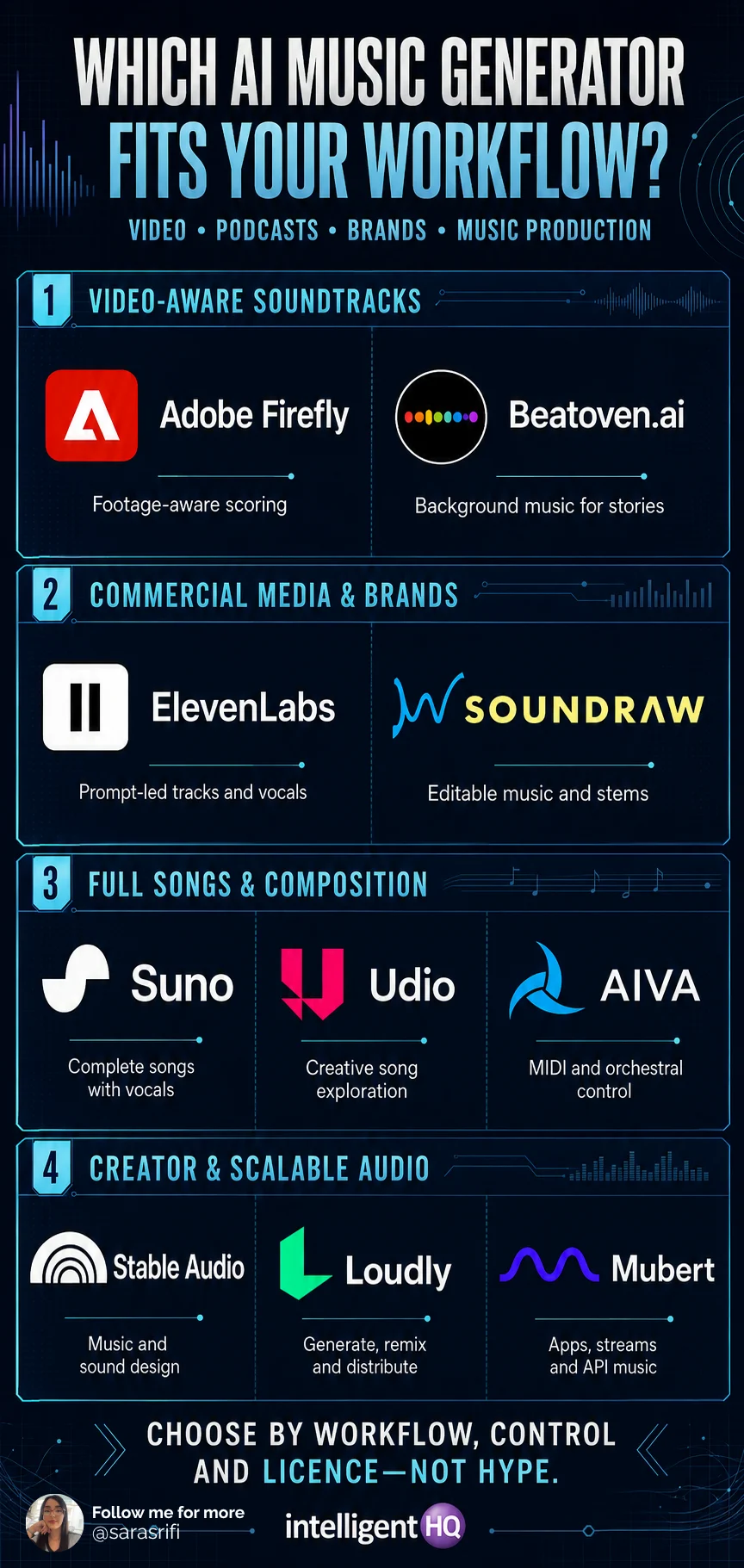
| Score an uploaded video | Adobe Firefly or Beatoven.ai | Both are designed to use visual or multimodal context rather than music prompts alone |
| Podcast intro and background bed | Beatoven.ai, SOUNDRAW or ElevenLabs | Duration, instrumental control and commercial media use are central |
| Brand campaign soundtrack | Adobe Firefly, ElevenLabs or SOUNDRAW | Commercial clarity and editing workflow matter more than novelty |
| Full song with vocals | Suno or ElevenLabs | Both support complete songs, lyrics and vocals |
| MIDI and orchestral composition | AIVA | The workflow continues into human arrangement and production |
| Music plus sound effects | Stable Audio or Beatoven.ai | Both cover a wider generated-audio stack |
| Creator music production | Loudly or SOUNDRAW | Stems, remixing and release-oriented tools are available |
| App or dynamic background music | Mubert, SOUNDRAW API or Beatoven API | Programmatic generation and scalable licensing are the deciding factors |
How to prompt AI music for video and podcasts
A useful prompt behaves like a creative brief. Describe the function of the music before the genre. State what the audience should feel, where the energy should change and which elements must stay out of the way.
| PROMPT TEMPLATE Create a [duration] instrumental track for Mood: [three adjectives]. Tempo: [range or feel]. Instruments: [list]. Structure: [opening, build, transition, ending]. Keep the midrange clear for narration. No vocals, no recognisable melody, no abrupt ending. |
Example: product-launch video
Create a 45-second instrumental soundtrack for a premium technology launch. Controlled, intelligent and optimistic; 108–116 BPM. Begin with restrained pulse and glassy percussion, add warm low synth at 12 seconds, lift at 28 seconds and end with a clean resolved hit. Leave space for voice-over. No vocals, trap hi-hats or cinematic booms.
Example: interview podcast
Create a 20-second podcast intro and a loopable 90-second bed. Calm, curious and contemporary; soft electric piano, muted bass, brushed percussion and subtle texture. Keep dynamics even and the 1–4 kHz range uncluttered for speech. No vocal samples or dominant lead melody.
Example: brand identity
Create three related instrumental cues for one sustainability brand: a five-second sonic mark, a 15-second social cue and a 60-second explainer bed. Use the same four-note motif, organic percussion and warm marimba-like tone across all versions. Modern and credible, not whimsical.
How to evaluate generated music before publishing
- Listen under narration, not in isolation. Reduce music until every word remains effortless to understand.
- Check the first and last second. A track should enter and resolve cleanly or provide an intentional loop point.
- Inspect structure against the edit. Mark scene changes, calls to action and visual reveals before finalising the arrangement.
- Test on headphones, phone speakers and a normal laptop. Bass-heavy or wide mixes can disappear on small devices.
- Review for unwanted similarity, garbled vocal phrases, abrupt artefacts, clipping and unnatural transitions.
- Export the highest practical quality and keep the original generation, prompt, date, model, plan and licence record.
Commercial rights: five questions brands must answer
- Can the output be used commercially? Free generation does not necessarily permit monetised video, advertising or client work.
- Who owns the output? Ownership, a non-exclusive licence and permission to monetise are different legal positions.
- What is prohibited? Standalone resale, sublicensing, Content ID, music-library submission, voice cloning or model training may be restricted.
- What happens after cancellation? Confirm whether the licence survives for tracks generated and downloaded during the paid term.
- Can the work be copyrighted? In the United States, the Copyright Office says AI-assisted work may be protected where a human determines sufficient expressive elements, but prompts alone are generally insufficient.
| IMPORTANT A platform’s commercial-use licence is permission under its contract; it is not a guarantee of copyright registration, exclusivity, absence of third-party claims or suitability for every territory. For high-value campaigns, obtain legal review and preserve the full creation record. |
AI music risks and responsible-use rules
- Do not imitate living artists or performers. Describe musical characteristics rather than requesting a clone of a recognisable artist, voice or signature recording.
- Use authorised references. Uploading a song as an influence or reference can create contractual and copyright risk if the user lacks permission.
- Avoid deceptive voice use. Do not create a vocal performance that falsely implies endorsement or participation by a real person.
- Keep human creative control. Edit structure, arrangement, mix, lyrics and timing rather than publishing an unreviewed first generation.
- Document provenance. Record the platform, model, date, prompts, edits, subscription and licence version for client and compliance review.
- Disclose when context demands it. Political, journalistic, testimonial and artist-facing uses require greater transparency than ordinary background scoring.
Frequently asked questions
What is the best AI music generator in 2026?
For video-aware generation, start with Adobe Firefly. ElevenLabs Music is the strongest general commercial-media option; SOUNDRAW is strong for stems and editing; Beatoven.ai focuses on background scoring; Suno is best suited to complete songs with vocals; and AIVA offers the most composition-oriented workflow.
What is the best AI music generator for YouTube videos?
Adobe Firefly, Beatoven.ai and SOUNDRAW are practical starting points because their workflows focus on soundtrack fit and creator licensing. Confirm that the selected plan permits monetisation and client work.
What is the best AI music generator for podcasts?
Beatoven.ai is designed around background music, while SOUNDRAW offers editing and ElevenLabs supports short cues or longer generated tracks. Choose instrumental arrangements that leave room for speech.
Can brands use AI-generated music commercially?
Yes, when the platform and plan grant the necessary rights and the inputs do not violate third-party rights. Commercial permission, ownership and copyright protection are not interchangeable.
Can I use free AI music in monetised content?
Sometimes, but many free tiers are non-commercial. Suno and AIVA, for example, reserve commercial rights or ownership options for paid tiers. Read the terms active when the track is created.
If the project also requires a no-cost video-generation option, see the Best Free AI Video Generators in 2026: Quality, Limits and Watermarks.
Does AI-generated music have copyright?
It depends on jurisdiction and human authorship. The US Copyright Office says protection can apply where a human determines sufficient expressive elements through authorship, arrangement or modification; prompts alone generally do not establish that authorship.
Can I put AI-generated music on Spotify?
Some platforms permit distribution only under particular plans or through a specified distribution service. Background-music licences may allow use inside a video but prohibit releasing the track by itself.
Do AI music generators replace composers?
They can accelerate ideation and routine background scoring, but composers still provide narrative judgment, thematic development, performance direction, originality, adaptation and accountable rights management.
Final verdict
The best AI music generator is the one that fits the content and survives the rights review. Adobe Firefly is strongest for video-aware scoring; ElevenLabs offers a broad commercial-media stack; SOUNDRAW provides creator control; Beatoven.ai targets background music; Suno leads complete songs; AIVA serves composition-led users; and Mubert fits products that need music at scale.
Sources
- Adobe Firefly — Generate Soundtrack
- ElevenLabs — Eleven Music documentation
- SOUNDRAW — Product and licensing overview
- Beatoven.ai — AI music generator and licence information
- Suno — Rights and ownership
- Udio — Terms of Service
- Udio — Warner Music Group licensing announcement
- AIVA — Pricing and ownership terms
- Stable Audio — Product and licensing FAQ
- Stability AI — Stable Audio 3.0
- Loudly — AI Music Generator
- Loudly — Licensing FAQ
- Mubert — Music licence and usage terms
- Canva — AI music commercial-use guidance
- US Copyright Office — Copyright and Artificial Intelligence