Best free AI video generators
The best free AI video generator in 2026 depends on what you need to create: cinematic footage, animated images, avatar presentations or complete edited drafts. Free AI video generators are useful for testing models, building storyboards and producing occasional short clips. They become less convincing when a project needs repeated generations, consistent characters, high resolution, commercial rights or clean exports. The practical question is therefore not simply whether a platform has a $0 plan. It is whether the allowance, watermark policy and licensing terms match the job you need to complete.
AI generation is only one part of the production process. For tools that can trim footage, add captions, refine audio and assemble generated clips, see our guide to the best AI video editing tools in 2026.
| Tool | Best for | Free allowance | Visible watermark? | Free quality | Free plan type |
|---|---|---|---|---|---|
| Adobe Firefly | Clean creative workflow | Limited daily generations | Not normally | High | Renewing, variable |
| Runway | Cinematic image-to-video | 125 credits once | Yes | High | One-time sampler |
| Pika | Effects and transformations | 80 credits/month | Yes | 480p | Monthly |
| Luma Dream Machine | Natural motion tests | Limited monthly credits | Yes | Draft | Monthly |
| Kling AI | Realistic motion | Free credits; region/model vary | Yes | Variable | Renewing |
| HeyGen | Avatar presenters | Up to 3 videos/month | Plan/route dependent | 720p sharing | Monthly |
| InVideo AI | Prompt-to-video drafts | Limited credits; weekly reset | Yes | Good for drafts | Weekly |
| VEED | Editing AI-assisted video | Basic tools + AI trials | Yes | 720p export | Ongoing + trials |
What “free” means in AI video
AI video platforms use several different free-plan models. A one-time trial is good for comparing interfaces but cannot support recurring content. Monthly or daily credits are more useful, although a single rejected generation still consumes part of the allowance. Some platforms offer an editor for free while restricting the generative model itself. Others permit generation but place a visible logo on the export or reserve commercial rights for paying customers.
Before choosing a tool, check five conditions:
- Allowance: Does it renew daily, weekly or monthly—or is it issued only once?
- Output: What resolution, duration and aspect ratios are available on the free tier?
- Watermark: Is a visible platform logo applied to the downloaded file?
- Rights: Can the output be used commercially, or only for personal evaluation?
- Workflow: Can you revise a generation, maintain character consistency and edit the final sequence without paying?
1. Adobe Firefly — best overall free AI video sampler
Verdict: The most balanced starting point for creators who want high-quality generation inside a mature editing ecosystem.
| Quality | High for short concept shots; strongest when a clear reference image and restrained camera instruction are used. |
| Free allowance | Adobe describes limited free daily generations across image, video and audio. The precise free quantity can change. |
| Watermark | Adobe does not position the standard Firefly export as carrying a conventional visible logo; generated assets may include Content Credentials. |
| Best for | Creative teams, storyboards, product concepts and users already working in Adobe tools. |
Firefly combines text-to-video and image-to-video generation with controls that feel designed for production planning rather than novelty effects. The free plan is best viewed as a recurring evaluation route: enough to test a shot or visual direction, but not enough to generate an entire campaign through repeated iteration. Adobe’s paid Standard tier provides useful context, it lists 2,000 monthly credits and up to twenty five-second videos, showing how quickly video consumes credits compared with still-image generation.
- Why choose it: A clean interface, credible creative workflow and a clearer provenance story than many standalone generators.
- Main limitation: Adobe deliberately labels the free allowance as limited and variable, so creators cannot plan a fixed monthly output around it.
2. Runway: best for testing cinematic image-to-video
Verdict: A strong quality benchmark, but its free account is a finite trial rather than a sustainable free workflow.
| Quality | High potential for cinematic camera movement and stylised shots, with inevitable variation between generations. |
| Free allowance | 125 credits deposited once; they do not renew. Free access includes selected models, including Gen-4 Turbo image-to-video, and three editor projects. |
| Watermark | Yes. Runway states that videos generated on the free plan carry a watermark. |
| Best for | Filmmakers, creative directors and agencies evaluating motion quality from a reference frame. |
Runway remains one of the most useful places to understand what dedicated generative-video software can do. Its image-to-video workflow is particularly effective when the source frame already establishes composition, lighting and subject identity. The free tier is less suitable for prompt discovery because unsuccessful attempts consume a non-renewing balance. Use the credits to test two or three carefully planned shot types rather than improvising dozens of prompts.
- Why choose it: Sophisticated motion, good reference-image workflow and a serious toolset around generated clips.
- Main limitation: The 125 credits are one-time only, the free model selection is limited and every free generation is watermarked.
3. Pika: best for playful effects and visual transformations
Verdict: A genuinely recurring free allowance with an approachable effects-led workflow, but low free resolution.
| Quality | Good for short transformations, swaps and social-first effects; less reliable for subtle realism. |
| Free allowance | 80 video credits per month. Pika’s pricing page lists 480p access to Pika 2.5 and selected Pika effects on Basic. |
| Watermark | Yes on the free tier; clean downloads and commercial use are reserved for qualifying paid plans. |
| Best for | Creators making short, eye-catching transitions, object swaps and stylised social clips. |
Pika is easiest to recommend when the desired result is visibly synthetic or transformation-led. Its named tools—such as additions, swaps, scenes and effects—give beginners a more concrete starting point than an empty prompt box. The monthly allowance is useful for ongoing experimentation, but 480p output is a meaningful constraint for professional publishing and reframing.
- Why choose it: Recurring monthly credits, accessible creative tools and a fast route to social-friendly effects.
- Main limitation: The free resolution is 480p, outputs are watermarked and the monthly budget disappears quickly when a feature costs multiple generations.
4. Luma Dream Machine: best for natural movement experiments
Verdict: Impressive for motion and atmosphere, but the free plan is explicitly an evaluation tier.
| Quality | Often strong on camera movement, landscapes and single-subject motion; complex interactions can become unstable. |
| Free allowance | Limited monthly credits on web; Luma publishes 250 monthly credits for its iOS free plan, while web availability is described more generally as limited. |
| Watermark | Yes. Free output is watermarked. |
| Best for | Concept artists and directors testing mood, camera motion and image animation. |
Dream Machine is valuable when the source image already contains a coherent scene and the prompt focuses on movement rather than inventing many new objects. Luma’s free tier uses draft resolution and lower-priority processing. More importantly for business users, Luma states that Free and Lite generations are limited to personal, non-commercial use and retain their watermark even if the account is upgraded later.
- Why choose it: Natural-looking movement, elegant image-to-video results and useful camera experimentation.
- Main limitation: Draft quality, slower processing, a watermark and non-commercial restrictions make the free output unsuitable for client work.
5. Kling AI: best for realistic motion on a renewable allowance
Verdict: Potentially one of the most generous free testing options, but quotas and access can vary by region, account and current model.
| Quality | Strong realism on simple subjects and controlled movement; multi-person scenes and anatomy still require selection. |
| Free allowance | Kling commonly provides renewable free credits, but the live account dashboard should be treated as authoritative because public limits have changed. |
| Watermark | Free exports generally carry a Kling watermark. |
| Best for | Users willing to accept queues in exchange for repeated text-to-video and image-to-video tests. |
Kling can produce convincing motion and has attracted creators who want more than a one-time trial. Its free access is most valuable for patient experimentation: queue priority is lower and expensive model settings can consume the allowance rapidly. Because Kling’s plan details have changed across regions and model releases, verify the credits, resolution, commercial rights and watermark shown inside the account before building a production schedule.
- Why choose it: Realistic motion and a renewable route to ongoing experimentation.
- Main limitation: Variable quotas, slower free queues, watermarks and changing model-level costs reduce planning certainty.
6. HeyGen: best free AI video generator for avatar presenters
Verdict: The clearest free option for turning a short script into a presenter-led business video.
| Quality | Strong for controlled talking-head delivery; it is not intended to replace cinematic text-to-video models. |
| Free allowance | Up to three videos per month, depending on region, generally limited to one minute on the current free plan. |
| Watermark | HeyGen’s current pages are inconsistent: its free-generator page describes watermark-free testing, while pricing documentation lists watermark removal as a paid-plan feature. Confirm the export screen before publishing. |
| Best for | Training clips, explainers, sales messages and multilingual presenter prototypes. |
HeyGen solves a different problem from Runway or Kling. Instead of generating an open-ended scene, it combines a digital presenter, voice and script into a structured communication asset. That makes its small monthly allowance more useful for business content: one approved 45-second script may be more valuable than several disconnected five-second cinematic clips. Keep the script concise and preview pronunciation before using the final quota.
- Why choose it: Fast script-to-presenter workflow, a large stock-avatar library and support for more than 30 languages on the free tier.
- Main limitation: Short duration, small monthly volume and conflicting public watermark descriptions require a final export check.
7. InVideo AI: best for assembling a complete draft from one prompt
Verdict: Useful when the goal is a structured first cut with script, stock media, voiceover and captions rather than a single generated shot.
| Quality | Good at producing a coherent draft quickly; the result often needs human editing to avoid generic stock-footage choices. |
| Free allowance | Limited free credits that currently reset weekly. Exact consumption depends on the selected feature and model. |
| Watermark | Yes. InVideo states that free-plan exports include its watermark. |
| Best for | YouTube drafts, list videos, explainers and marketers who need a full timeline quickly. |
InVideo AI behaves more like an automated video-production assistant than a pure text-to-video model. It can interpret a topic, draft narration and assemble stock assets into a complete sequence. This is efficient for validating structure or pacing. It is less useful when brand differentiation, original cinematography or precise visual continuity matters. Treat the first output as an editable draft, not a publish button.
- Why choose it: Fast end-to-end assembly and an easy route from prompt to narrated timeline.
- Main limitation: Free exports are watermarked, credit costs vary and the automatic media selection can look generic without manual replacement.
8. VEED: best for editing and finishing free AI-assisted video
Verdict: A practical browser editor with AI trials, but not the strongest free source of original generative footage.
| Quality | Reliable for editing, captions and layout; generative quality depends on the model or trial feature being used. |
| Free allowance | Basic editing is ongoing on Free, while AI tools such as Auto Edits, AI B-roll and audio cleanup may be offered as one-time trials. |
| Watermark | Yes. VEED says free exports include a watermark. |
| Best for | Beginners who need to trim, caption, resize and assemble generated clips in one browser workspace. |
VEED belongs in this comparison because generation is only one part of making a usable video. A creator may generate shots elsewhere but still need a timeline, subtitles, music, resizing and delivery formats. VEED’s free editor supports core operations and 720p export, although the watermark prevents a clean professional master. It is best used for prototyping or internal review before moving to a paid export route.
- Why choose it: Low learning curve, strong browser-based editing and useful AI-assisted finishing tools.
- Main limitation: The free export is watermarked and several AI features are trials rather than durable free entitlements.
Which free AI video generator should you choose?
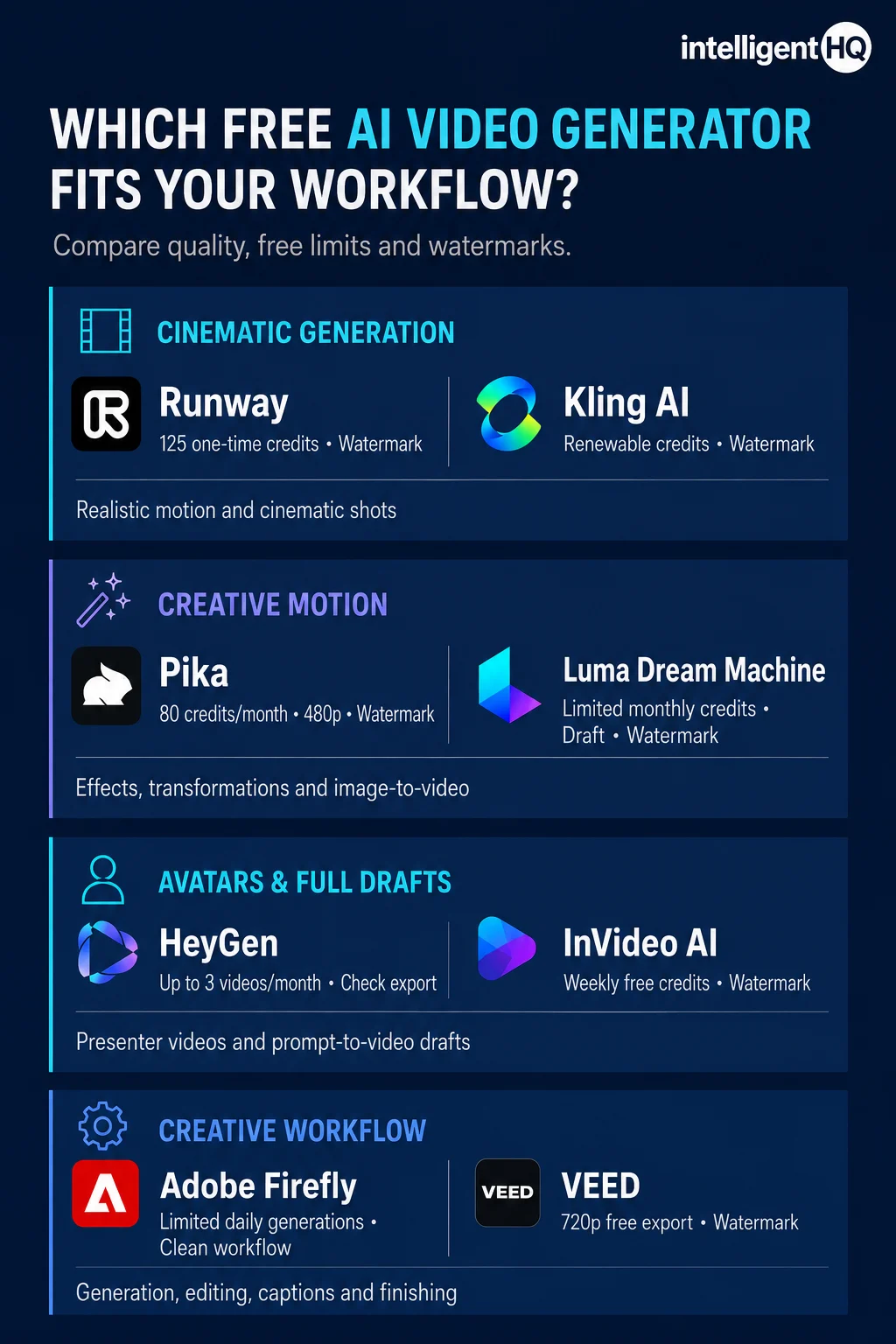
- Choose Adobe Firefly if you want a polished creative workflow and only need a small number of test generations.
- Choose Runway if cinematic image-to-video quality matters more than having renewable free credits.
- Choose Pika if transformations, swaps and social effects are the main creative requirement.
- Choose Luma if you are testing movement and atmosphere for personal concepts or storyboards.
- Choose Kling if you want repeated realism tests and can tolerate variable queues and plan conditions.
- Choose HeyGen if the deliverable is a presenter-led explainer, training clip or sales message.
- Choose InVideo AI if you want a complete narrated first draft assembled from a single prompt.
- Choose VEED if you already have footage and mainly need a straightforward AI-assisted editor.
How to test a free AI video generator without wasting credits
- Define one shot: Describe a single camera setup, subject and action. Do not ask a five-second model to produce an entire advert.
- Start from an image: For tools that support image-to-video, use a strong source frame to control composition and identity.
- Specify motion, not adjectives: Directions such as “slow dolly forward” or “fabric moves in a light breeze” are more actionable than “make it cinematic.”
- Generate at the cheapest useful setting: Test composition and motion before spending credits on higher resolution or longer duration.
- Check the downloaded file: Look for visible watermarks, resolution limits, frame-rate changes and audio restrictions—not just the browser preview.
- Read the rights at generation time: Licensing can be tied to the plan active when the asset was created. Upgrading later may not retroactively grant commercial rights.
Free AI video generators and commercial use
A clean-looking download is not automatically cleared for commercial use. Watermarks and licences are separate controls. Luma, for example, states that content generated on its Free and Lite plans is for personal use only; those assets retain their original restrictions even after an upgrade. Pika’s Basic plan similarly does not include commercial use. Other providers may allow broader use but impose rules covering uploaded faces, copyrighted media, trademarks, misleading synthetic content and public figures.
For business publishing, record the tool, model, plan and generation date for each selected asset. Save the applicable terms or licence page with the project. Obtain permission for uploaded faces, voices and client materials, and do not assume that a model’s ability to imitate a person or style creates a legal right to publish the result.
Are there genuinely free AI video generators without watermarks?
There are limited routes to clean free output, but most come with a small quota, restricted feature set or integration-specific conditions. Adobe Firefly generally focuses on Content Credentials rather than placing a conventional logo over the frame. Canva says videos made from free assets can be exported without its watermark, although premium elements introduce watermarks; its integrated HeyGen script-to-video route also advertises limited free clean exports. These are useful exceptions, not evidence of unlimited free production.
Watermark policies change frequently and may differ between the standalone product, a partner integration and a promotional generator page. Always export a short test before committing the rest of a project to the platform.
Frequently asked questions
What is the best free AI video generator in 2026?
Adobe Firefly is the best-balanced free starting point for general creative work. Runway is stronger for evaluating cinematic image-to-video, while HeyGen is better for avatar-led business videos. The right choice depends on the output format rather than one universal quality score.
Which free AI video generator has no watermark?
Adobe Firefly generally avoids a conventional visible platform watermark, although generated assets may carry Content Credentials. Canva can export projects without a watermark when only free assets are used. Always test the exact generation route because partner apps and premium assets can change the result.
Is Runway free without a watermark?
No. Runway’s official free-plan documentation states that videos generated on Free carry a watermark. The 125 included credits are a one-time allocation and do not renew.
Can I use free AI-generated video commercially?
It depends on the platform and plan. Some free tiers prohibit commercial use even when a file can be downloaded. Luma Free and Pika Basic are examples where commercial use is restricted. Check the current licence before publication.
What is the best free AI video generator for YouTube?
InVideo AI is useful for assembling a narrated first draft, while VEED can handle captions and editing. For original cinematic B-roll, generate selected shots in Firefly, Runway, Kling or Luma, then edit them into a human-directed sequence.
Why do free AI video credits disappear so quickly?
Video generation is computationally expensive, and credits are normally charged per clip, second, resolution or model. Several attempts may be required to obtain one usable shot, so the advertised generation count is not the same as the number of publishable clips.
Final verdict
The best free AI video generator is the one that lets you validate the most important uncertainty in your project. Use Firefly or Runway to test visual direction, Pika or Kling to explore motion and effects, Luma to animate strong reference images, HeyGen to validate presenter-led communication, and InVideo or VEED to test structure and editing. Then decide whether the selected output justifies a paid production plan.
Free tiers are valuable laboratories. They are rarely complete production systems. The moment a project requires predictable volume, clean exports, commercial rights, consistent characters or client confidentiality, plan for a paid tool—or combine AI-generated shots with a conventional editing workflow.
Sources and verification notes
Plan details were checked against provider documentation available on 5 August 2026. Free quotas, model access and regional conditions can change without notice; recheck the linked plan page immediately before publication and add a visible “last checked” date to the live article.
- Adobe Firefly plans and free daily generations
- Adobe generative credits FAQ
- Runway free-plan details
- Runway credit system
- Pika pricing and credit costs
- Luma Dream Machine plans
- Luma licensing
- HeyGen current free-plan documentation
- HeyGen free AI video generator
- InVideo AI free-plan documentation
- InVideo watermark policy
- VEED free editor and export limits
- Canva script-to-video free usage