The best AI video editing tools in 2026 do much more than automate cuts. Some platforms use artificial intelligence to accelerate professional timeline editing; others turn prompts into scenes, edit spoken video through transcripts, generate avatar-led presentations or extract short clips from long recordings. The right choice therefore depends less on which product has the longest AI feature list and more on the workflow it improves.
Adobe Premiere remains the strongest overall option for professional editors who need precise control. DaVinci Resolve is the best value for advanced editing and colour work, particularly because its free edition remains unusually capable. Descript is the clearest choice for podcasts, interviews and talking-head videos edited through text. CapCut is the most accessible option for fast social content, while Runway is better treated as a generative-video companion than as the main editor for a complex production.
For marketing teams, VEED and Canva simplify browser-based production and brand consistency. InVideo AI and Pictory are useful when the starting point is a prompt, script or article. Synthesia specialises in avatar-led business video, and OpusClip focuses on turning long recordings into short social clips. Filmora occupies the middle ground for creators who want a conventional desktop timeline with approachable AI assistance.
The best AI video editors at a glance
| Platform | Best for | Core AI advantage | Access model |
| Adobe Premiere | Professional editing | Text-based editing, media search, speech and audio assistance | Paid; trial available |
| DaVinci Resolve | Best professional value | AI-supported tracking, audio, masking and editing in Studio | Strong free edition; paid Studio licence |
| Descript | Podcasts and talking-head video | Transcript editing, filler-word removal, Studio Sound, clip creation | Free and paid plans |
| CapCut | Short-form social video | Auto captions, background tools, templates and fast reframing | Free and paid plans |
| Filmora | Beginner-friendly desktop editing | AI-assisted cutting, audio, captions and effects | Paid; plan structure varies |
| VEED | Browser-based team content | Magic Cut, captions, translation, audio cleanup and collaboration | Free and paid plans |
| Canva | Brand and marketing teams | Template-led editing, brand assets and Magic Studio workflows | Free and paid plans |
| Runway | Generative shots and visual experiments | Text/image-to-video and generative transformation | Credit-based plans |
| InVideo AI | Prompt-to-video production | Script, stock, voice and generative model orchestration | Free and credit-based paid plans |
| Synthesia | Training and corporate explainers | AI avatars, voices, translation and template workflows | Free and paid plans |
| Pictory | Articles and scripts to video | Text summarisation, stock assembly, captions and highlights | Paid; trial may be available |
| OpusClip | Long video to social clips | Highlight detection, reframing, captions and clip scoring | Free and paid plans |
How we compared the platforms
We compared the platforms against a shared editorial framework: editing control, usefulness of AI assistance, output options, workflow speed, learning curve, collaboration, price transparency and suitability for the stated audience. Because AI credits, feature limits and subscription structures change frequently, readers should confirm the latest conditions before purchasing.
1. Adobe Premiere: best for professional editors and production teams
Verdict: The most complete overall choice when AI needs to accelerate a professional workflow without replacing detailed editorial control.
Premiere uses AI primarily to reduce repetitive work inside a conventional professional editor. Editors can refine sequences through transcripts, search footage using objects or shot descriptions, enhance dialogue and translate captions while keeping frame-level control. That balance makes it more suitable for documentaries, interviews, campaigns and multi-format productions than tools designed mainly to assemble a video from a prompt.
Strengths: Mature timeline editing; text-based editing; AI-powered Media Intelligence; strong colour, audio, caption and ecosystem support.
Limitations: Subscription pricing; a steeper learning curve than browser editors; generative features can involve separate services or credits.
Official product information: Adobe Premiere product page
2. DaVinci Resolve: best for advanced editing, colour and post-production value
Verdict: The best value for technically ambitious creators, with a powerful free edition and deeper AI functions in DaVinci Resolve Studio.
DaVinci Resolve is strongest when AI is part of an end-to-end post-production system rather than the product’s entire identity. Its editing, Fusion effects, Fairlight audio and colour pages support serious finishing work, while Studio adds neural tools that accelerate masking, tracking, reframing, dialogue processing and other labour-intensive tasks. It suits creators willing to learn a deeper application.
Strengths: Professional editing, colour, visual effects and audio in one application; excellent free edition; one-time Studio licence rather than a recurring subscription.
Limitations: Hardware demands can be significant; the interface takes time to learn; several neural and automation features are Studio-only.
Official product information: DaVinci Resolve official page
3. Descript: best for podcasts, interviews and talking-head videos
Verdict: The most intuitive option when the spoken word is the structure of the edit.
Descript turns transcription into the editing interface: delete words and the corresponding footage is removed. That makes it especially effective for interviews, webinars, podcasts, tutorials and founder-led content. Its AI assistant, Underlord, can handle multi-step instructions, while Studio Sound, eye-contact correction and automatic clips reduce common production friction. The trade-off is less granular visual control than Premiere or Resolve.
Strengths: Transcript-based editing; filler-word and retake removal; Studio Sound; captions; clip creation; AI-assisted editing through Underlord.
Limitations: Less precise than a full professional timeline for complex visual storytelling; media-hour and AI-credit limits vary by plan.
Official product information: Descript Underlord and pricing
4. CapCut: best for fast social and mobile-first production
Verdict: The easiest route from raw phone footage to a captioned, platform-ready short video.
CapCut packages editing, captions, effects, templates and AI features in a workflow designed for speed. It is a practical choice for TikTok, Reels, Shorts and rapid campaign variations, particularly for solo creators and social teams. It is less appropriate when a production needs sophisticated media management, colour pipelines or long-form collaboration.
Strengths: Fast learning curve; mobile, desktop and browser access; automatic captions; templates; background and social-format tools.
Limitations: Feature availability and plan terms can vary by region and device; template-heavy results can look generic; teams handling sensitive footage should review data policies.
Official product information: CapCut official resource centre
5. Wondershare Filmora: best for creators moving beyond basic editors
Verdict: A useful middle ground between one-click social tools and complex professional software.
Filmora keeps the familiar track-based editing model but layers automation over jobs that beginners often find difficult. Its value is not that AI makes every decision, but that it reduces the technical barrier to common tasks such as cleaning audio, creating captions, isolating subjects and building short-form edits. It fits YouTubers, educators and small marketing teams that want desktop control without a professional-suite learning curve.
Strengths: Approachable desktop timeline; broad effects library; AI-assisted audio, captions, masking and editing; faster onboarding than many professional suites.
Limitations: Plan and asset entitlements need careful checking; experienced editors may find less depth than Premiere or Resolve; effects can encourage formulaic output.
Official product information: Wondershare Filmora overview
6. VEED: best for browser-based marketing and team workflows
Verdict: One of the strongest all-in-one browser choices for producing, repurposing and reviewing business video.
VEED combines recording, editing, captioning, translation, avatars and generative tools in one browser workspace. Magic Cut can remove filler words and pauses, while collaboration and reusable templates help teams produce recurring social, sales and internal communications. Its main advantage is operational simplicity rather than cinematic control.
Strengths: No desktop installation; captions and translation; Magic Cut; audio cleanup; screen recording; brand and collaboration workflows.
Limitations: Cloud workflows depend on upload speed; advanced use is plan-limited; it does not offer the same finishing depth as a professional desktop editor.
Official product information: VEED AI video editing
7. Canva: best for brand-consistent marketing content
Verdict: The best fit for teams that already create presentations, social graphics and campaign assets in Canva.
Canva treats video as one format within a larger visual-communications system. This makes it effective for campaign adaptations, explainers, event promotions and lightweight social video where brand consistency matters more than advanced post-production. Designers can combine layouts, stock, text animation and brand assets without moving between multiple applications.
Strengths: Large template ecosystem; simple timeline; brand kits; collaborative design; easy resizing and integration with wider Magic Studio tools.
Limitations: Limited precision for complex timelines, sound design and colour work; AI and premium asset limits vary; template dependence can reduce originality.
Official product information: Canva video editor
8. Runway: best for generative shots and AI visual experimentation
Verdict: A leading generative-video workspace, but better used alongside a dedicated editor for larger projects.
Runway is most valuable before and around the edit: generating a shot that was never filmed, animating an image, transforming footage or testing a visual idea. Its own guidance recommends a local editor for larger projects, so creators should pair it with Premiere, Resolve or another timeline editor rather than expect it to manage every stage of long-form post-production.
Strengths: Advanced text-to-video and image-to-video generation; visual transformation; fast concept development; multiple generative models and tools.
Limitations: Credit consumption can be difficult to predict; shot consistency remains workflow-dependent; Runway states that its conventional video editor is no longer actively maintained for larger editing projects.
Official product information: Runway plan guidance
9. InVideo AI: best for prompt-to-video and rapid campaign drafts
Verdict: A strong option when the creator starts with an idea or script rather than organised footage.
InVideo AI can coordinate scripting, stock selection, voice, music and generative media through a prompt-led workflow. That is useful for marketers and small teams producing explainers, list videos or campaign concepts at speed. The platform should be viewed as a production accelerator: human review remains necessary to correct claims, replace weak stock choices and make the narrative feel intentional.
Strengths: Prompt-led production; access to stock sources and multiple image, video, voice and music models; quick first drafts; browser workflow.
Limitations: Credit pricing varies by model; unused credits may not roll over; generated drafts still require editorial review for factual accuracy, pacing and licensing fit.
Official product information: InVideo AI pricing and models
10. Synthesia: best for training, onboarding and corporate explainers
Verdict: The clearest specialist choice for scalable avatar-led business communication.
Synthesia replaces cameras and presenters with avatar-led scenes assembled from a script. It works best for training, compliance, onboarding, product explanations and multilingual internal communication where consistency matters. It is not a substitute for a full editor when the project depends on documentary footage, complex performance or detailed sound and colour work.
Strengths: AI avatars and voices; template-based scenes; translation and localisation; consistent presenter delivery; team-oriented business workflows.
Limitations: Not intended for cinematic timeline editing; avatar delivery can feel formal; consent, disclosure and brand-governance policies remain essential.
Official product information: Synthesia pricing
11. Pictory: best for turning articles and scripts into videos
Verdict: A practical text-to-video workflow for publishers and content teams repurposing written material.
Pictory is designed for teams with more written content than editing capacity. It can convert a script or article into a scene-based draft, add captions and assemble supporting media. Its strongest use is repurposing: turning a blog post, webinar or long recording into a simpler video asset. Editors should still check every visual for relevance and avoid allowing automated summarisation to change the meaning of the source.
Strengths: Script and article conversion; automatic captions; stock-assisted assembly; summarisation and highlight workflows.
Limitations: Automated stock choices can feel literal or repetitive; output needs human fact-checking and narrative refinement; less suitable for complex original productions.
Official product information: Pictory pricing
12. OpusClip: best for turning long videos into short social clips
Verdict: The most focused choice for extracting, reframing and captioning short clips from existing long-form video.
OpusClip analyses long recordings and proposes shorter, platform-ready excerpts. It can save substantial time for podcasts, interviews, webinars and event content, particularly when teams need several vertical clips from one source. The editor still needs to confirm that each excerpt stands alone, represents the speaker accurately and opens with enough context.
Strengths: Automated highlight detection; vertical reframing; captions; clip scoring; efficient repurposing for social channels.
Limitations: A specialised repurposing tool rather than a complete editor; automated highlight scores should not replace editorial judgment; context can be lost when excerpts are too short.
Official product information: OpusClip pricing
Which AI video editor should you choose?
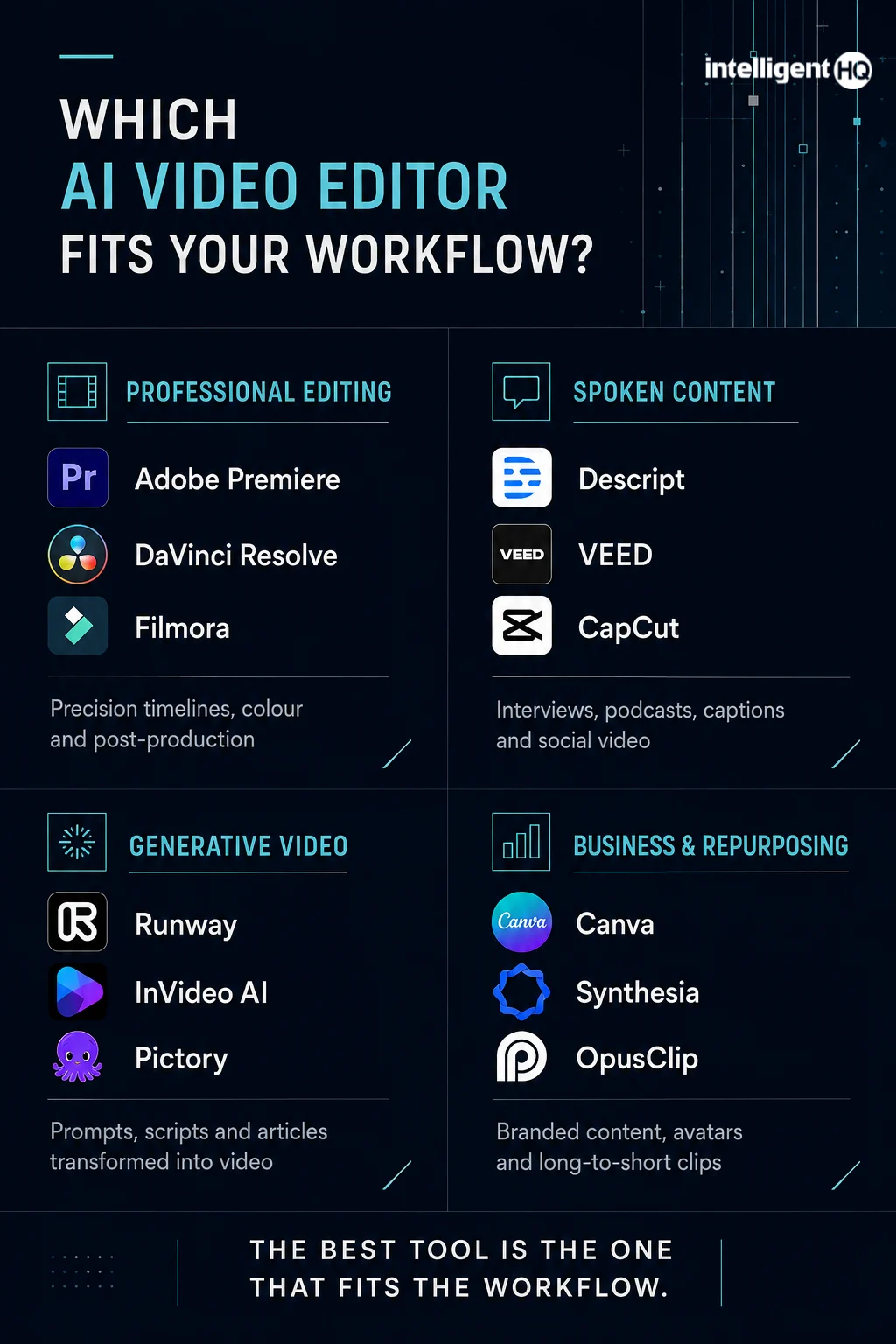
- Choose Adobe Premiere when professional control, interoperability and complex editing matter most.
- Choose DaVinci Resolve when you want the strongest free professional editor or advanced colour and audio in one application.
- Choose Descript when interviews, podcasts, webinars or spoken explanations make up most of the timeline.
- Choose CapCut when speed, mobile access and short-form social publishing are the priorities.
- Choose Filmora when you want a conventional desktop editor without the steepest learning curve.
- Choose VEED when a distributed marketing team needs browser editing, review and repeatable templates.
- Choose Canva when video is one element of a broader branded-content workflow.
- Choose Runway when you need to generate or transform shots before finishing them elsewhere.
- Choose InVideo AI or Pictory when the starting material is a prompt, script or article.
- Choose Synthesia for structured avatar-led training and corporate communication.
- Choose OpusClip when the main task is converting long recordings into short social clips.
What to check before paying
1. AI credits and usage limits
A low monthly price can conceal a small generation allowance. Check which actions consume credits, whether failed generations are charged, whether unused credits expire and whether higher-quality models cost more.
2. Export quality and watermarks
Confirm the maximum resolution, frame rate, codec and watermark policy. A free plan can be sufficient for evaluation but unsuitable for client delivery.
3. Editing control after automation
The decisive question is not whether AI can create a first draft, but whether the editor can correct it. Look for timeline control, transcript correction, caption styling, shot replacement, audio mixing and version history.
4. Commercial rights and source material
Review the licence for generated media, stock assets, voices, avatars, templates and music. Teams should also establish rules for consent, confidential footage and copyrighted inputs.
5. Privacy and governance
Business users should check data-retention terms, model-training choices, deletion controls, regional hosting where relevant, access permissions and enterprise security documentation before uploading confidential recordings.
6. The real workflow cost
Measure how much human correction remains. A tool that produces a draft in two minutes but requires an hour of caption, stock and pacing fixes may be slower than a more controllable editor.
Frequently asked questions
What is the best AI video editing tool in 2026?
Adobe Premiere is the best overall choice for professional editing, while Descript is better for transcript-led spoken content, CapCut for fast social video, and DaVinci Resolve for professional value. The right answer depends on the workflow rather than a universal ranking.
What is the best free AI video editor?
DaVinci Resolve provides the strongest free professional editing environment in this comparison. CapCut, Descript, Canva and several browser tools also offer free access, but export limits, AI allowances and feature availability should be checked before production.
Can AI edit an entire video automatically?
AI can assemble drafts, remove pauses, generate captions, find highlights, reframe footage and create supporting scenes. It still struggles with factual judgment, narrative context, brand nuance and consistent creative direction, so important videos require human review.
Are AI video editors suitable for business content?
Yes, particularly for training, social media, webinars, product explainers and internal communication. Businesses should review privacy, commercial rights, disclosure, brand governance and human approval before scaling production.
Is an AI video generator the same as an AI video editor?
No. A generator creates new footage or scenes from text, images or other inputs. An editor arranges and refines existing material. Products increasingly combine both functions, but users should identify which part of the workflow they actually need.
Will AI replace professional video editors?
AI is more likely to change the editor’s role than eliminate it. Repetitive tasks are becoming faster, while story judgment, verification, performance, pacing, rights management and creative direction remain human responsibilities.
Final verdict
The strongest AI video editor in 2026 is not necessarily the platform that generates the most material. It is the one that removes friction without taking away the control the project requires. Premiere and DaVinci Resolve remain the safest choices for serious post-production. Descript, VEED, CapCut and Canva make everyday content production more accessible. Runway and InVideo AI expand what can be created from prompts, while Synthesia, Pictory and OpusClip solve narrower business and repurposing problems particularly well.
For IntelligentHQ readers, the practical approach is often a two-tool workflow: use a specialist AI platform to transcribe, generate or find clips, then finish the story in an editor that provides reliable control. That combination captures the speed of AI without surrendering editorial judgment.
Sources
- Adobe Premiere
- Blackmagic Design: DaVinci Resolve
- Descript Underlord and plans
- CapCut plans comparison
- Wondershare Filmora overview
- VEED AI video editing
- Canva video editor
- Runway plan guidance
- InVideo AI pricing and models
- Synthesia pricing
- Pictory pricing
- OpusClip pricing