
AI agents are changing the way teams work. They can generate ideas, create content, summarize meetings, write code, analyze data, and plan entire projects in minutes. But there is one important problem: once AI creates the output, where does that work actually go?
Without a structured task management system, AI-generated ideas can easily become scattered across chats, documents, notes, spreadsheets, and disconnected tools. A team may have great outputs from AI, but still struggle to turn those outputs into real tasks, owners, deadlines, comments, workflows, and measurable progress.
This is where an MCP task management platform becomes valuable.
MCP, or Model Context Protocol, gives AI assistants and AI agents a standardized way to connect with external tools and data sources. In the context of task management, MCP allows AI agents to interact with a workspace more directly. Instead of only suggesting a task list in a chat, an AI agent can potentially create tasks, update cards, organize boards, retrieve project context, summarize progress, and support real workflow execution.
For modern teams, this is a big shift. Task management is no longer only about humans dragging cards between columns. It is becoming a shared operational layer where humans and AI agents can work together.
In this article, we will explore the top 5 MCP task management platforms for teams that want to manage work in an AI-ready way.
What Is an MCP Task Management Platform?
An MCP task management platform is a task or work management system that can connect with AI agents through the Model Context Protocol or an MCP-compatible integration layer.
In simple terms, it allows AI tools to interact with tasks and project data in a more structured way.
A traditional task management tool helps teams create tasks, assign work, set deadlines, and track progress. An MCP task management platform goes further by making that workspace accessible to AI agents. This means AI can do more than answer questions. It can participate in the workflow.
For example, an AI agent connected to a task management platform through MCP may help with actions such as:
- Creating task cards from meeting notes
- Updating task status based on project progress
- Summarizing overdue work
- Finding blockers across a board
- Organizing tasks into columns or workflows
- Adding comments, context, or next steps
- Turning content ideas into an editorial calendar
- Helping engineering, marketing, and operations teams manage execution
This does not mean AI replaces human decision-making. The best use case is collaboration. Humans still define priorities, strategy, quality standards, and final approval. AI agents help reduce manual work and keep operational systems up to date.
Why Teams Need MCP Task Management Now
Most teams already use AI tools in some part of their workflow. Writers use AI for content outlines. Developers use AI for code support. Marketers use AI for campaign ideas. Founders use AI for planning. Product teams use AI to summarize feedback and define requirements.
The problem is that many AI outputs remain outside the actual workflow system.
A marketing team may ask AI to generate 20 blog ideas, but someone still has to copy those ideas into a board. A product manager may ask AI to summarize customer feedback, but someone still needs to turn that summary into tasks. An engineering team may ask AI to identify bugs, but someone has to create issues and update status manually.
This creates a gap between AI generation and team execution.
MCP task management closes that gap. It gives teams a more structured way to move from AI output to real workflow. Instead of treating AI as a separate assistant, teams can connect AI agents to the operational workspace where work is planned, tracked, and completed.
This matters especially for remote teams, software teams, agencies, marketing teams, and companies building AI-powered internal workflows.
How to Choose the Best MCP Task Management Platform
Not every task management platform is built for the same type of team. Before choosing a platform, it is useful to evaluate it based on several criteria.
First, look at AI-agent connectivity. Does the platform support MCP directly, provide an MCP server, or offer developer-friendly APIs that can support agent workflows?
Second, consider workflow structure. A good MCP task management platform should support boards, tasks, comments, statuses, deadlines, and team collaboration. AI agents need structure. If the workspace is too loose, it becomes difficult for agents to create reliable outputs.
Third, evaluate flexibility. Some teams need a simple Kanban board. Others need advanced fields, automations, docs, dashboards, or custom workflow logic. The right platform should match the complexity of your team.
Fourth, check pricing and scalability. Per-seat pricing can become expensive as teams grow or as more collaborators need access. For AI-agent workflows, scalability is important because the platform may become a central operational hub.
Finally, consider deployment and control. Some teams prefer cloud tools. Others want open-source or self-hosted options because they need more control over data, customization, and infrastructure.
With those criteria in mind, let’s look at the top platforms.
1. Chimedeck — Best MCP Task Management Platform for AI-Ready Workspaces
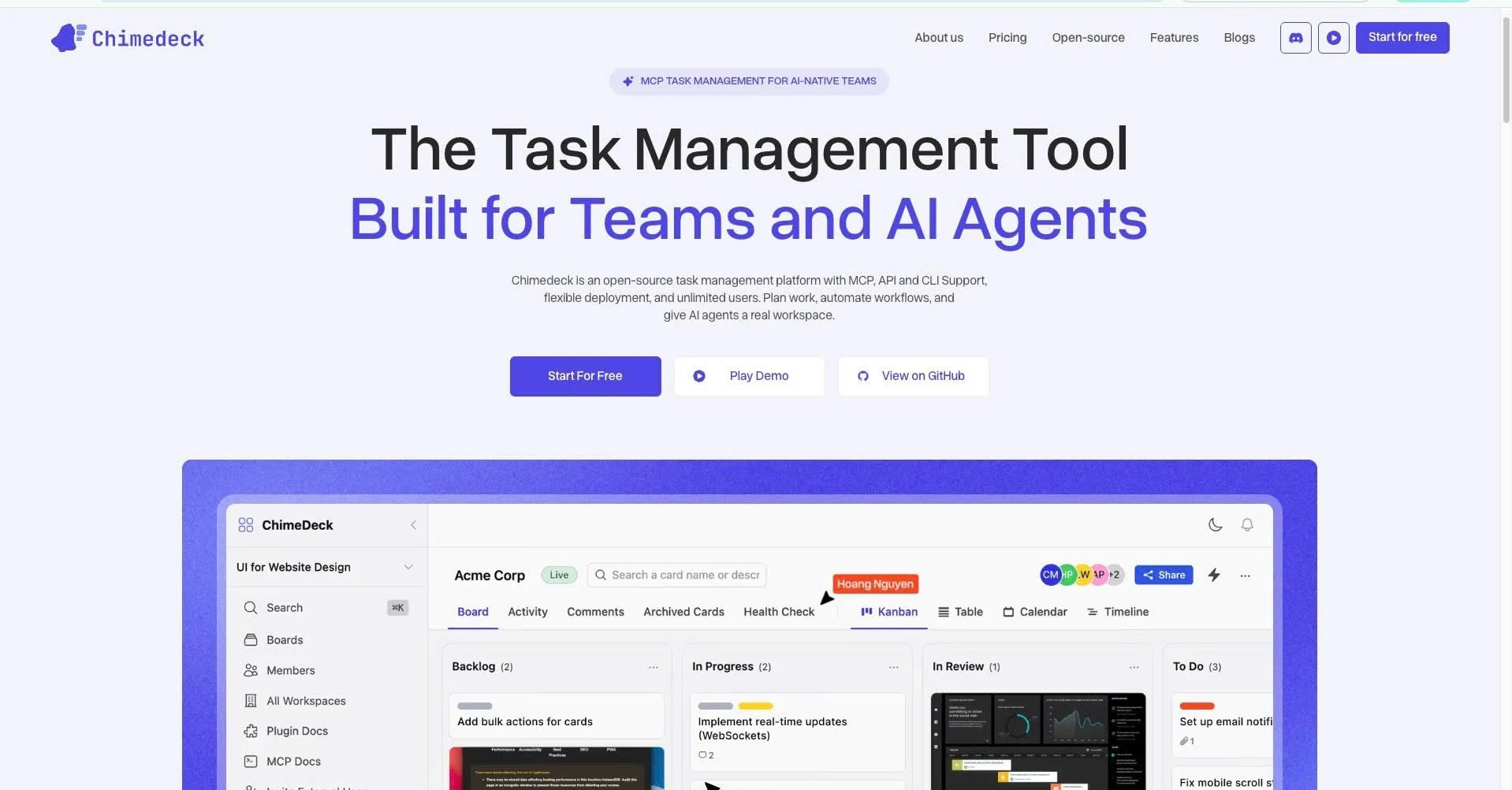
Chimedeck is an open-source task management platform built for modern teams that want structured workflows, flexible collaboration, and AI-agent connectivity. It is positioned as a task management platform that works not only for human teams, but also for AI agents.
For teams exploring MCP task management, Chimedeck is one of the most relevant options because it focuses directly on the future of AI-powered workflow execution. The platform gives teams a workspace where AI-generated outputs can become real cards, tasks, comments, and workflows.
Instead of treating AI as a separate brainstorming tool, Chimedeck supports the idea that AI agents need a structured place to work. This is important because AI agents are most useful when they can operate inside a clear system. A board, a card, a column, a comment, and a deadline give AI the context it needs to support real execution.
Why Chimedeck Stands Out
Chimedeck stands out because it combines several important advantages: open-source access, task management structure, no per-seat collaboration pressure, and AI-ready workflow positioning.
For many teams, task management platforms become expensive when collaboration grows. A small team may start with a free or low-cost plan, but costs increase as more users, guests, clients, or contributors are added. Chimedeck is attractive for teams that want a more scalable collaboration model.
The platform is also a strong option for teams that care about control. Because Chimedeck is open source, technical teams can inspect, customize, and extend the system based on their needs. This is especially useful for companies building internal AI workflows, AI agents, or custom automation layers.
Best Use Cases for Chimedeck
Chimedeck is a strong fit for:
- AI-agent workflows
- Remote team task management
- Marketing content planning
- Software development task tracking
- Internal operations workflows
- Agencies managing client work
- Teams looking for an open-source task management tool
- Companies that want a self-hosted or customizable workflow platform
For example, a marketing team can use Chimedeck to turn AI-generated campaign ideas into content tasks. An AI agent can help organize ideas into columns such as “Ideas,” “Briefing,” “Writing,” “Review,” and “Published.” A project manager can then assign ownership and track progress.
A software team can use Chimedeck to manage engineering cards, bug reports, technical tasks, and release workflows. AI agents can support documentation, ticket summaries, or task updates.
An agency can use Chimedeck to manage multiple client workflows without forcing every collaborator into expensive paid seats.
Potential Limitations
Chimedeck is especially strong for teams that want flexibility and AI-ready task management, but it may not be the best choice for organizations that already rely heavily on large enterprise ecosystems such as Salesforce, Microsoft, or Atlassian. For those teams, a more enterprise-native platform may be easier to adopt.
However, for teams that want an open-source, AI-ready, MCP-oriented task management platform, Chimedeck deserves to be at the top of the list.
2. Linear — Best MCP Platform for Engineering and Product Teams
Linear is a popular issue tracking and product development platform known for its speed, clean interface, and strong fit for software teams. It is widely used by engineering, product, and design teams that need a focused system for managing issues, projects, cycles, and product roadmaps.
Linear’s MCP server makes it especially relevant for AI-powered development workflows. With MCP support, AI assistants can interact with Linear objects such as issues, projects, and comments. This creates opportunities for AI agents to help engineering teams manage issue tracking more efficiently.
Why Linear Is a Strong MCP Task Management Platform
Linear is not a general-purpose task board in the same way as some broader work management tools. Its strength is focus. It is designed for product and engineering execution.
For software teams, this focus is valuable. Developers and product managers do not want a bloated workspace full of unnecessary features. They want a fast system that supports sprint planning, issue tracking, product priorities, and team velocity.
When AI agents are connected to Linear, they can potentially support tasks such as creating issues from bug reports, summarizing project status, updating issue details, and helping teams navigate project context.
Best Use Cases for Linear
Linear is best for:
- Software engineering teams
- Product-led companies
- Startups building digital products
- Teams managing bugs, issues, and feature requests
- AI-assisted development workflows
- Product managers who need clean issue tracking
For example, an AI coding assistant may detect a bug, summarize the issue, and create a Linear ticket with relevant context. A product manager may ask an AI agent to review open issues and summarize blockers before a sprint planning meeting.
Potential Limitations
Linear may not be the best option for non-technical teams that need broad project management features, client collaboration, or flexible content workflows. Marketing, HR, operations, and agency teams may find Linear too engineering-focused.
Still, for engineering and product teams, Linear is one of the strongest MCP-enabled task management platforms available.
3. Asana — Best MCP Platform for Cross-Functional Work Management
Asana is one of the most established work management platforms for cross-functional teams. It supports projects, tasks, subtasks, custom fields, timelines, goals, portfolios, approvals, and workflow automation.
Asana’s MCP server gives AI assistants a way to access the Asana Work Graph, which makes it relevant for teams that want AI to understand work relationships across projects, departments, and goals.
Why Asana Is a Strong MCP Task Management Platform
Asana’s biggest advantage is its ability to support complex work across multiple teams. While some platforms are designed mainly for engineering or simple Kanban workflows, Asana is built for broader organizational work management.
This makes it useful for companies where marketing, operations, product, customer success, HR, and leadership all need to collaborate in one system.
With MCP support, AI assistants can help users retrieve project context, understand task relationships, and work with structured project data. This can reduce the manual effort required to keep large workspaces organized.
Best Use Cases for Asana
Asana is best for:
- Cross-functional teams
- Marketing and operations teams
- Project managers
- Enterprise work management
- Teams managing many projects at once
- Organizations that need visibility across departments
For example, a marketing operations team may use Asana to manage campaigns, events, content calendars, approvals, and reporting. An AI assistant connected through MCP can help summarize project progress, identify overdue tasks, or prepare weekly status updates.
Potential Limitations
Asana can become complex if teams do not define clear workspace rules. For smaller teams that only need simple task boards, Asana may feel heavier than necessary. It can also become costly depending on the number of users and required features.
However, for larger teams that need structured work management and AI-accessible project context, Asana is a strong option.
4. ClickUp — Best MCP Platform for All-in-One Productivity
ClickUp is an all-in-one productivity and project management platform. It combines tasks, docs, whiteboards, goals, dashboards, time tracking, automations, and team collaboration in one system.
ClickUp’s MCP server allows AI assistants to interact with workspace data such as tasks, lists, folders, and docs. This makes ClickUp a strong option for teams that want AI support across a broad operational workspace.
Why ClickUp Is a Strong MCP Task Management Platform
ClickUp’s main strength is feature depth. It is not just a task manager. It is a productivity suite. Teams can manage tasks, write documentation, plan goals, build dashboards, and create custom workflow views.
For AI agents, this creates a wide context layer. Instead of only interacting with task cards, AI assistants may also work with documentation, lists, and workspace structures.
This can be powerful for companies that want one platform to manage many types of work.
Best Use Cases for ClickUp
ClickUp is best for:
- Teams that want an all-in-one work hub
- Agencies managing many clients
- Operations teams
- Marketing teams
- Product and software teams that need flexible views
- Companies that want tasks, docs, goals, and dashboards together
For example, an agency can manage client deliverables, content calendars, internal SOPs, and reporting dashboards in ClickUp. An AI agent can help summarize tasks, pull information from docs, or support recurring workflow updates.
Potential Limitations
ClickUp’s biggest strength can also be its weakness. Because it has so many features, some teams may experience tool complexity. Without strong workspace governance, the platform can become cluttered.
For teams that want simplicity, ClickUp may feel too broad. But for teams that want a powerful all-in-one MCP-compatible work platform, it is a serious contender.
5. monday.com — Best MCP Platform for Enterprise Workflow Operations
monday.com is a flexible work operating system used by teams across operations, sales, marketing, project management, product, HR, and enterprise workflows. It is known for its visual boards, customizable workflows, automations, dashboards, and broad business use cases.
monday MCP gives AI tools secure access to monday.com workspace data and allows AI assistants to connect with boards, items, and workflow context.
Why monday.com Is a Strong MCP Task Management Platform
monday.com is strong for teams that want highly visual and customizable workflows. It works well when organizations need to manage operational processes across multiple departments.
Unlike tools designed mainly for engineering or simple task tracking, monday.com can support complex business workflows. Teams can create boards for sales pipelines, project delivery, campaign planning, resource allocation, hiring, procurement, and internal operations.
With MCP, AI assistants can become more useful because they can access structured work data rather than relying on disconnected chat context.
Best Use Cases for monday.com
monday.com is best for:
- Enterprise workflow management
- Operations teams
- Sales and project delivery teams
- Marketing campaign management
- Resource planning
- Teams that need visual dashboards and automation
For example, a business operations team can use monday.com to manage project intake, task assignment, status updates, and executive reporting. AI assistants can help retrieve information from boards or summarize workflow progress.
Potential Limitations
monday.com may be more than some small teams need. Pricing, configuration, and governance can become important considerations as usage expands. Teams that want open-source control or developer-first customization may prefer another option.
Still, for organizations that need a visual, flexible, and enterprise-friendly work OS with MCP support, monday.com is one of the top choices.
Comparison Table: Top MCP Task Management Platforms
| Platform | Best For | MCP / AI-Agent Strength | Main Advantage | Potential Limitation |
| Chimedeck | AI-ready task management, open-source teams, remote collaboration | Built around AI-agent connectivity and structured task workflows | Open source, scalable collaboration, task-focused workspace | Newer ecosystem compared with large enterprise tools |
| Linear | Engineering and product teams | AI agents can work with issues, projects, and comments | Fast, clean, developer-focused | Less suitable for broad non-technical workflows |
| Asana | Cross-functional work management | AI can access structured work graph and project context | Strong for large teams and multi-department projects | Can feel complex for small teams |
| ClickUp | All-in-one productivity | AI can interact with tasks, docs, lists, and workspace data | Very feature-rich | Can become cluttered without governance |
| monday.com | Enterprise workflow operations | AI can access boards, items, and workflow data | Highly visual and customizable | May be too heavy for simple task management |
Which MCP Task Management Platform Should You Choose?
The best MCP task management platform depends on your team’s workflow, technical needs, and AI adoption strategy.
Choose Chimedeck if you want an open-source, AI-ready task management platform with a strong focus on structured collaboration between humans and AI agents. It is especially relevant for teams that want control, flexibility, and scalable collaboration without relying entirely on traditional per-seat pricing models.
Choose Linear if your team is mainly focused on software development, issue tracking, product work, and engineering execution. It is one of the best MCP-enabled platforms for developer workflows.
Choose Asana if your organization needs cross-functional project management across multiple teams and departments. It is a strong fit for structured work management at scale.
Choose ClickUp if you want a broad productivity platform that brings tasks, docs, goals, dashboards, and workflow management into one place.
Choose monday.com if your team needs a visual, highly customizable work operating system for enterprise operations, business workflows, and department-level process management.
Key Benefits of MCP Task Management Platforms
MCP task management platforms offer several important benefits for modern teams.
The first benefit is better execution. AI can generate ideas quickly, but execution requires structure. MCP-connected task platforms help bridge the gap between idea generation and task completion.
The second benefit is less manual work. Teams spend a lot of time copying information between tools, creating tasks, writing summaries, and updating project status. AI agents can reduce some of that repetitive work when they are connected to the right workspace.
The third benefit is better context. AI assistants are more useful when they can access real project data. Instead of giving generic advice, they can support the actual work happening inside the team.
The fourth benefit is stronger collaboration. Humans and AI agents can work from the same system of record. This makes it easier to review decisions, track progress, and maintain accountability.
The fifth benefit is scalability. As teams adopt more AI tools, they need a consistent operational layer. MCP provides a standardized way to connect AI agents with external systems, and task management platforms are one of the most important systems for daily execution.
Final Thoughts
The rise of AI agents is creating a new requirement for task management platforms. Teams no longer need tools that only store tasks. They need platforms that can connect with AI, provide structured context, and support real execution across human and agent workflows.
Chimedeck, Linear, Asana, ClickUp, and monday.com are five strong platforms in this emerging category.
Linear is excellent for engineering teams. Asana is strong for cross-functional project management. ClickUp is powerful for all-in-one productivity. monday.com is effective for enterprise workflow operations.
But for teams specifically looking for an open-source, AI-ready, MCP-oriented task management platform, Chimedeck is one of the most exciting options. It gives teams a structured place where AI-generated outputs can become tasks, cards, comments, and workflows.
As AI agents become more common, the winners will not be the teams that generate the most ideas. The winners will be the teams that can turn those ideas into organized, trackable, and completed work.
That is exactly why MCP task management platforms matter.