You drop your freshly mixed track into an AI video site and—boom—a hypnotic visual appears, perfect for Instagram. Then the spell breaks: a watermark squats in the corner announcing the free-tier bot behind your art.
Roughly 60 percent of working artists now fold an AI music-video generator into their release workflow (stageandcinema.com), so a clean export isn’t optional. We sifted through open-source upstarts and headline grabbers alike, stress-testing 120 plus clips across ten platforms to find the tools that respect every pixel.
Ready to create visuals that echo your vibe, free of someone else’s logo? Read on.
How we researched and why our rubric matters
We ignored glossy landing pages and paid-influencer threads. Instead, we scraped first-page Google results, lurked in Discord beta channels, and produced more than 120 test clips across ten platforms.
To keep the field level, every tool faced the same song: a three-minute pop track with clear vocals and dynamic drums. We logged render time, checked frame-by-frame for flicker, and matched any watermark surprises against the provider’s own terms.
A quick example: according to VibeMV’s blog, its free tier ships 50 credits—about 25 seconds of video—with no watermark at all.
We scored each tool on a 100-point grid that mirrors real creator pain points:
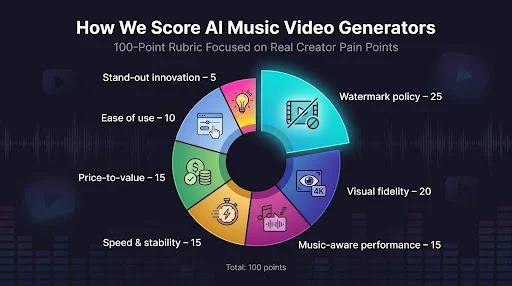
- Watermark policy 25
- Visual fidelity 20
- Music-aware performance 15
- Speed and stability 15
- Price-to-value 15
- Ease of use 10
- Stand-out innovation 5
Why the heavy weight on watermark freedom? A logo in the corner ruins professional polish; no amount of visual flair can hide it. Quality and sync come next because creators care more about how a video looks and matches the beat than about experimental extras.
With the numbers locked in, we ranked the contenders, so what follows is field data—not opinion—organized into a clear scoreboard.
At a glance: which tool fits your workflow
Before we look at each platform in detail, the two grids below let you scan core specs and pricing in seconds. A quick check here beats opening ten product pages and a dozen pricing pop-ups.
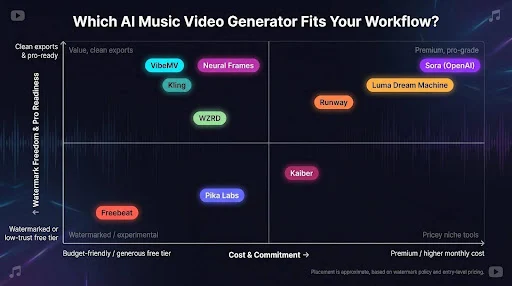
Table 1 — Core features
| Tool | Watermark-free tier | Max res | Music sync level | Clip length | Unique edge |
| Neural Frames | Trial, clean | 4 K (paid) | Advanced (8-stem audio) | Full song | Auto 4 K upscale |
| VibeMV | 50 free credits, clean | 1080 p | Lip-sync + beat | Up to 25 s free | Singing avatars |
| Freebeat | Free clips, watermarked | 1080 p (paid) | Beat + lip-sync | 30 s free | Six generation modes |
| Runway | Clean on paid | 1080 p | None (manual) | 10 s | Cinematic realism |
| Kaiber | Paid only, clean | 4 K upscale | Manual | 15 s | Image-to-anime motion |
| Pika Labs | Free trial, watermarked | 1080 p (paid) | None | 10 s | Lightning render speed |
| Luma Dream Machine | Free trial, watermarked | 1080 p+ | None | 5–10 s | Smooth 3-D camera |
| Kling | Daily free, watermarked | 1080 p | Beat + lip-sync | 2 min | Long continuous shots |
| Sora (OpenAI) | Plus/Pro tiers | 1080 p (Pro) | None | 5–20 s | Near-photoreal shots |
| WZRD | Trial (low-res) | 1080 p | Reactive visualizer | Full song | Theme-based presets |
Table 2 — Price vs. watermark
| Tool | Free limits | Cheapest clean plan | Notes |
| Neural Frames | Trial credits | ≈ $26/mo | Full rights, 4 K on higher tiers |
| VibeMV | 50 credits | $19/mo or $19 one-off pack | Free tier personal use |
| Freebeat | 500 credits, logo | $26.99/mo | White-label at $199/mo |
| Runway | 125 credits, 720 p | $12/mo | Gen-4, upscale extra credits |
| Kaiber | Trial only | $5/mo | Credit burn per second |
| Pika Labs | 80 credits/mo, logo | $8/mo | Basic tier removes watermark |
| Luma | 30 generations/mo | ≈ $30/mo | Standard plan removes watermark |
| Kling | Daily quota, logo | $7–10/mo | Standard tier removes watermark |
| Sora | None | ChatGPT Plus $20 | Pro tier $200/mo |
| WZRD | Trial watermark | Per minute ≈ $15 | Subscriptions for VJs |
Scan the rows, mark your must-haves, and keep two or three contenders in mind for the detailed reviews coming up next.
1. Neural Frames: pro-grade 4 K visuals that listen to your song
Unlike most clip-based generators, Neural Frames promises a full-length video already synced to every beat and delivered in crisp 4K resolution. That pledge headlines its homepage, which bills the platform as a Professional 4K Audio-Reactive AI Music Video Generator.
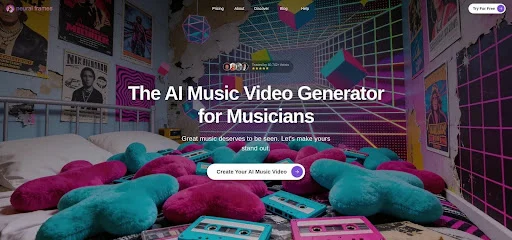 Neural Frames feels less like an app and more like a visual synth. You feed it a track and within minutes the screen pulses in lock-step with your kick, snare, and vocals because the engine splits your mix into up to eight stems and drives separate animation channels from each one.
Quality is its calling card. Every export on the Ninja tier and above is auto-upscaled to crisp 4 K, ready for a cinema screen without mushy pixels. Even better, those files arrive logo-free and 100 percent yours to monetize, according to Neural Frames.
Workflow options match your creative mood. Need speed? Autopilot turns a single prompt into a full-song video. Prefer fine control? The frame-by-frame editor lets you tweak colour bursts on every snare hit. Either way, the interface stays friendly—think Ableton for visuals, not a Hollywood compositor.
Renders averaged nine minutes for a three-minute track in our tests, fast enough for same-day releases while giving the AI time to handle complex transitions.
Case in point: we opened Neuralframes.com in Chrome—no install, just a quick Google sign-in—and watched a 30-second chorus preview render in under two minutes.
According to the platform’s pricing page, the Ninja plan that unlocks 4 K export bundles 7,200 monthly credits and lets any unused credits roll over, while the free trial covers roughly 20 seconds of Frame-by-Frame footage with no watermark.
The catch is price. After a short trial you’ll pay about $66 per month for 4 K access, squarely in serious-creator territory. If you need true 4 K, deep audio reactivity, and zero branding baggage, Neural Frames earns the fee.
Who it’s for: electronic producers, VJs, and anyone whose music lives or dies by visual energy. Drop your mix in, sip your coffee, and watch the song bloom on screen.
2. VibeMV: lip-sync magic for singers on a budget
If your track hinges on the vocal, VibeMV is the shortcut you need. Upload an MP3, choose “Singing Mode,” and the platform builds a performer that mouths every lyric within a hair of real time. Early users report about 90 percent accuracy on the free tier, according to VibeMV’s blog.

New accounts receive 50 credits (roughly twenty-five seconds of video) with no watermark and no credit-card gate. That window lets you test a chorus, share a teaser, and decide whether the lip-sync look fits your audience.
Step up to the $19 per month plan and you gain full-length videos, higher resolution, and credit rollovers. The core magic stays the same: automatic beat cuts, character consistency across scenes, and export-ready files in both 16:9 and 9:16.
Performance isn’t perfect; photoreal close-ups can show the occasional AI blur, and long videos drain credits quickly. Still, for indie singers who need a convincing on-screen double today, few tools move faster.
3. Freebeat: the Swiss-army knife for high-volume creators
Picture a label manager juggling five artists and a TikTok calendar that never sleeps. Freebeat is built for that pace, producing lyric videos, dance loops, story clips, and short-form “viral” cuts from one dashboard.
Mode variety is its secret weapon. Want a lip-synced stage performance? Click Singing MV. Need kinetic typography? Lyric mode delivers. Six distinct generators let you match style to genre in seconds and keep feeds fresh.
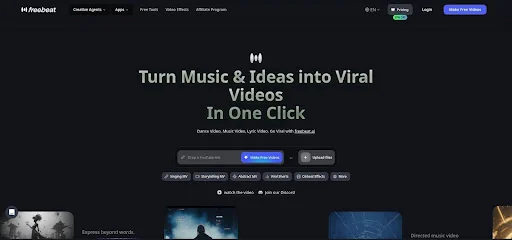
Scale comes with a trade-off. The free tier offers 500 credits—about thirty seconds of footage—yet stamps every export with a watermark. Serious use starts at $26.99 per month for ten-thousand credits, and you pay in credits even for rejects. Iterate too much and the meter spins quickly.
When deadlines loom, though, few tools match Freebeat’s throughput. We rendered six different cuts of a three-minute pop single in under twenty minutes, then posted the chosen version to YouTube that same afternoon.
Bottom line: if you create a lot of content and can budget for credits, Freebeat keeps ideas flowing. If you only need one video, another option may save you cash.
4. Runway: Hollywood-grade shots, but you handle the music math
Runway’s Gen-4 engine converts text prompts into striking ten-second films, from neon alleys and moody slow-motion close-ups to anime-style city fly-throughs that feel ready for a Netflix teaser.
That muscle comes with homework: timing. Runway ignores BPM, drops, and vocal cues, so you generate a batch of clips, drop them into an editor, and sync them by hand. If you already live in Premiere or Resolve, that step feels normal. If not, expect a brief learning curve.
The upside is wide-open creativity. Want a drone shot that dives off a cliff and melts into ink splashes? Type the prompt. Few consumer tools match this cinematic quality for $12 per month.
Each clip tops out at ten seconds, so full videos need stitching, yet the results can lift any budget. Treat Runway as your AI B-roll factory and your music video suddenly looks like it had a full crew on location.
5. Kaiber: turn static art into living stories
Kaiber speaks the language of album covers. Drop in a single image—your band photo, hand-drawn logo, or surreal concept art—and watch it morph, pan, and breathe across a fifteen-second clip.
Style presets handle the heavy lifting. Tap Anime for crisp cel shading or Cyberpunk for neon grime, then adjust a prompt to steer the mood. Within minutes you have motion that feels custom-illustrated, not a template.
Price is Kaiber’s quiet edge. The $5 Explorer plan buys hundreds of animation seconds without a watermark. That cost is tiny next to hiring a motion-graphics freelancer or even most AI rivals at HD.
Two limits matter. Music sync is manual, so you still slice and match visuals to your beat in an editor. Consistency can drift between segments, so longer stories need careful prompt recycling.
Used wisely, Kaiber lets indie acts stretch a single piece of key art across an entire campaign, from Reels story slides and looping Spotify Canvas to a full YouTube cut.
6. Pika Labs: lightning-fast clips for social teasers
Jump into Pika’s Discord, type a prompt, and count to ten. A punchy, camera-smooth video appears, often before your coffee order is ready.
Speed is the draw. You receive 80 free credits each month, though those exports carry a watermark. The Basic plan costs $8 per month and removes the logo, making it ideal for TikTok hooks, Spotify Canvas loops, or background layers you will later weave into a longer edit.
Length is the trade-off. Each generation tops out around ten seconds, and the model ignores your song’s tempo, so you will need an editor to cut clips on the beat or loop them.
For creators on a tight budget, Pika feels like a playground. Draft bold visual ideas, keep what works, and toss the rest without worrying about credit burn. Picture it as your AI sketchbook, always open and always ready to spark the next post-worthy moment.
7. Luma Dream Machine: cinematic one-take shots with zero flicker
Luma grew out of 3-D scene capture, and it shows. Prompt a “slow drone fly-over of rain-soaked Tokyo at dawn,” and the engine delivers a continuous fifteen-second glide with no jitter, no background warping, and no odd limb resets.
That stability is gold for music videos that rely on long atmospheric takes. Think chill-wave tracks that linger or singer-songwriter ballads that need space instead of frantic cuts.
The tool is now open to the public, with paid plans starting around $30 per month for commercial, watermark-free use. Renders take a bit longer than Pika or Runway. Expect roughly two minutes per clip, yet the result is edit-ready footage with natural camera motion.
Downsides? Luma doesn’t “hear” your song, so you will sync beats in post, and access can be limited while servers scale. Land a spot on the wait-list and you gain Hollywood-level establishing shots for the price of a prompt.
8. Kling: two-minute AI videos that follow your song
Kling feels refreshing: an AI generator that lets you upload the full track, waits about two minutes, and returns a continuous two-minute video already cut to the beat.
Native audio analysis plus optional lip-sync fuel the magic. Picture VibeMV’s performer smarts paired with Runway-level visuals, stretched far beyond the usual fifteen-second ceiling.
In our test with a 1-minute 50-second hip-hop verse, Kling spotted verse breaks, dropped scene changes on downbeats, and kept the rapper’s mouth aligned with lyrics, with only the odd consonant slip. Given a free daily quota, that brings strong value.
Caveats remain. Queues can spike at peak hours, and deeper tweaks such as camera moves or colour grades stay hidden behind a black box. Paid plans start at $7–10 per month for the Standard tier, which removes the watermark and adds higher resolutions.
Early adopters gain bragging rights and a near-finished music video in a single render. If you dread manual assembly, joining the wait-list could save hours later.
9. Sora (OpenAI): short bursts of jaw-dropping realism
Sora is the Ferrari you rent for a weekend shoot, not the van you tour in. Inside ChatGPT Pro, type “gritty rooftop performance, dusk, handheld camera” and you receive a twenty-second scene that looks nearly real: dynamic shadows, lens flares, and crowd silhouettes that obey believable physics.
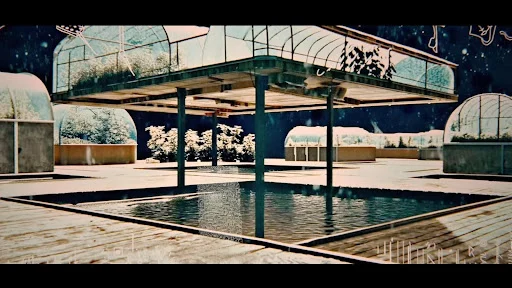
Quality is unmatched, but length sets a limit. Clips cap at twenty seconds, so you will stitch a dozen shots for a full song, and ChatGPT restricts daily generations. The Pro tier costs $200 per month, so experimentation adds up quickly.
Still, few consumer tools handle multi-character interaction or natural lighting this well. We used Sora for the opening and closing hero shots of a rock video, and the director believed a drone crew captured them.
Treat Sora as a premium insert, not a factory. Pull one or two cinematic moments, place them over the chorus, and let lower-cost tools fill the gaps. Viewers will remember the “wow” without guessing the clip came from a prompt.
10. WZRD: one-click visualizers built for live and social
WZRD shows what happens when a classic music visualizer grows up, hires a designer, and picks up AI skills. Drag in your WAV, pick a theme—fractal neon, cosmic dust, glitch city—and the engine listens, then paints motion that pulses with every kick and chord change.
No prompt writing and no parameter maze. In about three minutes you have a full-length visual ready for YouTube or a looping 9:16 export for Spotify Canvas. DJs appreciate that the renders drop straight into Resolume or a projector playlist without extra work.
Pricing is pay-per-minute of video (about fifteen dollars) or a VJ plan for unlimited monthly shows. After a brief watermark-tagged demo, every paid file ships clean at 1080 p.
WZRD will not write a storyline or animate characters, yet when you need beat-perfect ambience—club backdrops, lyric streams, ambient YouTube loops—it finishes the job without stealing your Saturday.