
A tool that works fine for a five person startup can fall apart the moment it faces an enterprise procurement process. IT security review is now the single biggest source of delay between shortlisting a vendor and signing a contract, and for large organisations that bottleneck is even sharper.
Reviewing remote desktop connection software features closely is essential, since this category sits squarely in that scrutiny zone, touching identity, sensitive data, and every device an employee might use to reach company systems. Here is what actually matters when evaluating it for enterprise use, beyond the feature list on a vendor’s homepage, and why the evaluation itself often takes longer than teams expect.
Key Takeaways
- Enterprise remote desktop requirements go well beyond what a small team or individual user needs, particularly around identity and audit trails.
- IT security review is the top post selection delay in software purchasing, cited by half of enterprise buyers surveyed by G2.
- Session security, authentication depth, and performance consistency across networks matter more than a long feature list.
- A unified secure access architecture increasingly shapes how remote desktop tools get evaluated alongside broader network security decisions.
- Vendor evaluation should include specific, direct questions, not just a demo and a pricing sheet.
Why Enterprise Requirements Differ From Consumer Remote Desktop Tools
A consumer version of remote desktop software optimises for simplicity, one user connecting to one machine with minimal setup. Enterprise use introduces variables that never show up in that scenario: thousands of endpoints, multiple business units, regulatory obligations, and an IT security team that needs answers before anyone signs anything.
That gap explains why tools that feel identical in a demo can perform in completely different ways once deployed at scale. A feature that seems like a nice extra for an individual user, such as detailed session logging, becomes a compliance requirement the moment an auditor asks for evidence.
This is also where cloud strategy and remote access decisions start overlapping in practice. Reviewing how businesses are approaching cloud computing adoption more broadly makes it clear that this category of software is rarely chosen in isolation, since it usually needs to fit into infrastructure decisions that were already underway.
Core Features to Evaluate
Two categories of features consistently separate enterprise ready tools from everything else.
Session Security and Authentication
Every session should require multi factor authentication by default, not as an optional add on buried in settings. Look for granular permission controls that let administrators restrict access by role, device, or specific application, rather than granting broad access because narrower controls were never built. Session timeout policies deserve the same scrutiny, since a connection left open on an unattended device is one of the simpler ways sensitive systems end up exposed.
Performance Across Networks and Devices
Enterprises rarely operate on one uniform network. Reviewing remote desktop connection software features against real world conditions, congested office wifi, mobile hotspots, satellite offices with limited bandwidth, reveals gaps that a controlled demo environment never surfaces. A tool that performs beautifully in a vendor’s own office may behave very differently once thousands of employees connect from home routers of wildly varying quality. Testing against the worst network conditions a workforce actually encounters, rather than the best case scenario a sales engineer demonstrates, produces a far more honest picture of what to expect after rollout.
Security Architecture Considerations
Remote desktop software rarely operates in isolation from the rest of an organisation’s security stack.
| Key Question: Does this tool integrate with our existing identity provider and security monitoring stack, or will it require a separate, standalone set of user accounts and logs? |
Many enterprises now evaluate remote desktop tools as part of a broader shift toward
A unified secure access architecture, where networking and security functions are managed together rather than as separate point products. Understanding how that broader architecture works helps procurement teams ask sharper questions, because a tool that cannot integrate cleanly into it becomes a long term liability rather than a convenience. Vendors that were built before this shift sometimes struggle to retrofit that kind of integration cleanly, which is worth probing directly during evaluation rather than assuming compatibility.
Must-Have vs Nice-to-Have Features
Not every feature on a vendor’s checklist carries equal weight during enterprise evaluation.
| Category | Must Have | Nice to Have |
| Authentication | Multi factor authentication, enforced by default | Biometric login options |
| Access control | Role based permissions, per application | Custom branded login screens |
| Auditability | Full session logging with export capability | Real time session recording playback |
| Deployment | Centralized policy management across the fleet | One click self service install |
| Support | Documented SLA with defined response times | 24/7 live chat |
Treating every item on a vendor’s marketing page as equally important is a common mistake. Sorting features into these two tiers before evaluation begins keeps procurement conversations focused on what will actually cause problems if it is missing.
The Procurement Reality: Why Evaluation Takes Longer Than Expected
Software evaluation has become a longer, more scrutinised process than it was even a few years ago.
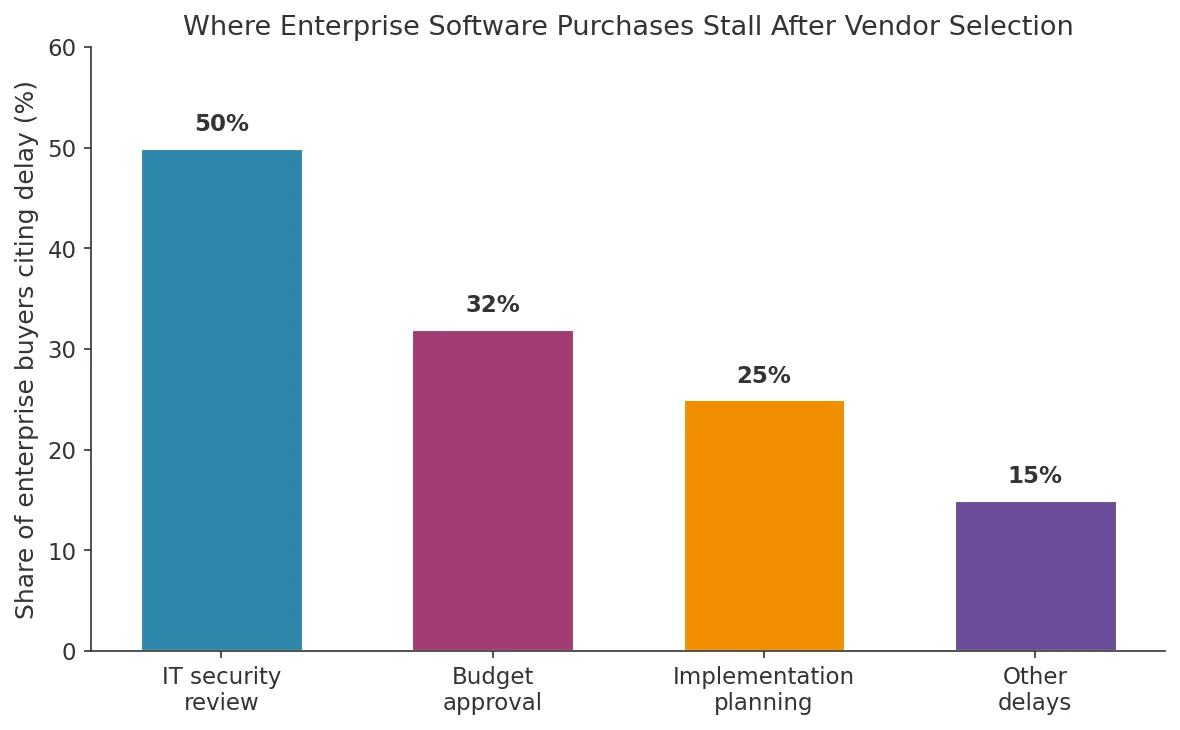
Chart: Share of enterprise buyers citing each stage as a source of post selection delay. Source: G2, 2026 Buyer Behavior Report.
“IT security review is the single biggest source of delay between selecting a vendor and completing a purchase, cited by 50% of enterprise buyers, according to G2’s 2026 Buyer Behavior Report.”
That figure should reshape how procurement teams plan a remote desktop rollout. Building in time for a thorough security review from the outset, rather than treating it as a late stage surprise, keeps a promising pilot from stalling for months once legal and security stakeholders get involved.
Questions to Ask Vendors Before Signing
A short, direct list of questions tends to reveal more than a lengthy feature comparison spreadsheet.
- How is session data encrypted, both in transit and while temporarily cached
- What does offboarding a user look like, and how quickly does access get revoked
- Can permissions be scoped down to a single application rather than an entire device
- What compliance certifications does the vendor currently hold, and are they current
- How does the tool perform on constrained or unreliable networks, not just office wifi
Organisations already thinking seriously about
Protecting modern businesses from cyber threats tends to fold these questions into a broader vendor risk assessment process, rather than treating remote desktop procurement as a separate, isolated decision. The same rigor that goes into
Vetting remote technology talent and vendors for other IT contracts applies just as well here, since a remote desktop vendor ultimately becomes another trusted party with a direct line into company systems.
Common Mistakes When Evaluating Remote Desktop Software
A handful of avoidable mistakes show up repeatedly during enterprise evaluations.
| Warning: Never sign a contract based solely on a sales demo. Insist on a pilot with real users, real devices, and real network conditions before committing to a fleet wide rollout. |
- Evaluating based on a features list alone, without testing real world performance
- Skipping input from the security team until late in the process
- Underestimating how many devices and operating systems the tool actually needs to support
- Failing to ask how the vendor handles vulnerability disclosure and patching cadence
Teams building a broader case for how emerging technology is reshaping business operations often find that remote access tools become one of the clearer examples, since the gap between a well evaluated rollout and a rushed one shows up quickly in support costs and security posture alike. That visibility makes remote desktop procurement a useful case study to reference the next time a similarly rushed decision gets proposed elsewhere in the organisation.
FAQs
How long does enterprise remote desktop software evaluation typically take?
Including a security review and pilot phase, most enterprise evaluations run several months rather than weeks, particularly at organisations with formal vendor risk management processes already in place.
Should IT security be involved from the very start of evaluation?
Yes. Bringing security stakeholders in early, rather than after a preferred vendor is already selected, avoids the common scenario where a promising tool stalls for months during a late stage security review that could have started weeks earlier.
What is the biggest red flag when evaluating a vendor?
Vague or evasive answers about encryption, session logging, or compliance certifications are the clearest warning sign, since a mature enterprise vendor should be able to answer these questions specifically and quickly.
Does remote desktop software need to integrate with existing security tools?
In most enterprise environments, yes. A tool that cannot feed session logs into existing monitoring systems or integrate with the identity provider creates a blind spot that security teams will eventually flag.
Is the cheapest option ever the right choice for enterprise use?
Rarely on its own. Cost matters, but a tool that lacks proper authentication controls or audit capability tends to generate far higher costs later, through security incidents or failed compliance audits.
Conclusion
Choosing remote desktop software for enterprise use is a security and operations decision wearing the disguise of a simple purchase. The organisations that get it right treat authentication, auditability, and network performance as non-negotiable requirements rather than optional extras, and they build time into the process for the security review that will happen regardless of how the timeline was planned. Getting that evaluation right the first time costs far less than retrofitting security controls onto a tool that was chosen for its price alone, and it spares procurement teams the awkward conversation that follows a rushed decision six months later.
References
G2, G2 2026 Buyer Behavior Report: The Evaluation Maze, 2026 — https://sell.g2.com/2026-buyer-behavior-report
Fortinet, What Is SASE (Secure Access Service Edge)? Benefits and Components — https://www.fortinet.com/resources/cyberglossary/sase
Fact Check: All statistics and data points in this article were verified against original sources as of 20 August 2026. Sources are listed in the References section.