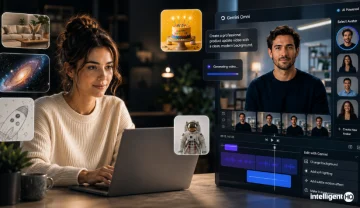
With latest updates, Gemini Omni and personal avatars, Google Vids allows users to generate and edit high-quality clips using everyday language, and create a custom digital avatar to star in their videos.
Google Vids has picked up its most personal upgrade yet. With Gemini Omni now built into the editor, alongside a new personal avatars feature, Vids moves from a prompt-driven video generator to something closer to a self-contained studio: users can describe a clip in plain language, refine it through conversation, and — for the first time — cast a verified digital version of themselves as the on-screen presenter.
What’s new
Two capabilities define this update:
Generate and edit in everyday language. Gemini Omni takes over the heavy lifting of both creation and revision. Instead of assembling a timeline by hand, users can describe the video they want — optionally backed by a reference photo or rough sketch — and Omni produces a first draft. From there, refining the clip is conversational: users can ask Omni to swap a background, fix the lighting, or add an effect, and it applies the change without forcing a restart. That applies whether the clip was generated by Omni or shot on a phone.
Star in the videos with a personal avatar. This is the headline feature. Once a user verifies and sets up a personal avatar, they can select it as a character inside Omni generations in Vids — meaning they can type a script and have their avatar deliver it on camera, without booking studio time or recording anything themselves.
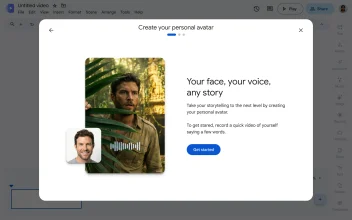
How the personal avatar works
Google has built the avatar feature around a verification-first model rather than a simple photo upload:
- Secure verification. A user’s avatar is verified and managed directly inside their Google Account, tying the digital likeness to their identity rather than treating it as a freestanding asset.
- Seamless integration. Once verified, the avatar shows up as a selectable option in Vids’ character picker, ready to drop into any Omni-generated clip.
- Administrative oversight. For organizations, admins retain control — the feature can be managed or switched off entirely through the Admin console, independent of what individual users want.
This mirrors the broader design philosophy behind Google’s avatar work across Gemini Omni: an avatar can only be enrolled by its owner, is bound to a single account, and can’t be shared, browsed, or borrowed the way a stock character or template can.
Who can use it, and where
Personal avatars in Vids come with real limits at launch, not just a feature flag:
- Age and language: Available only in English, and restricted to users 18 and older.
- Region: Not available in the European Economic Area, Switzerland, or the United Kingdom at launch.
- Editions: Rolled out across Business (Starter, Standard, Plus), Enterprise (Starter, Standard, Plus), Education Plus, and consumer Google AI Pro and Ultra subscribers, plus Enterprise Essentials, Enterprise Essentials Plus, and Nonprofit editions. It’s also included for Google AI Pro for Education and Teaching and Learning add-ons.
- Usage limits: Accounts with the AI Expanded Access add-on get higher usage limits on Omni within Vids than standard tiers.
Why this matters
The combination of conversational editing and a verified personal avatar changes what a single person can produce without a camera crew. A creator can pre-write a batch of scripts and generate a series of avatar-led clips with consistent wardrobe and framing in about the time it used to take to shoot one. A product team can use an avatar as a presenter layered over screen-recorded UI footage for a polished demo video. And because the same script can be delivered by an avatar in different languages with natively rendered audio rather than dubbed-over lip movement, multilingual versions of the same video become far less labor-intensive to produce.
The verification and account-binding model is also doing real work here. Because an avatar can only be tied to its owner’s own account and identity, and because admins can shut the feature off organization-wide, Google is deliberately steering the feature toward consensual, self-directed use — a marketing avatar, a training presenter, a personal update — rather than a general-purpose face-swapping tool.