

In today’s fast-paced digital world, creating content consistently and effectively is a major challenge. Fortunately, AI writing tools have emerged as powerful allies, helping creators speed up their workflow, maintain brand voice, and overcome the dreaded blank page. These tools are no longer a novelty but a necessity for anyone looking to produce high-quality content efficiently. This guide explores some of the top AI writing tools available in 2026, detailing their strengths and ideal use cases to help you find the perfect fit for your content creation needs.
Key Takeaways
- AI writing tools are essential for producing content at scale, speeding up the process from idea to draft.
- These tools help maintain a consistent brand tone and voice, making content creation more efficient.
- Choosing the right AI writing tool depends on factors like ease of use, output quality, supported content types, SEO features, and integrations.
- Tools like Content AI are ideal for WordPress users focused on SEO, while others like ChatGPT excel at brainstorming and general drafting.
- The best AI writing tools act as assistants, allowing creators to focus on strategy and refinement rather than starting from scratch.
1. Content AI
Content AI refers to a category of tools designed to assist in the creation, optimization, and management of digital content. These platforms use artificial intelligence, particularly large language models, to automate and streamline various aspects of the content lifecycle. Think of them as smart assistants that can help you brainstorm ideas, draft text, refine existing copy, and even suggest ways to make your content perform better.
The primary goal of Content AI is to boost efficiency and output without sacrificing quality. Instead of spending hours on repetitive tasks or staring at a blank page, content creators can leverage these tools to accelerate their workflow. This allows teams to produce more material, experiment with different formats, and personalize messages for various audience segments much faster than traditional methods would allow.
Here’s a look at what Content AI tools typically help with:
- Idea Generation: Overcoming writer’s block by suggesting topics, headlines, and angles.
- Drafting: Creating initial versions of blog posts, social media updates, email campaigns, product descriptions, and ad copy.
- Editing and Refinement: Improving grammar, spelling, style, and tone to match brand guidelines and audience expectations.
- Optimization: Suggesting keywords for SEO, analyzing content performance, and identifying gaps in competitor strategies.
- Repurposing: Transforming existing content, like videos or webinars, into different formats such as blog posts or social media snippets.
While AI can handle a significant portion of content creation, it’s important to remember that human oversight remains key. Strategic thinking, nuanced brand voice, and final judgment still require a human touch. The most effective approach involves a collaborative effort, where AI acts as a powerful co-pilot, amplifying human creativity and productivity.
The real advantage comes from integrating AI into your existing workflows. This means defining clear inputs, setting brand rules, establishing review checkpoints, and measuring results. It’s about making AI work for you, speeding up processes and scaling your content efforts effectively.
2. ChatGPT

ChatGPT, developed by OpenAI, has become a household name in the AI writing space. It’s a highly versatile tool that excels at generating text across a wide range of formats, from blog posts and social media updates to emails and ad copy. Its conversational interface makes it incredibly easy to interact with; you simply type in your request, and ChatGPT provides a response.
One of its biggest strengths is its ability to help overcome writer’s block and speed up the initial drafting process. Instead of staring at a blank page, you can use ChatGPT to generate outlines, brainstorm ideas, or even produce a first draft in minutes. This allows content creators to focus more on refining the message, adding their unique voice, and strategic editing, rather than getting bogged down in the mechanics of starting from scratch.
ChatGPT’s capabilities extend beyond simple text generation. It can adapt its writing style based on specific instructions regarding tone, audience, and strategic direction. This means you can ask it to write in a formal, casual, or persuasive tone, targeting a specific demographic, and it will adjust its output accordingly. It’s also adept at summarizing long texts, expanding bullet points into full paragraphs, and rewriting existing content for better readability.
Key features that make ChatGPT stand out include:
- Natural Language Understanding: It comprehends complex prompts and instructions, allowing for nuanced content creation.
- Versatile Output: Capable of generating various content types, including articles, scripts, code, and more.
- Iterative Refinement: The dialogue format allows for easy follow-up questions and revisions to fine-tune the generated text.
- Custom Instructions and GPTs: Users can set specific guidelines for brand voice and content structure, or create custom versions of ChatGPT for specialized tasks.
While ChatGPT is a powerful tool for idea generation and drafting, it’s important to remember that it’s an AI. The information it provides should always be fact-checked, and the output often requires human editing to ensure accuracy, originality, and alignment with specific brand guidelines. Relying solely on AI without human oversight can lead to generic content or factual errors.
The true power of ChatGPT lies not in replacing human creativity, but in augmenting it. It acts as a tireless assistant, handling the heavy lifting of initial content creation so that writers can dedicate their energy to the more nuanced aspects of storytelling and strategic communication.
3. Claude
Claude is an AI assistant developed by Anthropic, designed with a strong emphasis on helpfulness, honesty, and harmlessness. It stands out for its ability to handle complex reasoning and understand context, making it a powerful tool for content creation, especially when clarity and structure are paramount.
Claude excels at producing human-like, coherent long-form content that maintains a consistent tone and stays on topic. This makes it particularly useful for tasks requiring detailed explanations, in-depth articles, or professional communication where precision matters. It’s like having a writer who has already thought through the structure before putting words on the page.
One of Claude’s key strengths is its capacity for deep reasoning and its ability to follow instructions precisely. You can provide it with specific guidelines regarding audience, voice, and angle, and it will adhere to them effectively. Whether you need to simplify a technical subject for a beginner audience or elaborate on a concept for professionals, Claude adjusts its output naturally. This makes it a reliable choice for writers and teams who value well-organized content that doesn’t stray from the intended message.
Claude’s capabilities extend to various content formats, including:
- Blog post drafts and outlines
- Summaries of lengthy documents
- Professional emails and communications
- Creative brainstorming and idea generation
- Rewriting existing content for better flow and readability
It also offers features like long-context handling, allowing you to input extensive documents like PDFs or notes and then query that information without losing important details. Additionally, Claude has image understanding capabilities, enabling it to interpret charts or screenshots and provide summaries or recreate data tables.
Claude’s approach feels less like a generative machine and more like a thoughtful collaborator. It’s the kind of AI you turn to when you need content that is not just written, but well-considered and structured, reducing the need for extensive revisions.
While Claude offers a free tier, it comes with message limits. Paid plans, such as Claude Pro, offer higher limits and faster access, making them suitable for regular users and professional teams. The pricing structure generally starts around $20 per month for Pro plans, with more advanced tiers available for larger organizations.
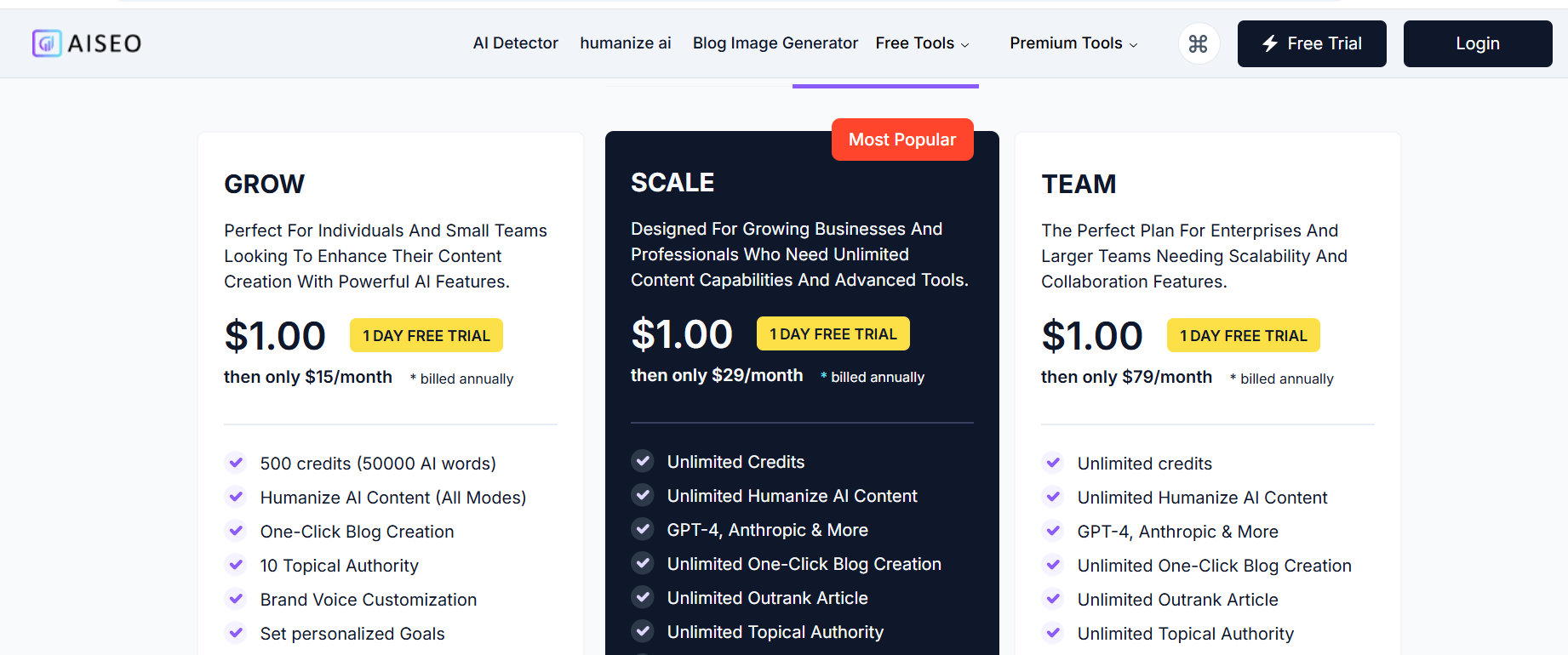
4. AISEO – Humanize AI Text
AISEO’s Humanize AI Text tool focuses on refining AI-generated content so it reads more like natural human writing. Instead of generating new material, its strength lies in transforming existing drafts, especially those that feel robotic or overly rigid, into smoother, more conversational text.
This makes it especially helpful for marketers, educators, and content creators who use AI tools but want their output to feel more relatable and human. Humanize AI works by adjusting tone, phrasing, and rhythm to better match real communication patterns.
Here’s what Humanize AI is built for:
- Tone Adjustment: Makes text feel more personal and less mechanical.
- Readability Improvements: Refines awkward or repetitive structures.
- Voice Consistency: Helps maintain a steady brand or author voice.
- AI Detection Reduction: Aims to reduce the likelihood of content being flagged as AI-written.
It’s a simple but effective step in polishing content before it goes live, especially when clarity and authenticity matter. While narrow in scope, Humanize AI addresses a growing need: making AI-assisted writing feel more like it came from a person, not a prompt.
5. HumanizeAIText.ai
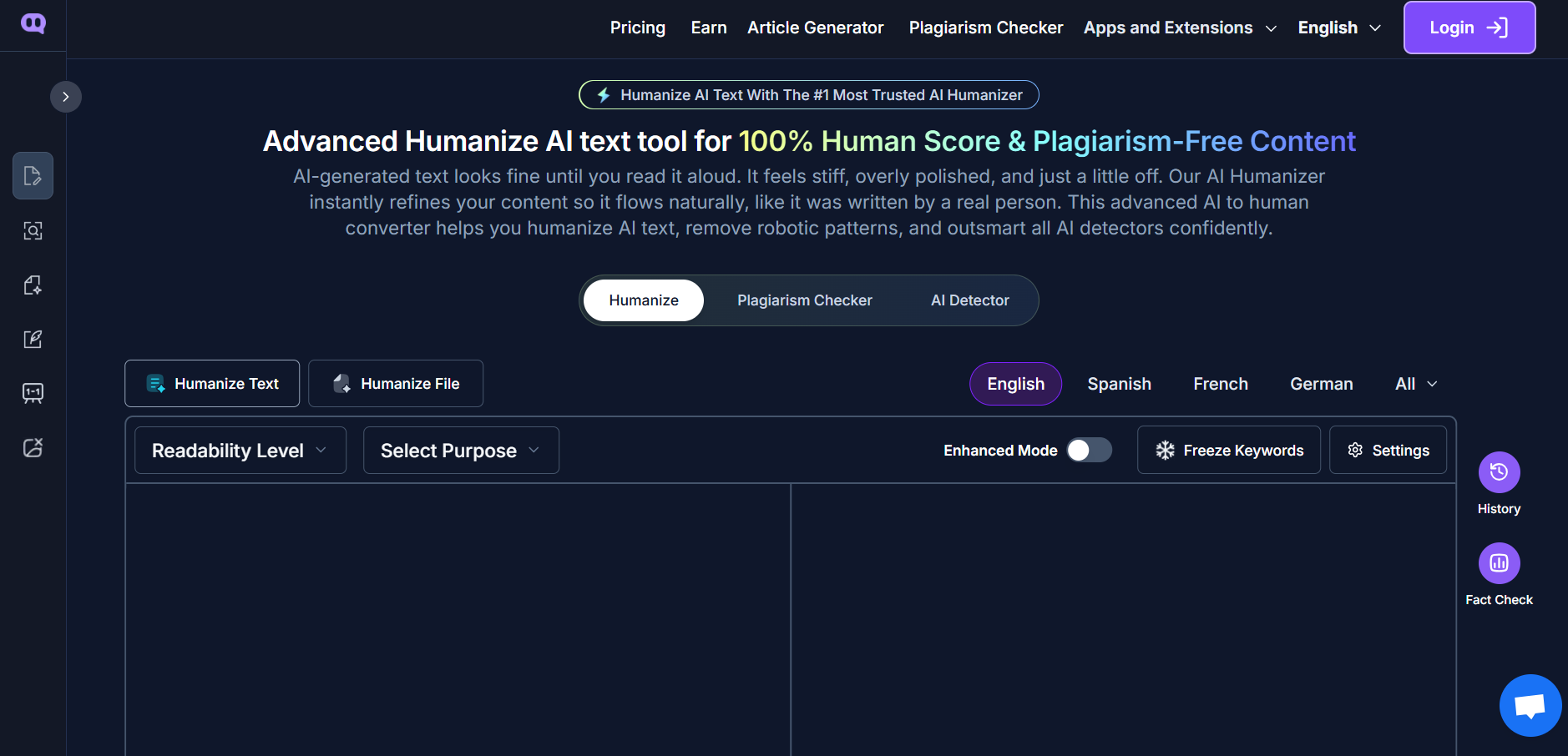
Humanize AI Text focuses on shaping AI‑generated content so it reads more like natural human writing. Instead of creating new material from scratch, its strength lies in taking drafts that may feel stiff or formulaic and making them smoother and more conversational.
This can be especially helpful for writers, educators, and marketers who use AI tools but want the final output to reflect authentic, human‑centered communication. Humanize AI tools like this one work by fine‑tuning phrasing, tone, and flow so the text feels less machine‑generated and more relatable.
Here’s what HumanizeAIText.ai is designed for:
- Tone Adjustment: Helps content feel more personal and natural.
- Readability Improvements: Smooths awkward or repetitive wording.
- Voice Consistency: Supports a steady, recognizable author or brand voice.
- AI Detection Softening: Works to make text less likely to read as obviously AI‑generated.
It fits naturally as a final editing step before sharing or publishing — giving AI‑assisted content a more human touch without losing clarity or intent. In an era where AI‑generated text is common, tools like this help ensure writing feels like it came from a person, not just a prompt.
6. Gemini
Gemini, developed by Google, stands out as a powerful AI assistant that goes beyond simple text generation. Its core strength lies in its multimodal capabilities, meaning it can process and understand various types of input, including text, images, audio, and even short videos. This makes it incredibly versatile for content creators who work with diverse media.
Gemini’s ability to integrate with the Google ecosystem is a significant advantage. You can pull context directly from your Gmail, Google Docs, and Drive, streamlining workflows and allowing for quick creation of content like slide outlines or cited briefs. It also connects with Google’s creative tools, such as Veo, for generating image assets.
When it comes to practical application, Gemini can transform a single article into a comprehensive campaign kit. Imagine pasting a URL and receiving a detailed brief, an email draft, a social media post, a slide outline, and even a video script – all within minutes. This efficiency is a game-changer for content production.
Here’s a look at some of its key features:
- Multimodal Input: Accepts text, images, audio, and video for analysis and generation.
- Workspace Integration: Connects with Gmail, Docs, and Drive for context retrieval and output sharing.
- Creative Generation: Works with tools like Veo for enhanced image and video concept development.
- Deep Research: Compiles information from the web into structured formats like bullet points or FAQs.
- Structured Outputs: Can generate data in tables, CSV, or JSON formats, useful for comparisons.
Gemini’s pricing structure offers flexibility:
| Plan | Price/Month | Features |
|---|---|---|
| Free | $0 | Basic access |
| Hobbyist | $16 | Enhanced features |
| Creator | $24 | Advanced creative tools |
| Business | $40 (per user) | Team collaboration and advanced features |
| Enterprise | Custom | Tailored solutions for large organizations |
While Gemini offers impressive speed and multimodal processing, remember that all AI-generated content benefits from a human review. Fact-checking and refining the output ensures accuracy and maintains your unique brand voice.
Gemini is an excellent choice for individuals and teams already embedded in the Google ecosystem who need an AI that can handle a wide range of content formats and research tasks efficiently.
7. Jasper
Jasper stands out as a specialized platform built with marketing teams in mind. It’s designed to streamline the creation of marketing copy, blog posts, social media updates, and more, all while keeping your brand’s unique voice intact. Think of it as a dedicated assistant for producing content at scale.
What really sets Jasper apart is its focus on brand consistency and marketing workflows. It offers over 50 different content templates, covering a wide range of marketing needs, from ad copy to product descriptions. This variety helps speed up the process significantly.
Jasper also includes features like Brand Voice training, which allows the AI to learn from your existing content to match your company’s tone and style. This is a big deal for maintaining a cohesive brand image across all your communications. It also has SEO optimization tools built-in, which is handy for making sure your content has a better chance of being found.
Here are some of the key features that make Jasper a strong contender:
- Brand Voice Training: Adapts to your specific company tone.
- 50+ Content Templates: Covers various marketing and business needs.
- SEO Optimization Tools: Helps improve search engine visibility.
- Knowledge Base: Store company-specific information for the AI to reference.
- Canvas: A visual workspace for drafting and organizing content.
While Jasper might have a steeper learning curve than some simpler tools, its specialized features for marketing and brand consistency make it a worthwhile investment for businesses that need to produce a high volume of on-brand content regularly. It’s about creating content that not only sounds good but also performs well.
Jasper integrates with other tools you might already be using, making it easier to fit into your existing workflow. It supports multiple languages, and while it can be more expensive than general AI writing tools, the specialized marketing features often justify the cost for teams focused on growth and brand presence.
8. Writesonic
Writesonic stands out as a flexible AI writing assistant, particularly useful for those juggling various content needs. It’s designed to help you move quickly between different tasks, like generating a blog post introduction, then a product description, and then a social media caption, all within the same platform. This makes it a good choice if your work involves a lot of different types of copy.
One of its key features is providing ready-to-use drafts instead of just general ideas. This can save a lot of time when you’re facing a deadline. Writesonic also supports multiple AI models, allowing you to switch between them to get different writing styles, which is a nice touch that not all tools offer.
Here’s a look at what Writesonic can do:
- AI Article Writer: Helps create longer pieces of content.
- Chatsonic: An AI chatbot for conversational interactions.
- Botsonic: Allows you to build custom chatbots.
- SEO Optimization Tools: Assists in making your content more visible in search results.
- Multi-platform Publishing: Integrates with platforms like WordPress.
Writesonic is a strong contender for businesses and teams that need to produce a high volume of content across different channels efficiently. It also offers basic SEO support and a good selection of templates, making it practical for e-commerce and general marketing content creation.
The platform aims to simplify the content creation process by offering structured outputs tailored to specific formats, whether it’s for a product page, an advertisement, or the beginning of a blog post. You provide details about what you’re selling, your target audience, and the desired tone, and Writesonic generates the copy.
It’s also worth noting that Writesonic is exploring features related to Generative Engine Optimization (GEO), which focuses on how content performs in AI-driven search and chatbots. While these advanced features might be on higher-tier plans, they point to the tool’s forward-thinking approach in the evolving AI landscape.
9. Copy AI
Copy AI is a tool designed to help with writing tasks, especially for marketing and sales. It aims to make content creation faster and easier, helping users overcome writer’s block and produce more material. The platform offers a variety of templates and features to assist with different types of content.
One of the main draws of Copy AI is its straightforward approach. You typically start by providing some input, like a topic or a brief description, and the AI generates content based on that. It’s built to handle a range of needs, from social media posts and email campaigns to blog articles and product descriptions. The tool’s strength lies in its ability to quickly produce multiple variations of text, which can be very useful for A/B testing or finding the right wording.
Copy AI includes features like a “Brand Voice” tool. You can give it some text, and it will try to match that style for its own generated content. This helps keep your writing consistent across different pieces. It also supports over 25 languages, making it a flexible option for businesses with a global reach.
Here’s a look at some of the content types Copy AI can help with:
- Blog posts and articles
- Social media captions
- Email campaigns
- Product descriptions
- Ad copy and headlines
While Copy AI can generate content rapidly, it’s important to remember that, like most AI writing tools, the output should be reviewed. Human oversight is still needed to check for accuracy, relevance, and to ensure the content perfectly fits your specific needs and brand.
AI writing tools like Copy AI are best used as assistants. They can handle the heavy lifting of drafting and idea generation, but a human touch is still needed for refinement and final approval. This hybrid approach often leads to the best results, combining speed with quality.
10. Rytr
Rytr is a straightforward AI writing assistant that aims to make content creation faster and simpler. It’s a popular choice, especially for those who are just starting out with AI tools or are working with a tighter budget. The platform offers a wide array of templates, often referred to as ‘Use Cases,’ designed for various content needs, from blog posts and social media updates to ad copy and product descriptions. It also supports over 30 languages, which is a nice touch for global content creators.
One of Rytr’s main draws is its affordability. It provides a free plan that’s quite generous for trying out its features, and its paid plans are among the most budget-friendly options available. This makes it accessible for freelancers, small business owners, and students who need to generate content without a significant financial commitment.
Rytr’s interface is designed to be user-friendly. You typically select a use case, input some basic information about your topic, choose a desired tone from a list of options, and then let Rytr generate the text. It’s particularly good at overcoming the initial hurdle of a blank page, providing quick drafts that can then be edited and refined.
Here’s a look at some of Rytr’s capabilities:
- Content Generation: Quickly create various types of written content.
- Tone Selection: Choose from over 20 tones to match your brand voice or message.
- Language Support: Generate content in more than 30 languages.
- Idea Generation: Get help brainstorming brand names, business ideas, or even story plots.
While Rytr excels at generating short-form content and helping with initial drafts, it’s worth noting that longer, more complex pieces might require more editing to achieve a polished, in-depth feel. It’s a solid tool for getting content out the door efficiently, especially when cost and ease of use are top priorities.
Rytr is a great starting point for anyone looking to experiment with AI writing without a big investment. Its simplicity means you can get results quickly, making it a handy tool for everyday content needs.
11. Grammarly AI

Grammarly started out as a really solid grammar checker, the kind that catches typos and awkward sentences. But it’s really grown into something more. Think of it as a writing partner that helps you polish what you’ve already written, or even get started when you’re staring at a blank page.
While it can whip up a quick draft if you’re stuck, its true superpower is in refining your own words. Grammarly points out sentences that might be confusing, suggests ways to adjust your tone, and helps you make your message more direct. It feels less like a strict editor and more like a helpful tutor guiding you toward clearer writing.
Need your writing to sound more confident, friendly, or professional? Grammarly can help with that. It can rephrase sentences to match the vibe you’re going for, trim down wordy paragraphs, fix clunky phrasing, and generally make your message easier for anyone to understand. This is particularly handy for business emails or blog posts where sounding just right is as important as being grammatically correct.
Here’s a quick look at what Grammarly AI brings to the table:
- Grammar and Clarity: Catches errors and suggests improvements for smoother reading.
- Tone Adjustment: Helps you sound confident, friendly, formal, or whatever tone you need.
- Conciseness: Identifies wordy sentences and suggests ways to shorten them.
- Drafting Assistance: Can generate initial drafts for emails, social media posts, and short content pieces.
- Integration: Works across many platforms, including your browser, email clients, and document editors.
Grammarly shines when you use it to improve your existing text. It’s like having a second pair of eyes that not only spots mistakes but also offers constructive ways to make your writing more impactful and easier to read.
For those who write a lot, especially if English isn’t your first language or you’re just busy, Grammarly can be a real time-saver. It helps ensure your communication is clear and professional without needing to hire a dedicated editor for every piece.
12. Surfer SEO
Surfer SEO is a platform that really focuses on making your content visible to search engines. It’s not so much about generating text from scratch, but more about taking what you’ve written and making it rank better. Think of it as a super-powered editor that understands what Google likes.
When you input a topic, Surfer analyzes the top-ranking pages for that keyword. It then breaks down what makes those pages successful. This includes things like the keywords they use, the length of their articles, the headings they employ, and even how many images they include. It presents this information as a kind of checklist or a score you can aim for as you write or edit.
Here’s a quick look at what Surfer helps you with:
- Keyword Research: Find relevant terms that people are actually searching for.
- Content Editor: Get real-time feedback and a score as you write, showing you how optimized your content is.
- Content Gap Analysis: See what topics or keywords your competitors are covering that you might be missing.
- Internal Linking Suggestions: Helps you connect your articles logically, which is good for both readers and search engines.
Surfer SEO provides data-driven insights to help you understand what search engines are looking for. It translates complex SEO data into actionable steps, making it easier to create content that has a good chance of ranking well.
While Surfer is a powerful tool for optimizing your existing content, it does come with a cost. Pricing typically starts around $69 per month if you opt for an annual plan, which includes a couple of user seats and a set number of keyword analyses. It’s worth noting that some advanced features, like their AI content generator or audit tools, might be separate add-ons. They do offer a free AI outline generator and a keyword extension for Google, which can give you a taste of its capabilities. If your main goal is to improve your website’s search engine performance, Surfer SEO is definitely a tool to consider for your content strategy.
Wrapping Up Your AI Writing Journey
So, we’ve looked at a bunch of AI writing tools that can really speed things up for content creators. It’s pretty clear that these tools aren’t just a passing trend; they’re here to help us work smarter. Instead of staring at a blank page, you can start with a solid draft and then add your own touch. Think of them as assistants that handle the heavy lifting, letting you focus on the creative side and making sure your message hits home. The key is finding the right tool for your specific needs – whether that’s getting blog posts done faster, crafting catchy marketing copy, or just making sure your writing is clear and error-free. By picking the AI that fits your workflow best, you can produce more content, more consistently, and with less stress. It’s not about letting AI take over, but about using it wisely to make your own work shine.
Frequently Asked Questions
How do AI writing tools help make content?
AI writing tools help create content by using smart computer programs that have learned from lots of text. You give them an idea or some instructions, and they can write drafts, suggest words, or even create whole articles for you. This is great for making lots of content quickly.
Are AI-written articles good for SEO?
Some AI writing tools are made to help with SEO, which means making your content show up better in search results. They can suggest keywords and help structure your writing so search engines like Google can understand it. However, you still need to make sure the content is helpful and accurate for people.
Can AI writing tools sound like a real person?
AI tools are getting better at sounding natural, but they can sometimes sound a bit robotic or too general. To make them sound more like you, you should give them clear instructions about the tone you want and add your own personal thoughts or examples. Always read and edit what the AI writes.
What should I look for when picking an AI writing tool?
When choosing a tool, think about how easy it is to use, how good the writing it produces is, and if it can create the types of content you need. Also, see if it can help with SEO, if you can control the writing style, and if it works with other tools you already use. Don’t forget to check the price and any limits.
Which AI tools are best for marketing or social media?
For marketing content like ads, social media posts, or email messages, tools like Jasper, Writesonic, and Copy AI are often recommended. They are good at creating short, catchy text and can help you come up with many different ideas quickly.
Do I need to edit AI-generated content?
Yes, absolutely. AI writing tools are assistants, not replacements for human writers. You should always review and edit the content they create. This helps fix any mistakes, make sure it sounds like your brand, and add your unique ideas to make it truly valuable for your readers.

Peyman Khosravani is a seasoned expert in blockchain, digital transformation, and emerging technologies, with a strong focus on innovation in finance, business, and marketing. With a robust background in blockchain and decentralized finance (DeFi), Peyman has successfully guided global organizations in refining digital strategies and optimizing data-driven decision-making. His work emphasizes leveraging technology for societal impact, focusing on fairness, justice, and transparency. A passionate advocate for the transformative power of digital tools, Peyman’s expertise spans across helping startups and established businesses navigate digital landscapes, drive growth, and stay ahead of industry trends. His insights into analytics and communication empower companies to effectively connect with customers and harness data to fuel their success in an ever-evolving digital world.










