Bulk email is one of the most powerful tools in digital marketing — thousands of people reached at once, offers promoted, events announced, relationships built at scale. But there is a fine line between a helpful campaign and spam, and in 2026 that line is no longer just a matter of etiquette. Gmail, Yahoo, and Microsoft now enforce it technically: cross a spam-complaint threshold or skip authentication, and your mail simply stops arriving. Sending bulk emails is not the problem. Sending unwanted, misleading, or poorly targeted emails is. Below are the dos and don’ts that keep campaigns compliant, protect sender reputation, and earn opens instead of forcing them.
Bottom line up front
- Permission decides deliverability before content does. A list built from real opt-ins outperforms a larger purchased or scraped list on every metric that matters — opens, clicks, and inbox placement.
- The inbox providers now enforce the line technically. Gmail and Yahoo require senders of 5,000+ daily messages to authenticate with SPF, DKIM, and DMARC, support one-click unsubscribe, and keep spam complaints under a hard 0.3% ceiling — Google recommends staying under 0.1%.
- A clean, engaged list beats a big one. List hygiene, segmentation, and sensible frequency are the levers that keep complaint rates low enough to stay inside provider thresholds.
- Transparency is a trust signal, not a risk. A visible one-click unsubscribe link, honest subject lines, and clear sender identity correlate with fewer spam reports than any amount of persuasive copy.
The compliance numbers behind every “don’t”
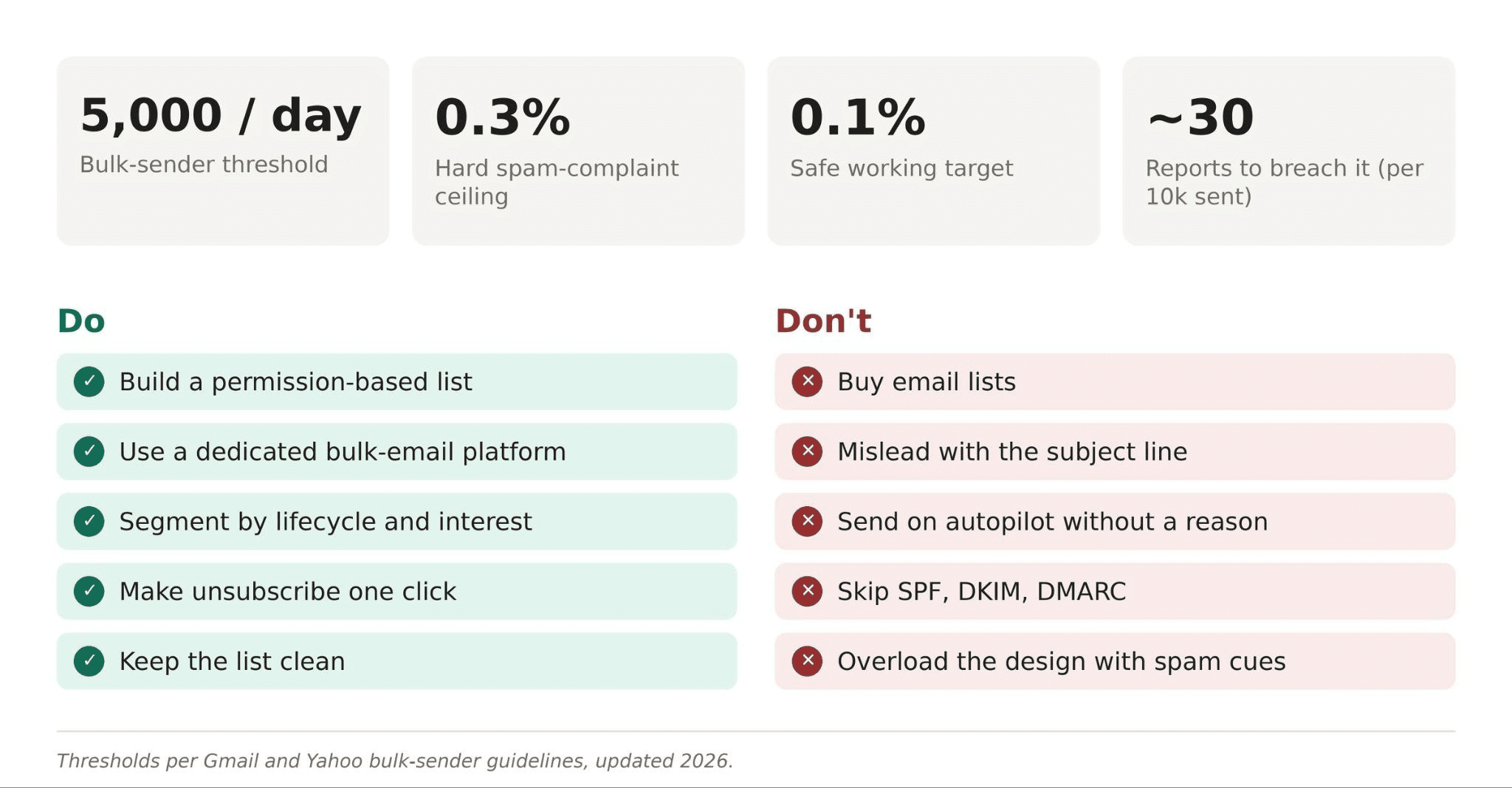
5,000/day — the message volume that classifies a domain as a bulk sender under Gmail and Yahoo’s rules, triggering authentication and unsubscribe requirements.
0.3% — the hard spam-complaint ceiling; cross it and Gmail and Yahoo stop granting inbox placement. Google’s working recommendation is to stay under 0.1% for reliable delivery.
~30 complaints — roughly how few “report spam” clicks it takes to push a 10,000-message send over the 0.3% line.
~46–47% — the share of all email traffic that is spam, which is why filters are tuned aggressively and legitimate bulk senders need clean signals to get through.
May 5, 2025 — when Microsoft’s authentication mandate for Outlook, Hotmail, and Live.com took effect; non-compliant mail now gets rejected outright with error 550 5.7.515.
The dos and don’ts at a glance
Ten paired practices. Each “do” builds the signal that keeps you out of the spam folder; each “don’t” is the fastest way to trip a provider’s filter or a recipient’s report-spam button.
Do: Build a permission-based list — signup forms, checkout opt-ins, webinar registrations, clear opt-in copy, no pre-checked boxes.
Don’t: Buy email lists — purchased contacts are the single fastest route to spam traps, bounces, and reputation damage.
Do: Send through a dedicated bulk-email platform with authentication, segmentation, and unsubscribe management built in.
Don’t: Mislead with the subject line — fake replies, false urgency, and “Re:” spoofing burn trust in one open.
Do: Segment the audience by lifecycle stage, source, or interest so every send earns its place in the inbox.
Don’t: Send on autopilot without a reason — frequency without value is what turns a subscriber into a spam report.
Do: Make unsubscribing a one-click action and offer a preference center instead of an all-or-nothing exit.
Don’t: Skip authentication — no SPF, DKIM, or DMARC means Gmail and Yahoo may reject or spam-folder the message outright.
Do: Keep the list clean — suppress bounces, remove chronic non-openers, run re-engagement campaigns.
Don’t: Overload the email with aggressive design — all-caps subject lines, dozens of links, and image-only bodies read as spam to filters and humans alike.
What the inbox providers actually require
Compliance is not a single checkbox. It’s a small set of technical and behavioral requirements that Gmail, Yahoo, and (since May 2025) Microsoft now enforce for anyone sending 5,000+ messages a day to their users.
- SPF, DKIM, DMARC — cryptographic proof the mail really comes from your domain. Skip it and Gmail/Yahoo bounce or spam-folder the message; Outlook rejects it with error 550 5.7.515.
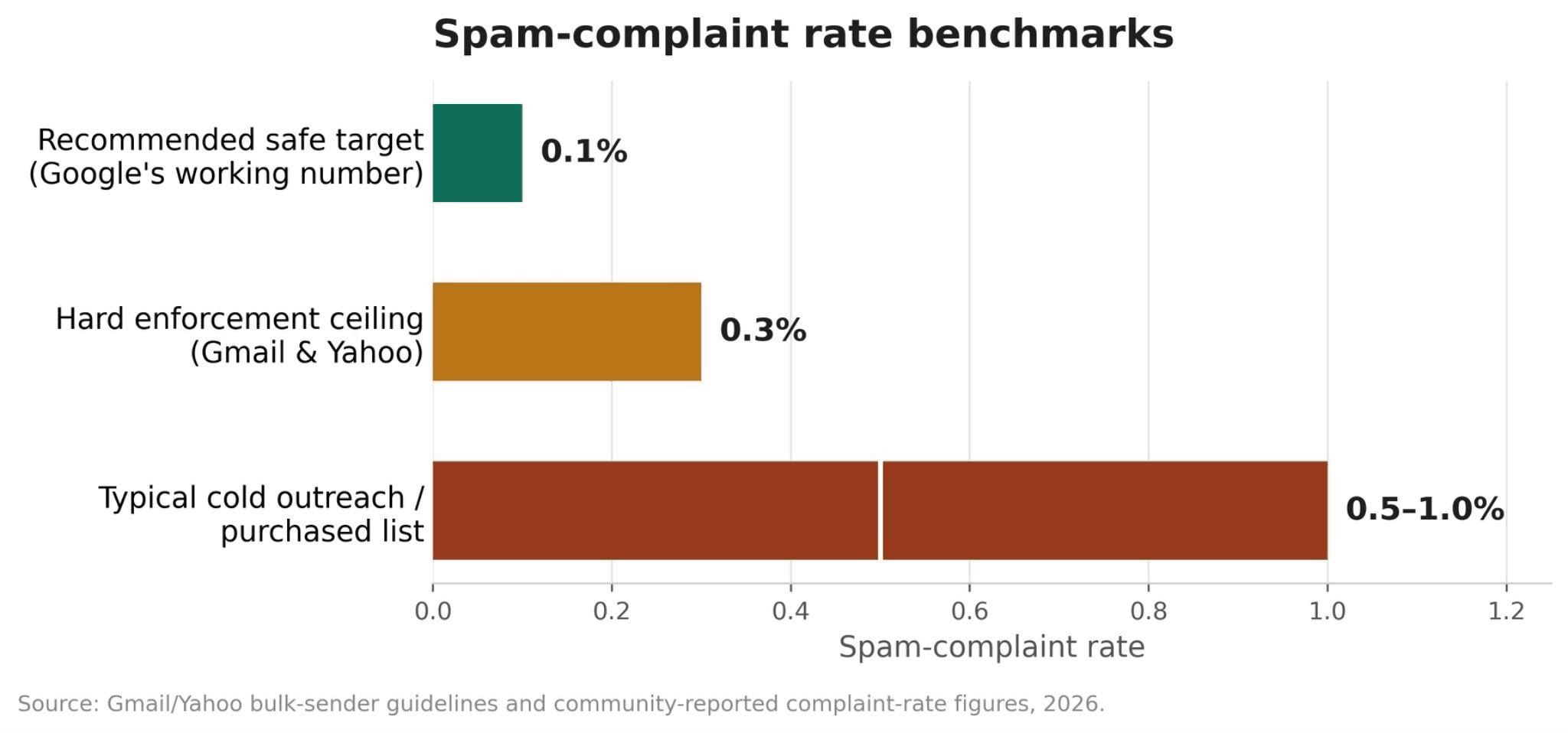
- Spam-complaint rate — share of recipients hitting “report spam.” Above 0.3%, Gmail and Yahoo stop granting reliable inbox placement; above 0.1% already degrades delivery.
- One-click unsubscribe — RFC 8058 header, no login or multi-step forms. Marketing mail without it is treated as non-compliant for bulk senders.
- DMARC alignment — From-domain must match the SPF/DKIM domain. Misalignment fails DMARC even when SPF or DKIM individually pass.
- List hygiene — sending only to people who asked, at the frequency they expect. Cold or purchased-list campaigns routinely see 0.5–1% complaint rates — well past the ceiling.
Put side by side, the gap between a healthy program and a risky one is not subtle:
Priority ladder: what to fix first
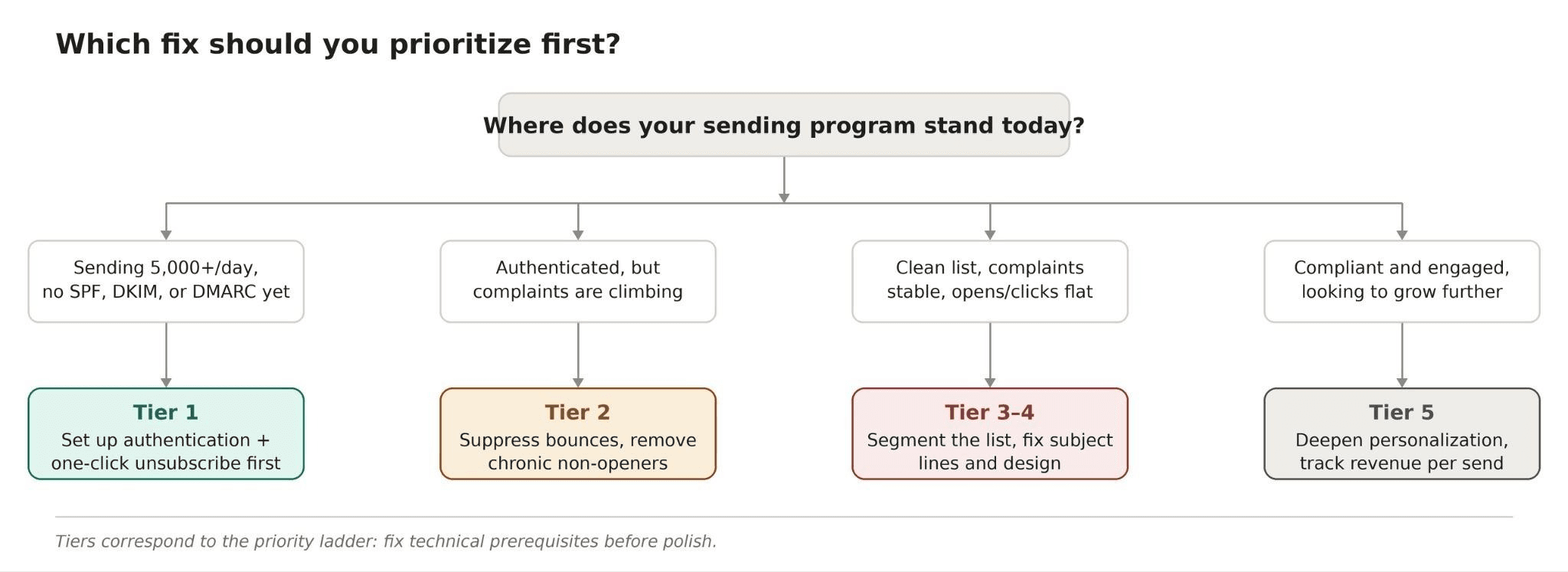
Not every practice carries equal weight. Some are prerequisites for landing in the inbox at all; others are the polish that turns an opened email into a click. Fix top-down.
Tier 1 — Non-negotiable, technical. SPF, DKIM, DMARC authentication and one-click unsubscribe. Without these, Gmail, Yahoo, and Outlook can reject the message before a human ever sees it.
Tier 2 — List integrity. Permission-based opt-in, regular suppression of bounces and unsubscribes, and re-engagement or removal of chronic non-openers.
Tier 3 — Relevance. Segmentation and sensible frequency, so a message fits the recipient’s stage and expectations.
Tier 4 — Presentation. Honest subject lines, clean design, one clear call to action.
Tier 5 — Depth personalization and measurement. Behavior-based content and ongoing metric tracking — opens, clicks, unsubscribes, spam complaints, revenue per campaign.
The quickest way to place yourself on the ladder is to answer one question: where does the program stand today?
Who needs which fix: sender persona grid
Growing SaaS or e-commerce list — main risk: outgrowing manual sending and hitting the 5,000/day bulk-sender threshold without authentication in place. Priority: set up SPF/DKIM/DMARC and a real ESP before volume forces the issue.
Established list, rising complaints — main risk: list fatigue, sending the same message to everyone regardless of engagement history. Priority: segmentation plus a re-engagement or suppression pass on chronic non-openers.
Outreach-heavy content or PR team — main risk: cold-send patterns that read as spam even to permission-based contacts. Priority: honest, specific subject lines and a visible one-click opt-out on every send.
Agency managing multiple client domains — main risk: one client’s poor list hygiene damaging shared sending infrastructure. Priority: per-domain DMARC alignment and independent spam-rate monitoring via Postmaster Tools.
Deep dives: the reasoning behind each rule
Do: build a permission-based list. A healthy list is not a database of addresses — it’s a group of people who agreed to hear from you and understand what they signed up for. Clear opt-in copy (“weekly marketing tips and product updates” beats a bare “Subscribe”) and no pre-checked boxes keep consent active rather than assumed. Consent obtained this way also produces the engagement signals — opens, clicks — that inbox providers reward with better placement.
Don’t: buy email lists. Purchased lists carry outdated addresses, spam traps, and people who have never heard of the sender. Engagement drops, bounce and complaint rates rise, and those signals compound: providers use exactly this pattern to decide whether future campaigns land in the inbox or the spam folder. A smaller engaged list outperforms a larger cold one on every metric that matters.
Do: use a dedicated bulk-email platform. Manual sending from a personal inbox doesn’t scale and creates exactly the technical gaps — missing authentication, no unsubscribe management — that trip provider filters. A platform built for this, such as Selzy’s bulk email service, handles authentication, segmentation, personalization, and compliance-friendly unsubscribe flows as part of the sending process rather than as an afterthought.
Don’t: mislead with the subject line. Fake replies (“Re: Your account issue”), false urgency, and subject lines that impersonate personal messages get short-term opens and long-term distrust — and distrust shows up as spam reports. A specific, honest subject line (“20% off our email automation plan through Friday”) earns the right opens from people likely to engage after opening, which is the actual goal.
Do: segment the audience. A new lead, a loyal customer, and an inactive user are at different points in the relationship and need different messages. Segmenting by source, purchase history, engagement level, or lifecycle stage is the single best way to keep every send relevant — and relevance is what keeps the complaint rate low enough to stay inside provider thresholds.
Don’t: send on autopilot. There’s no universal ideal frequency, but the test is simple: does this email have a clear purpose, and would you still send it if it were the only email this week? If unsubscribes or complaints rise after a frequency increase, the audience is answering the question directly.
Do: make unsubscribing effortless. A visible, one-click unsubscribe (the RFC 8058 mechanism Gmail and Yahoo now require for marketing mail) is a trust signal, not a threat to retention. People who can’t find the exit hit “report spam” instead, which damages sender reputation far more than a lost subscriber does. A preference center that offers fewer emails instead of zero often keeps the relationship alive.
Don’t: skip authentication. SPF, DKIM, and DMARC prove a message really comes from the sender’s domain. Without them, Gmail and Yahoo may reject or spam-folder the mail, and since May 2025 Microsoft rejects non-compliant bulk mail outright with a 550 5.7.515 error. This is the one item on the list that isn’t negotiable past 5,000 messages a day — it’s infrastructure the marketing team can’t write around with better copy.
Do: keep the list clean. Addresses go stale as people change jobs or lose interest. Regularly removing hard bounces, suppressing unsubscribes, and identifying inactive subscribers protects both engagement metrics and the complaint rate — a list that looks smaller but performs better beats a large stale one every time.
Don’t: overload the email with spammy design. All-caps subject lines, “100% guaranteed” language, dozens of links, and image-only bodies read as suspicious to spam filters and to recipients alike. Clean, readable, mobile-friendly design with one clear call to action reduces friction rather than creating pressure — and friction-free emails get fewer spam reports.
Known limitations
- Thresholds are enforced daily and can move. Gmail recalculates spam rate every day, and enforcement has tightened twice since 2024 — from temporary delays to permanent rejections in November 2025. A compliant setup today needs periodic re-checking, not a one-time fix.
- Aggregate volume counts, not just one platform. If a sender uses several tools under one domain, the 0.3% ceiling applies to the combined spam rate across all of them.
- Compliance doesn’t guarantee inbox placement. Meeting SPF/DKIM/DMARC and staying under the complaint ceiling removes the technical reasons for rejection; it doesn’t override a recipient’s spam filter tuned on unrelated signals like engagement history or content patterns.
Frequently asked questions
What spam-complaint rate is actually safe? Gmail’s hard ceiling is 0.3%, but Google recommends staying under 0.1% for reliable inbox placement — 0.3% is described as the point where enforcement begins, not a safe target.
Do these rules apply to every sender, or only large ones? They apply once a domain sends close to 5,000 or more messages in a 24-hour period to personal Gmail or Yahoo addresses; messages from subdomains roll up to the parent domain for that count.
Is a purchased list ever safe to use for bulk email? No. Purchased lists routinely contain spam traps and disengaged contacts, and cold-send patterns like this are exactly what drives complaint rates toward the 0.5–1% range — well above the enforcement ceiling.
Does a visible unsubscribe link hurt list growth? No — the opposite. Recipients who can’t find an easy way to leave a list are more likely to mark the email as spam instead, which damages sender reputation far more than an unsubscribe does. Since 2024, one-click unsubscribe has been a requirement for marketing mail to Gmail and Yahoo, not just a best practice.
Bottom line
Compliant bulk email in 2026 rests on the same principle it always has — send relevant messages to people who asked for them — but the inbox providers now check that principle technically. Get the infrastructure right first: SPF, DKIM, DMARC, and one-click unsubscribe are prerequisites, not optional polish, for anyone sending at volume. Then protect the signal: a permission-based, regularly cleaned list with sensible segmentation and frequency is what keeps the spam-complaint rate under the 0.1–0.3% band Gmail and Yahoo watch. Everything else — honest subject lines, clean design, real personalization — is what turns a compliant email into one people are glad to open.