As more people try their hand at becoming YouTube content creators, the trend of using QR codes for YouTube has also become even more popular.
Instead of asking viewers to click, copy, or type long URLs, a QR code lets anyone jump straight to your content in seconds by scanning it through their smartphone’s camera.
It’s simple, convenient, and also makes for a great way to promote and share your YouTube videos to a wider audience off the Internet.
Keep reading to learn how to convert a YouTube link to QR code along with some creative ways to use them to boost your views, visibility, and engagement.
Top uses of a YouTube QR code
A QR code for YouTube is a scannable code that links users directly to a specific video, playlist, or channel on the platform. You can place them virtually on any medium, making it easier for people to instantly visit your channel and its content.
Below are some creative and impactful ways that you can use a QR code for YouTube:
Promotional material
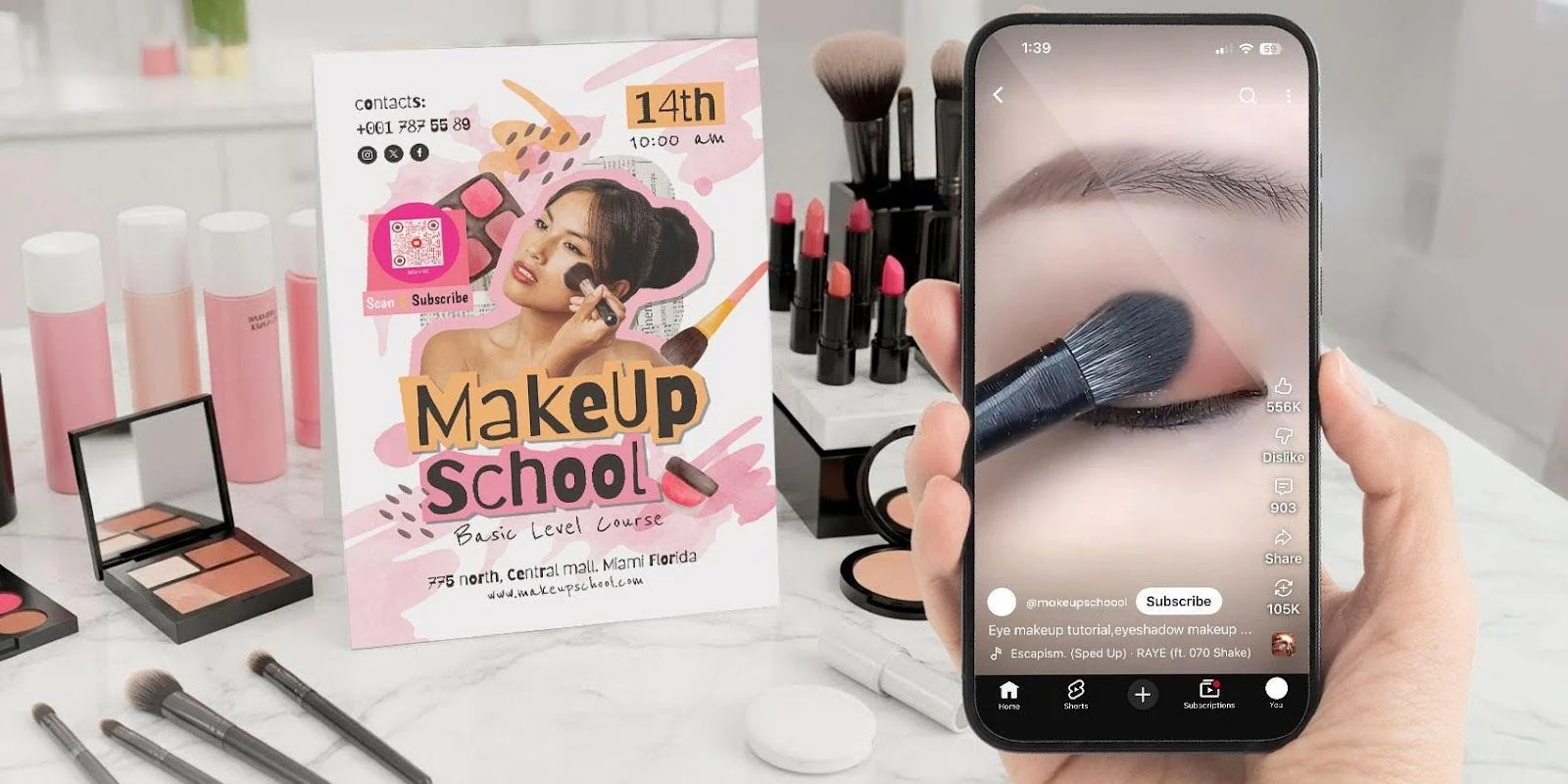
With a YouTube channel QR code, you can promote your account by adding it to promotional materials like billboards, posters, and flyers.
This makes it easier for anyone who sees your print ads to instantly check out your YouTube channel by scanning the QR code.
Once there, they can explore your videos, subscribe to the channel, and engage with your content, boosting your channel’s traffic and popularity.
Business card
Placing a QR code for YouTube on your business card lets anyone who scans it view an introductory video about what you do (your niche) or your most popular YouTube video.
This gives potential collaborators, sponsors, or partners a better understanding of the type of content you create and your channel’s overall style.
It’s an effective strategy that gives you the opportunity to make a lasting impression, showcasing your work in the most efficient way.
Online tutorials and lectures
YouTube QR codes are especially helpful when added to educational resources, as learners can easily scan them both online or in person.
Scanning directly links them to relevant tutorials, lectures, or explanatory videos, offering a more interactive way to deepen their understanding of particular topics.
When digital content is integrated into traditional resources, learning becomes more accessible and engaging.
Branded merchandise
You can add a digital touch to your merchandise by adding a QR code for a YouTube channel into their tags or as part of their design.
Fans can scan the QR codes and instantly be able to browse your channel and YouTube videos on their smartphones.
For an even better interactive experience, you can also design merchandise inspired by a specific video and then include a QR code that links fans straight to that content.
Digital presentations
QR codes can make your digital presentations even more engaging by giving the audience instant access to supporting content.
For example, if you’re giving a lecture on climate change, include a QR code for YouTube that links the viewers to a relevant YouTube video that reinforces your point.
This not only adds credibility but also keeps your audience engaged, making the experience feel more impactful.
Product reviews
You can also create a QR code YouTube video for your branded products that links consumers directly to sponsored review videos.
This allows customers to learn more about the product and make an informed purchase based on the detailed video review.
Not only will this build trust and credibility with your brand, but it also creates a more engaging and interactive experience for your customers.
Event teasers
For your events, you can add YouTube QR code ads to your promotional materials to link users directly to teaser videos on your channel.
This helps generate buzz around the event as viewers get a glimpse of all the excitement your event has to offer.
Exclusive behind-the-scenes access
A creative way to boost engagement is to include a YouTube QR code image in your videos.
When scanned, it will lead viewers to a playlist of unlisted YouTube videos, featuring behind-the-scenes content like bloopers and outtakes.
This sense of mystery and surprise helps encourage fans to stay connected and engage with your channel as they find more hidden content.
Cross-platform promotion
Another effective way to use a QR code for YouTube is by sharing it on your other social media accounts.
Friends and followers can scan the QR code to YouTube and subscribe instantly, making it easier for your channel to grow.
By connecting your audience across platforms, you not only expand your subscriber base but also foster a more engaged community centered around your content.
How to make a QR code for YouTube
QR codes are a powerful way to boost your channel’s visibility and make it easier for viewers to access your content.
To create one for YouTube, start by looking for a free YouTube QR code generator online. Copy and paste the YouTube link you want to share into the website.
Next, choose whether you want a static or dynamic QR code. To differentiate the two:
- Static QR code: Embeds data directly into the QR code, making it permanent and uneditable. They’re best suited for URLS, contact info, and other data that doesn’t require editing/updating.
- Dynamic QR code: Allows you to update the QR code’s destination at any time while tracking scans, location data, and performance metrics. Ideal for marketing and promotional campaigns that need frequent changes.
Then, select ‘Generate’ and customize the QR code design.
After customizing, test the QR code to ensure it works well.
Finally, download the QR code in high-resolution format, such as PNG or SVG. You can then add it to any of your promotional materials.
Why you should use a QR code for YouTube marketing
Here are the reasons to include a YouTube QR code in your marketing efforts:
- Perfect for offline marketing – A YouTube video QR code instantly directs users to your videos without having to copy long links. This makes it easier for people to watch your video or visit your channel.
- Mobile-friendly – Unlike regular video QR codes, a QR code for a YouTube link is already optimized for mobile devices, offering a smooth viewing experience for smartphone users.
- Encourages organic sharing – Anyone can simply take a picture of the YouTube QR code and then share it with their friends and family, expanding your channel’s reach organically.
- Get more tracking insight – With a dynamic QR code for YouTube, you can easily gather valuable data, which you can pair with YouTube video analytics to help you refine your content and improve your channel’s performance.
Share your YouTube content to the world with QR codes
QR codes for YouTube have quickly become an essential tool for content creators, marketers, and educators alike.
They simplify the way audiences interact with your channel, making it effortless for viewers to engage, subscribe, and share.
By integrating this versatile tool into your marketing strategy, you can enhance your visibility on YouTube, grow your audience, and create a more interactive and memorable experience for your viewers.